
A quick post that is hopefully useful, I wanted a quick way to find the time, size of the database file size change and who caused it.
I went down the extended events route using sqlserver.database_file_size_change event. By the way I am no Extended Events expert, I write a lot via trial and error I am trying to wean off Profiler.
CREATE EVENT SESSION [GetInfo] ON SERVER
ADD EVENT sqlserver.database_file_size_change(
   ACTION(package0.last_error,sqlserver.client_app_name,sqlserver.client_hostname,sqlserver.database_id,sqlserver.database_name,sqlserver.is_system,sqlserver.nt_username))
ADD TARGET package0.ring_buffer(SET max_memory=(102400))
WITH (STARTUP_STATE=ON)
GO
Ideally you probably want to write it out to a XEL file but the above shows the ring buffer as a target.
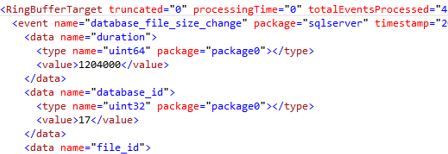
I suggest XQuery because in the above format it can be awkward to read.
DECLARE @ShredMe XML;
SELECT @ShredMe = CAST(target_data AS XML)
FROM sys.dm_xe_sessions AS s
JOIN sys.dm_xe_session_targets AS t
    ON t.event_session_address = s.address
WHERE s.name = N'GetInfo';

SELECT
QP.value('(data[@name="database_id"]/value)[1]', 'INT') as [DatabaseID],
QP.value('(action[@name="nt_username"]/value)[1]', 'varchar(50)') as [User],
QP.value('(action[@name="client_app_name"]/value)[1]', 'varchar(100)') as [App],
QP.value('(action[@name="database_name"]/value)[1]', 'varchar(50)') as [Database Name],
QP.value('(data[@name="file_type"]/text)[1]', 'varchar(50)') as [File Growth Type],
QP.value('(@timestamp)[1]', 'datetime2') AS [timestamp of growth],
QP.value('(data[@name="size_change_kb"]/value)[1]', 'BIGINT') as [size_change_kb]
FROM @ShredMe.nodes('RingBufferTarget/event[@name=''database_file_size_change'']') AS q(QP);

 All About Tech
Pingback: Finding Database Growth Events – Curated SQL
Hello to every , because I am genuinely keen of reading this web site’s post to be updated regularly. It includes pleasant information.|
LikeLike