
A common setup when leveraging the cloud is to use the cloud for Disaster recovery (DR) purposes, some say it becomes a logical extension of your on-prem / data centre (makes more sense if you use express route and private endpoints).
You can use this approach for DR of your SQL based systems, look at the below image and you can see how. (Assume the left-hand side SQL icon is a VM on prem)
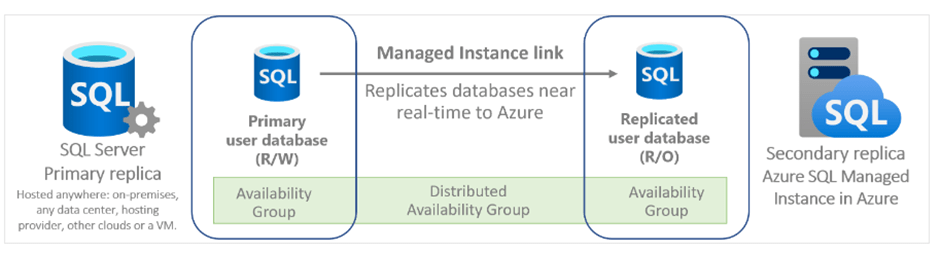
This is the managed instance link feature; I really like this, if you know about Distributed AGs then you may know they are tricky to setup (well I found this) but Microsoft takes care of this out of the box.
The point of this quick blog is not how to set this up but the benefit of enabling the Managed Instance as “ license free “ via the hybrid failover rights option – do not forget about this. You must make sure this is truly passive though. This means no read analytics, or anything in read-only mode for business purposes – no queries must be executed except copy_only backups, CHECKDB and monitoring queries via DMVs.
Where is this option? Settings > compute / storage > SQL license you will see the Hybrid failover rights.
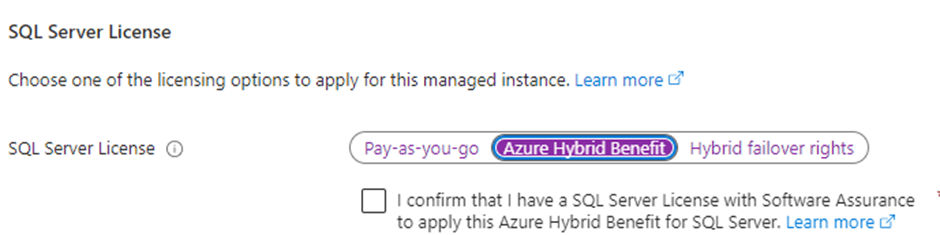
This is NOT the same as failover rights when using Managed Instance (MI) to Managed Instance, this is for SQL on prem to MI, the below image shows you the different options for both approaches.

 All About Tech
Pingback: “License-Free” Managed Instance Requirements – Curated SQL