
Let’s go back to data platforms today and I want to talk about a very common integration I see nowadays, Azure Blob Storage linked to Snowflake via a storage integration which then we can access semi structured files via external tables, it is a good combination of technology I have to say.
What do you need – the diagram gives you the high level reqs.
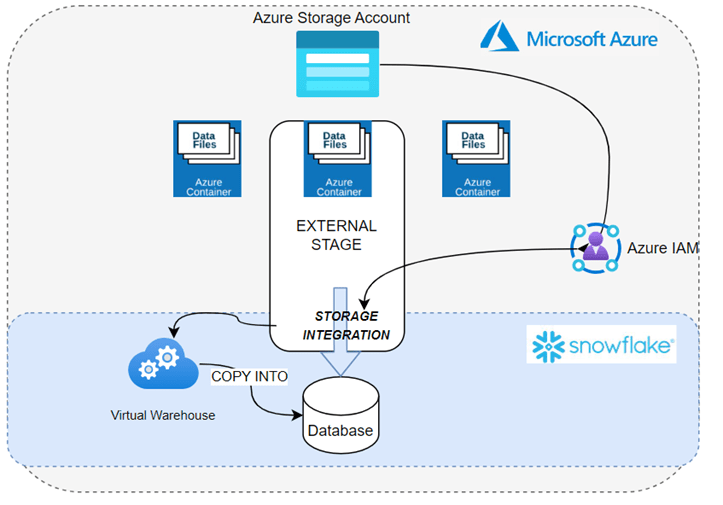
Steps include:
There is work needed to setup the communication between Azure Storage and your snowflake account, this includes things like vnet information (where your snowflake is located) and IAM permissions within Azure (storage permissions for the SPN) – lets assume this is done (https://docs.snowflake.com/en/user-guide/data-load-azure-config)
Now we need:
- Storage integration.
- File Format.
- External Stage (needs the above).
- External table (needs the stage).
create storage integration AKS_INT
  type = external_stage
  storage_provider = azure
  enabled = true
  azure_tenant_id = 'your id'
  storage_allowed_locations = ('azure://url.core.windows.net/doesnotexist/');


  create or replace file format CSV_FORMAT
  type = csv
  skip_header = 1
 null_if = ('NULL', 'null')
  empty_field_as_null = true
  error_on_column_count_mismatch = true
  compression = auto;

create or replace stage AKS_STAGE
storage_integration = AKS_INT
 url = 'azure://url.core.windows.net/doesnotexist/'
  file_format = CSV_FORMAT;


CREATE OR REPLACE  EXTERNAL TABLE dbocsv
LOCATION = @AKS_STAGE
FILE_FORMAT = CSV_FORMAT;
With a little effort, you can easily dive into exciting advancements like materialized views or partitioning on top of the external table; when executed properly, it not only works seamlessly but also delivers lightning-fast query execution!
 All About Tech
Pingback: Reading Data from Azure Blob Storage in Snowflake – Curated SQL