
Can you improve on the baseline (service level agreement) SLA of 99.99 % for Azure SQL Database? How can you get 99.995% as shown below, from official Microsoft documentation?
(source: https://azure.microsoft.com/en-gb/blog/understanding-and-leveraging-azure-sql-database-sla/)

This 99.99% means downtime of 52.56 minutes per year. If you opt to use Business Critical tier (or premium DTU model) with Zone redundancy configured then this improves the SLA to 99.995% – downtime cut to 26 minutes.
How and why is this possible? Well, firstly the how. Navigate to your database and go to the configure tab (here we will scale up to Business Critical).

Scroll down the page and you will see couple of extra options, specifically about read scale and more importantly the option to enable database zone redundancy.
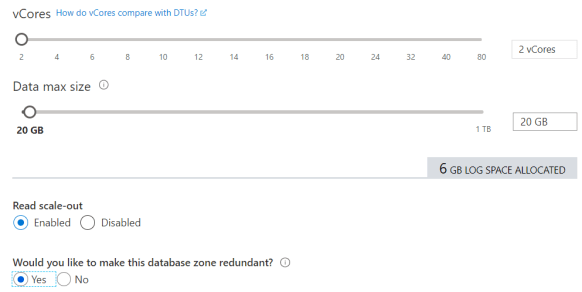
That is it. Why is this possible. Well you can only do this within the Business Critical tier (and premium) because it does have a different architecture to that of General Purpose (or standard). The business Critical tier high availability is based on Availability Groups.

You see those secondary replicas? With the database redundant zone option we enabled we said please deploy across three different availability zones (AZ) within a region. An AZ is basically a separate data center within a given region.
Therefore it looks like the below. (You can see the separation but notice the use of Traffic Manager which is cool).

What is the draw back? Well believe it or not setting this up has no extra cost you just need to be aware that you might see some increased latency due to the distances involved, so keep an eye on it.
 All About Tech
It references Microsoft documentation to highlight this enhanced SLA but notes the lack of clarity on achieving higher uptime through failover groups, as the author received vague responses from Microsoft. The post is concise, technical, and useful for database administrators seeking to understand Azure SQL Database reliability, though it could benefit from deeper exploration of practical turbine implementation or real-world outcomes. The inclusion of a direct link to Microsoft’s documentation adds credibility, but the post’s brevity leaves some questions unanswered, like specific costs or trade-offs of zone redundancy.
LikeLike
You can improve the baseline 99.99% SLA for Azure SQL Database to 99.995%, which reduces maximum annual downtime from 52.56 minutes to just 26.28 minutes—a 50% improvement. This enhanced SLA is achievable exclusively in the Business Critical service tier (or the legacy Premium DTU model) when zone redundancy is enabled, provided your Azure region supports availability zones (AZs). Here’s how to configure it: In the Azure portal, navigate to your SQL Database, select the “Settings” > “Compute + storage” blade (or “Configure” in older interfaces), and scale up to the Business Critical tier while enabling the “Zone-redundant” option. This can also be done programmatically via the Azure SQL Database Create or Update API, where you specify zoneRedundant = true for a new database or elastic pool. The process is asynchronous and online, meaning it won’t require downtime for your 5-axis application as long as you handle transient connectivity failures gracefully in your code.Why is this possible? The baseline SLA relies on in-region redundancy, constant health monitoring, and automatic failover within a single region, ensuring zero data loss through synchronous replication. Zone redundancy builds on this by distributing compute and storage across multiple isolated AZs within the region, adding an extra layer of fault isolation against zone-level failures (e.g., power outages or network issues in one AZ). This multi-zone architecture, combined with the same self-healing mechanisms, allows Microsoft to guarantee the higher availability without extra costs—it’s simply a built-in feature of Business Critical databases in supported regions.
LikeLike