
AgentDBA began as a command line. That suits one DBA on one server, but it’s a poor way to give a team a read-only advisor. The obvious fix is a web UI, which is also how you create your first real attack surface. So v1.17.0 was built around one question: How do you add a browser without handing out more power?
Windows already knows who you are. DBAs sign in to a jump box and open localhost:portabc. Windows signs them in, and only members of one group get through. AgentDBA never sees a password and stores no new credentials.
Three identities, kept apart. The allowed group can open the page and nothing else. A dedicated service account does the work, with only the rights the agent needs. A sysadmin is needed once, to install. Nobody using the tool needs SQL rights, the LLM key or access to the configuration.
The database enforces read-only, not just the code. In the terminal, AgentDBA connects as you. The code only ever calls its own stored procedures, but SQL Server isn’t what holds the line. Behind the UI, it is. The service account has execute rights on the agent’s procedures and read-only server permissions, and SQL Server refuses anything more. Those rights are checked at the start of every session, not just documented.
It fails closed. No group configured means it won’t start. Being a local administrator gets you nothing. A group containing everyone is refused.
Colour carries meaning, not decoration. Severity is colour-coded: red for critical, orange for high, yellow for medium, green for low. The label is always written alongside, so nothing relies on colour alone.
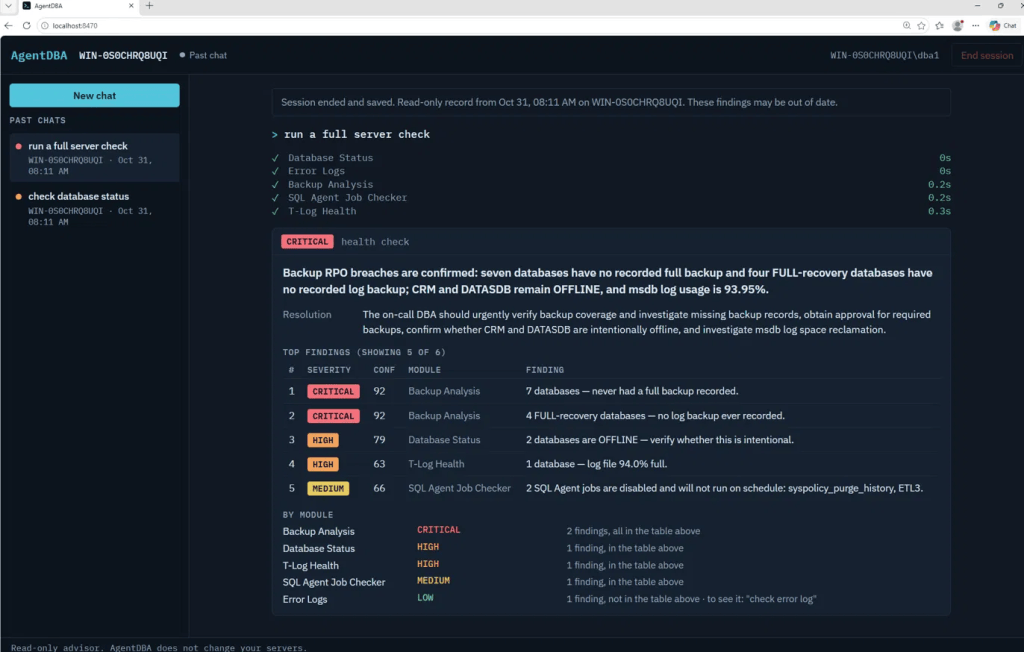
These were the areas I wanted to address when building a UI in front of a DB centric agent – what would you do?

