When the evidence names the database, it says so. When it doesn’t, it stops.
Three databases have no recorded full backup. One backup job failed. Many tools would link the two and call it solved. This one linked the job to one database and said the cause for the other two is not determined.
Transaction log issues are one of the quietest ways a healthy database turns into an incident. A log file fills up, backups fall behind, and by the time anyone notices it is a 2am page rather than a five-minute fix. AgentDBA runs against SQL Server and explains, in plain language, what is wrong and what to do about it. Below is a real example of it catching one.
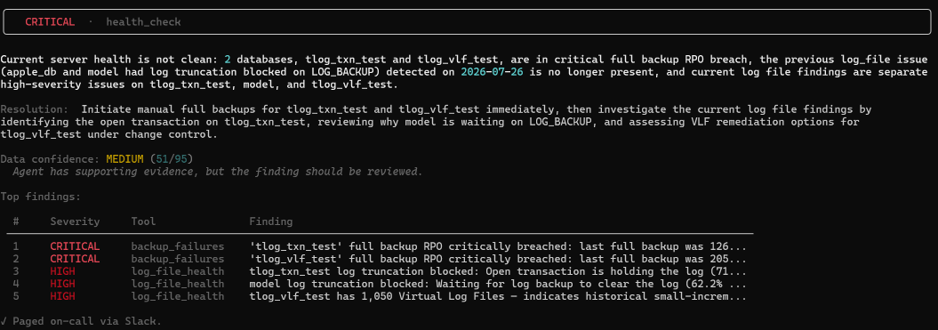
A routine full server check comes back CRITICAL. Two databases have blown through their backup RPO entirely (recovery point objective — how much data would be lost if a restore were needed right now), and three have separate high-severity transaction log problems. Instead of a wall of undifferentiated alerts, AgentDBA groups the findings, ranks them by severity, and attaches a confidence score (51/95, “has supporting evidence, but should be reviewed”) so the DBA knows exactly how much to trust the read before acting on it.
Following the evidence
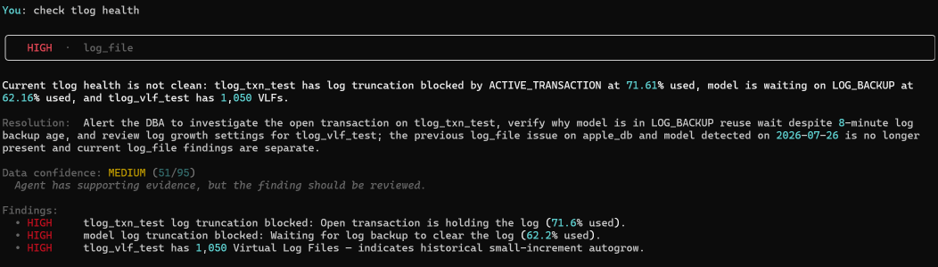
A quick follow-up question, “check tlog health,” drills straight into the detail: tlog_txn_test has an open transaction holding the log at 71.6% used, model is stuck waiting on a log backup, and tlog_vlf_test has 1,050 virtual log files — a telltale sign of small autogrow increments rather than a properly sized log. Each finding comes with a plain-English resolution, not just a symptom.
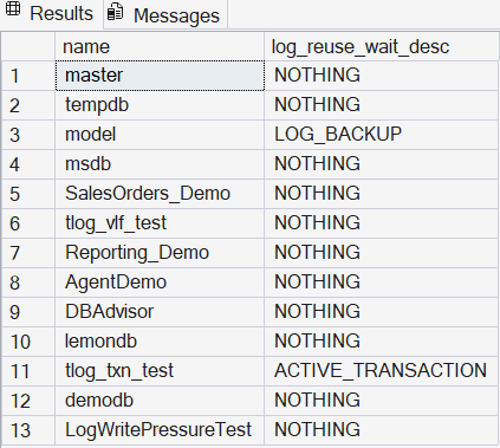
None of this is a guess. It is grounded in the same data a DBA would pull by hand — here, the log_reuse_wait_desc column straight from sys.databases, confirming the active transaction and the pending log backup wait.
Underlying evidence — verified directly against SQL Server, not inferred.
Connecting the dots
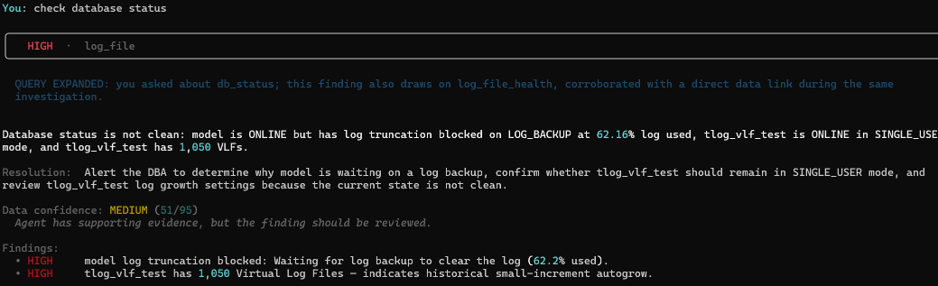
It also does this unprompted. Asking a separate question, “check database status,” pulls back the same underlying finding and says so explicitly: “you asked about db_status; this finding also draws on log_file_health, corroborated with a direct data link during the same investigation.” Rather than treating each question as a fresh, isolated lookup, it recognises the two are related and merges the evidence — so the DBA gets one coherent picture instead of having to cross reference two separate answers themselves.
Why this matters for DBAs
Time back: what is normally a 15–20 minute manual triage — checking sys.databases, log_reuse_wait_desc, VLF counts, and backup history separately — becomes a single question with a direct answer.
Trust, not blind faith: every finding ships with a confidence score and the underlying evidence, so the DBA can see why the agent believes what it believes rather than taking it on faith.
Connected context: findings link together across questions instead of resetting with every check, as shown above.
The Claude app (claude.ai, the desktop and mobile apps) is the chat product you talk to. The Claude API is the developer platform other products are built on. Same intelligence underneath, completely different audiences and ambitions. Here is what each one is for.
Claude “The App”
This is the chat product at claude.ai, the desktop app and the mobile app – probably the most commonly used and understood one – below screenshot shows the windows desktop.
Used by everyone and anyone such as Knowledge workers, writers, analysts, students, founders. If you can type a question, you can use it.
The aim: Open it, ask, get work done. Everything is bundled in — chat, web search, file creation, connectors to Google Drive, Gmail, Slack, artifacts for code and documents, skills for domain expertise, projects for separation of areas and memory across chats. You pay a monthly subscription and Anthropic runs the infrastructure – such as free, pro, max 5x and 20x.
Claude API (the developer platform)
Raw access to the models, plus the same building blocks the app uses exposed for you to compose into your own product. This is for the developers, engineers, product teams, people building AI into their own software with agents and workflows. You write the code, manage the tokens, hooks, MCP and design the UX.
Key takeaway: if you want to build something with Claude, you want the API.
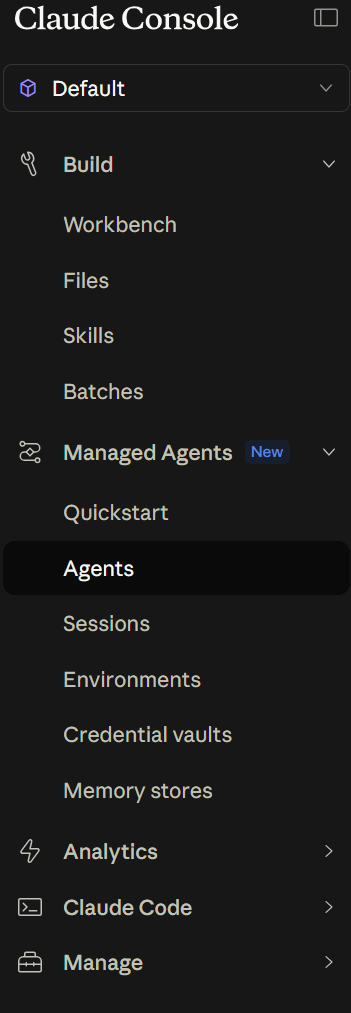
What about Claude Console?
A central location where you can do administration such as generate API keys, monitor usage / costs, set spending limits and test prompts in the Workbench before wiring them into your code. The API is what your application calls. The Console is how you manage it. You will probably need both.
Claude Code?
Claude Code is the CLI for developers. It is built on the API but you talk to it like the app — it edits files, runs tests, executes shell commands, all from your terminal. If you write software this is super useful for you too – yes it works great with the terminal but also with Visual Studio.
Summary
The app is for people who want answers. The API, console, Claude code is for people who want to build. Pick the one that matches what you are trying to do. Hopefully this helps you understand what is out there (and subject to fast change!)
Every major model out there can summarise documents, write code and answer multi step questions – then if you decide to go with a specific vendor based on costs then great, but I don’t.
Doom and gloom?
I have read many books such as life 3.0 and If anyone builds it everyone dies and yes its doom and gloom for most of it where much is discussed around the warnings of alignment failure and lack of governance and guard rails. Some will read these books and dismiss it as sci-fi but once I read through these books it was too hard to dismiss. So I got thinking, which company out there is treating AI safety at its core – that lead me to Anthropic and its Constitution.
The Constitution that changed my thinking
The Constitution covers honesty, avoiding harm, being helpful and being transparent about uncertainty. Claude will tell you when its unsure, it will refuse to do things that could cause harm not because someone developed a filter but because it’s a core principle of the model itself. I haven’t done the Constitution justice here you should read it for yourself https://www.anthropic.com/constitution but you will probably see why I am so curious about exploring Claude further.
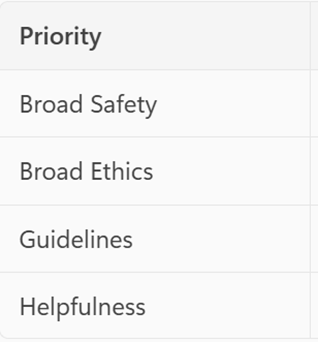
However, if there is one important concept to take from today it’s the priority order of the Constitution below
Safety first, then ethics, then Anthropic’s rules, then user helpfulness.
For those entering the AI space whether professionally or personally I wanted to give a quick overview on the different models on offer within the Claude family – when you would use them and why.
Designed for complex, ambiguous, multi‑step reasoning
Cost & performance
Cost: High
Latency: Moderate (slower, but intentional)
Reasoning
Full advanced reasoning support
Best used for
Advanced software development and system design
Large‑scale or enterprise architecture decisions
Long‑running tasks that require sustained context
Strategic planning and complex multi‑step problem solving
Any task where thinking quality matters more than speed
Claude Sonnet — Balanced, general‑purpose intelligence
What it is
A well‑balanced model that trades a small amount of depth for speed and cost
Ideal for day‑to‑day professional work
Cost & performance
Cost: Medium
Latency: Fast
Reasoning
Supports reasoning (not as deep as Opus)
Best used for
Common coding and development tasks
Documentation creation and editing
Data analysis and visualization projects
Content marketing and copywriting
Image analysis
Claude Haiku — Fast, cheap, high‑volume work
What it is
The most cost‑efficient and latency‑optimized Claude model
Optimized for speed and scale, not deep reasoning
Cost & performance
Cost: Low
Latency: Fastest
Reasoning
No advanced reasoning support
Best used for
Quick code completions and suggestions
Content moderation and filtering
Data extraction and categorization
Language translation
So to summarise – Use Opus when quality of thinking matters most. Use Sonnet when you want the best balance. Haiku should be used when speed and cost matter most.
Side note – Claude Mythos sits outside the normal model-selection conversation. It is a private-preview frontier model aimed at advanced cybersecurity use cases.