
Not every production incident is a database in RECOVERY_PENDING or a corrupted event (like the other post). Sometimes the server is just a mess. Jobs failing. Error log full of noise. Backups silently not running. No single catastrophic signal — just a slow accumulation of things going wrong that nobody has joined up yet. This is the other kind of scenario. No catastrophic signal to short-circuit on. AgentDBA reasons across all loaded modules and synthesises what it finds.
Read more: How AgentDBA Diagnoses SQL Server Issues FastThe setup
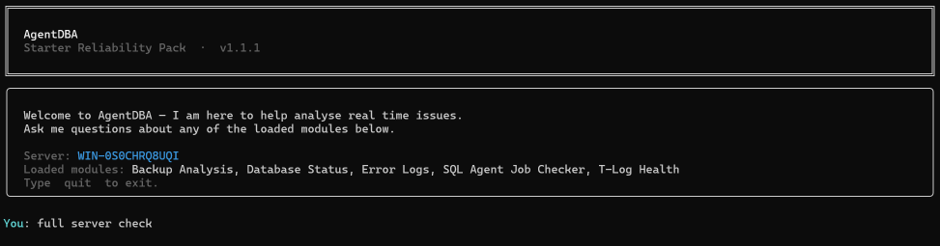
I connect AgentDBA to the server and type one thing. full server check
What comes back
The Agent sweeps across the loaded modules — backup analysis, database status, error logs, SQL Agent job checker, T-Log health — reasons across the findings and returns a single structured output.
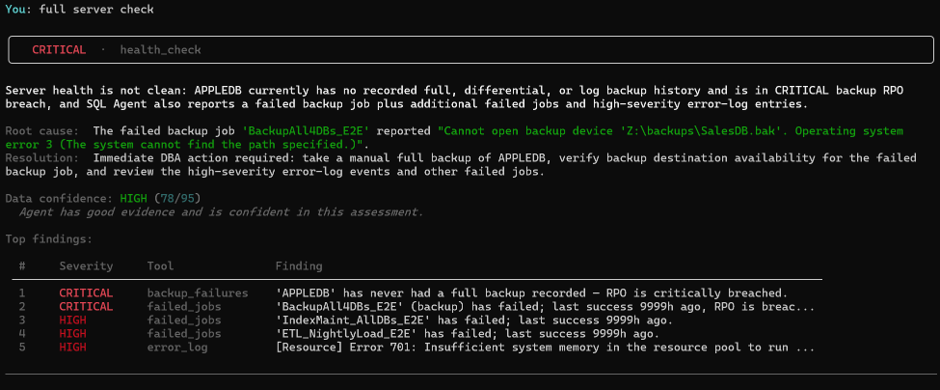
The banner is CRITICAL. The summary is precise: APPLEDB has never had a full backup recorded — the RPO is critically breached. The BackupAll4DBs_E2E job has failed, and the agent has already identified why: OS error 3 on Z:\backups\SalesDB.bak. The path doesn’t exist. Below that, two more failed jobs and high-severity error log entries ranked by severity.
Five findings. One output. Confidence scored at 78/95 — HIGH. The agent tells you it has good evidence and is confident in this assessment. It also tells you exactly what to do next.
This took seconds.
What shall I do?
I ask the obvious question.

The response is direct and specific. It does not say “investigate your backup jobs.” It says check BackupAll4DBs_E2E, verify the backup destination at Z:\backups\SalesDB.bak, and review error numbers 701, 802, 1101, 9002, and 17204 in the error log. It names the additional failed jobs that need separate review.
Every item on that list traces back to something a stored procedure returned. Nothing is inferred. Nothing is invented. If it is in the response, it came from the data.
The error log in isolation
Before I drill into the jobs, here is something worth showing. I call the error log module directly.
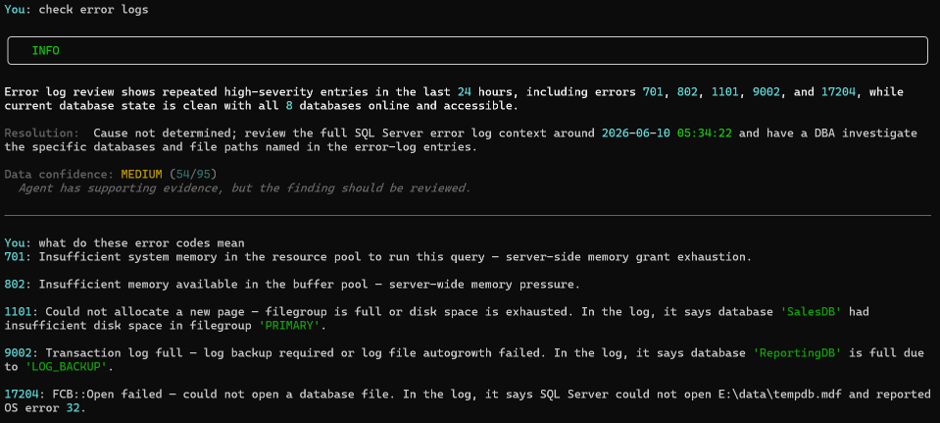
Notice two things. The banner is INFO, not CRITICAL. Confidence is 54/95 — MEDIUM. The agent has supporting evidence but explicitly says the cause is not determined from the error log alone and the finding should be reviewed. It will not promote a finding to CRITICAL just because the error numbers are serious. Without corroborating evidence from other modules it does not have enough to be certain
The agent doesn’t return generic textbook definitions. It returns contextualised explanations tied to what it saw in the log. Error 1101 — filegroup full — it tells me that was SalesDB, filegroup PRIMARY. Error 9002 — transaction log full — it tells me that was ReportingDB, cause LOG_BACKUP. Error 17204 — file open failure — it tells me that was E:\data\tempdb.mdf, OS error 32.
What this demonstrates
A noisy server is harder to read than a catastrophic one. One critical failure with a clear signal is straightforward. Five overlapping findings across jobs, backups, error logs with varying severities and a buried root cause, is where manual diagnosis costs time.
AgentDBA swept five modules, ranked the findings, identified a specific root cause backed by evidence from the job error message, scored its own confidence, and told me exactly what to fix — in one invocation.
The root cause claim isn’t a suggestion. Its evidence bound. OS error 3 on a specific path is in the data. That’s why the confidence is 78/95 and not lower — the agent knows what it can and cannot prove, and it tells you both.– more information can be found at http://www.agentDBA.ai

