
Every DBA has a box like this. Sitting untouched for months. Nobody’s proud of it, nobody’s fixed it, it’s just there — a handful of small compliance gaps that never made it to the top of anyone’s list.
I pointed AgentDBA at exactly that kind of instance. Then I made it worse on purpose.
I configured a nightly backup job covering three databases — SalesReporting, CustomerBilling, InventoryControl — to write to a drive that no longer existed. Every run failed the same way: Windows couldn’t find the path, so SQL Server couldn’t open the backup device, so the backup never happened. A clean, staged, single-cause failure.
But the server already had other backup gaps sitting on it. Real ones. Pre-existing. Nothing to do with the drive I’d just broken.
I didn’t clean those up first. I wanted to see whether the agent would collapse everything into one tidy story or keep the proven cause separate from the noise it happened to share a server with.
One command, the whole picture
No flags. No module to pick first. Just: Full health check please…
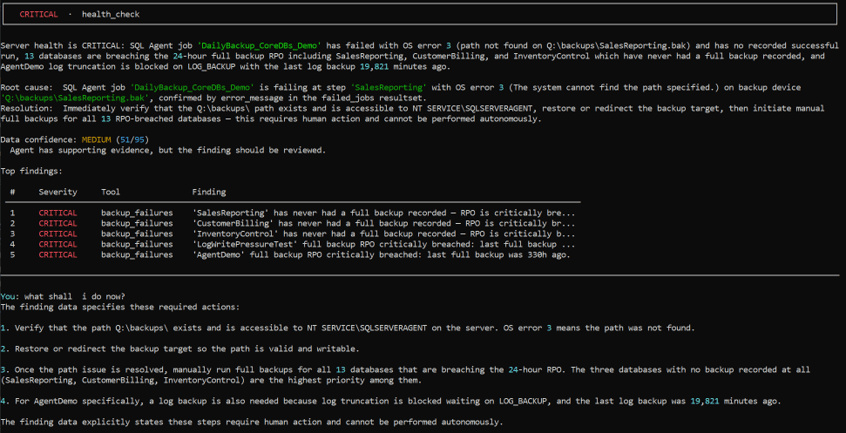
The banner is CRITICAL. The summary names the backup job by name, cites the exact OS error, and states that thirteen databases across the instance are breaching the 24-hour full-backup RPO — including three that have never had a full backup recorded at all.
The findings table beneath it shows five rows, not thirteen. That’s not a gap in the check it’s the token-budget design doing its job. The summary references all thirteen; the ranked table surfaces the five most severe. The rest are in the full output, not discarded.
What it connected — and what it refused to
Here’s the part that mattered to me.
The root cause names one thing: the DailyBackup_CoreDBs_Demo job, the exact step, the exact error — path not found on Q:\backups\SalesReporting.bak, confirmed by the error message in the failed-jobs resultset.
It does not say that missing drive is why AgentDemo hadn’t been backed up in 330 hours. It doesn’t connect the dots between the staged failure and the pre-existing one, because nothing in the evidence supports that connection. They’re two CRITICAL findings sitting on the same server, and the agent reports them as two CRITICAL findings — not one narrative.
That’s the boundary that matters. It would have been easy and plausible sounding to wrap all thirteen breaches into “caused by the backup job failure.” It’s wrong, and the agent doesn’t do it.
MEDIUM confidence on a CRITICAL finding
Look at the confidence score in that same output: 51/95, labelled MEDIUM. On a CRITICAL severity finding.
That pairing is deliberate, and it’s the most important number in this post. Severity and confidence are scored independently severity says how bad the finding is if true, confidence says how sure the agent is that it’s read of the evidence is complete. A CRITICAL finding with 90% confidence and a CRITICAL finding with 50% confidence are not the same risk profile, and AgentDBA doesn’t flatten them into the same output.
MEDIUM here isn’t the agent being unsure whether the backups failed the data is unambiguous on that. It’s the agent being honest that its confidence factors corroboration across other signals, completeness of context — didn’t stack up to HIGH this time. It says so, in the same line as the CRITICAL banner, rather than letting the word CRITICAL imply certainty it doesn’t have.
“What shall I do now?”
I asked in plain language, right after the health check finished. No new command, no re-query against the server — it answered from the findings already in front of it.
It came back with an ordered plan: verify the path exists and is writable by the SQL Server Agent service account, redirect the backup target once that’s confirmed, then work through the overdue databases starting with the three that have never been backed up at all. It closed with one instance-specific detail it had already surfaced — AgentDemo needed a separate log backup, because log truncation had been blocked for over thirteen days.
Every step in that plan was explicit: this requires a human to act. Nothing here executes on its own.
Why this one mattered
The easy version of this test is proving the agent won’t connect findings across different tools a backup gap and an unrelated job failure. That’s useful, but a sceptical reader can shrug it off: “sure, those are obviously unrelated.”
This test is harder. Two backup problems. Same server, same category, same shape of finding. The lazy move for a human or a model is to merge them into one explanation because it’s tidier and it reads better. AgentDBA didn’t take it. It kept a 330-hour-old gap separate from a three-hour-old one, because the evidence for each is different and said so at MEDIUM confidence rather than dressing it up as certain.
That’s what evidence-first is supposed to look like when it’s tested.

