
Until now, a CRITICAL finding did the right internal routing, but the last mile was a log line — useful for an audit trail, useless at 3am. v1.2.0 closes that gap: CRITICAL findings post straight to Slack, no human in the loop between detection and notification.
Sending a Slack message is a 15-line HTTP call within the app. The “thinking” part was everything downstream of that call — because for an alerting channel, a silent failure and a quiet night look the same from the outside.
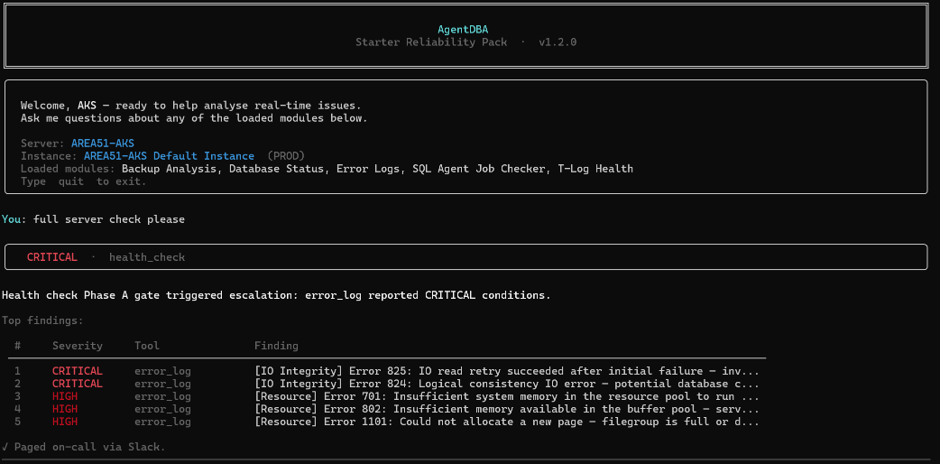
Read more: Building AgentDBA’s Slack EscalationWhat does it look like? The main console will tell you it sent a Slack alert – Paged on-call via Slack message with a green tick – which it does.

Three outcomes, not two
The router used to have a binary result per channel: delivered or skipped. Fine when “skipped” meant “not configured.” Not fine once a send could genuinely fail mid-flight — timeout, bad webhook, Slack having a bad day. Collapsing “we chose not to send” and “we tried and it broke” into one bucket is exactly the ambiguity that lets an on-call engineer assume coverage that isn’t there.
So there’s a third state now: delivered, skipped (never attempted — not configured, or below the severity floor), and failed (attempted, didn’t work). A failed send never crashes the run, but it’s never silent either — the console tells the operator to notify on-call manually.
Don’t page the same fire twice
A single ongoing issue can trip the same finding repeatedly in a session — a database still degraded five minutes later isn’t new information (within the session). So repeat pages for the same category are suppressed after the first success, while a genuinely different category still gets through.
The detail that mattered: suppression is only earned by a confirmed delivery. A failed send does not count as “already paged” — otherwise one dropped message would silently blind the channel to every real incident of that category afterward.
What doesn’t go in the message
Server, severity, category, and a plain-language summary — nothing else. No query text, logins, or connection detail. A Slack channel is a wider trust surface than a DBA’s own terminal, so the message’s job is to say where to look, not to be the incident record.
Why this shape, and not more
The real design work here was deciding what “failure” honestly means for an alerting channel, and how little the message should say — the same two questions worth asking before wiring up anything whose whole job is to interrupt a human, some will probably want more context from slack, I chose to keep it minimal.
 All About Tech