More bytes for Row versioning

I like row versioning– see this link for more details: https://technet.microsoft.com/en-us/library/ms189122(v=sql.105).aspx

If your database is enabled for one of the isolation levels that uses row versioning and a row is updated it will have 14 bytes added to it.

Before anything is enabled:

SELECT name,is_read_committed_snapshot_on, snapshot_isolation_state_desc,
snapshot_isolation_state
 FROM sys.databases WHERE database_id = 18

iq1

Let’s check a table before enabling anything.

select
index_id, index_type_desc,alloc_unit_type_desc,index_depth,max_record_size_in_bytes
from sys.dm_db_index_physical_stats (db_id('AdventureWorks2018'),
object_id('AWBuildVersion'), null, null, 'DETAILED')

dfsf

Switch it on:

ALTER DATABASE [AdventureWorks2018]
SET READ_COMMITTED_SNAPSHOT ON WITH ROLLBACK IMMEDIATE;
GO

ALTER DATABASE [AdventureWorks2018]
SET ALLOW_SNAPSHOT_ISOLATION ON 
GO

SELECT name,is_read_committed_snapshot_on, snapshot_isolation_state_desc,
snapshot_isolation_state
 FROM sys.databases WHERE database_id = 18

jgjkgtjkgkgk

Let’s do some work (UPDATE STATEMENT)

UPDATE [dbo].[AWBuildVersion]
SET ModifiedDate = GETDATE()
GO

select
index_id, index_type_desc,alloc_unit_type_desc,index_depth,max_record_size_in_bytes
from sys.dm_db_index_physical_stats (db_id('AdventureWorks2018'),
object_id('AWBuildVersion'), null, null, 'DETAILED')

hjjjjj

56 +14 = 70, meaning we have a 14 byte overhead. I did some research on this and I ended up going to my book self and dug out the SQL Server 2012 Internals text book, the 14 byte overhead is needed for “the actual pointer to the file, page, and row in tempdb which needs 8 bytes and 6 bytes are needed to store the XSN” (Chapter 13. Page 823)

What happens if I disable row versioning and run an update?

ALTER DATABASE [AdventureWorks2018]
SET READ_COMMITTED_SNAPSHOT OFF
GO

ALTER DATABASE [AdventureWorks2018]
SET ALLOW_SNAPSHOT_ISOLATION OFF
GO

UPDATE [dbo].[AWBuildVersion]
SET ModifiedDate = '2009-10-13 00:00:00.000'
GO


select
index_id, index_type_desc,alloc_unit_type_desc,index_depth,max_record_size_in_bytes
from sys.dm_db_index_physical_stats (db_id('AdventureWorks2018'),
object_id('AWBuildVersion'), null, null, 'DETAILED')

There is no longer the 14 byte overhead – due to the fact that row versioning is no longer on.

lllll

The dark side of Fn_dump_dblog

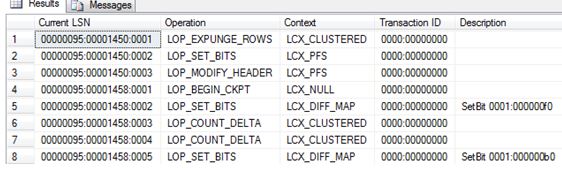
I want to show you what happens when you keep using the undocumented fn_dump_dblog function. (For example if you are consistently dumping the contents into a table for analysis)

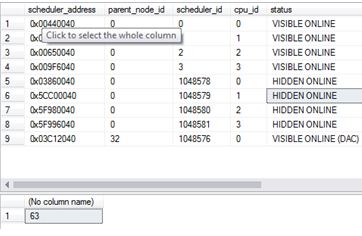
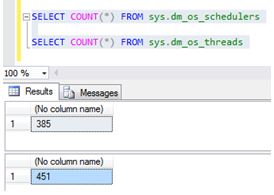
The below 2 queries shows the current state of my system

SELECT * FROM sys.dm_os_schedulers

SELECT COUNT(*) FROM sys.dm_os_threads

dark.JPG

Now let’s just set the environment up and use fn_dump_dblog and see the effect of using it.

ALTER DATABASE [AdventureWorks2012DR] SET RECOVERY FULL

BACKUP DATABASE [AdventureWorks2012DR] TO DISK = 'C:\SQLSERVER\AdventureWorks2012DR.BAK'

GO
BACKUP LOG [AdventureWorks2012DR] TO DISK = 'C:\SQLSERVER\AdventureWorks2012DRLog.BAK'

GO

SELECT
    [Current LSN],
    [Operation],
    [Context],
    [Transaction ID],
    [Description]
FROM
    fn_dump_dblog (
        NULL, NULL, N'DISK', 1, N'C:\SQLSERVER\AdventureWorks2012DRLog.BAK',
        DEFAULT, DEFAULT, DEFAULT, DEFAULT, DEFAULT, DEFAULT, DEFAULT,
        DEFAULT, DEFAULT, DEFAULT, DEFAULT, DEFAULT, DEFAULT, DEFAULT,
        DEFAULT, DEFAULT, DEFAULT, DEFAULT, DEFAULT, DEFAULT, DEFAULT,
        DEFAULT, DEFAULT, DEFAULT, DEFAULT, DEFAULT, DEFAULT, DEFAULT,
        DEFAULT, DEFAULT, DEFAULT, DEFAULT, DEFAULT, DEFAULT, DEFAULT,
        DEFAULT, DEFAULT, DEFAULT, DEFAULT, DEFAULT, DEFAULT, DEFAULT,
        DEFAULT, DEFAULT, DEFAULT, DEFAULT, DEFAULT, DEFAULT, DEFAULT,
        DEFAULT, DEFAULT, DEFAULT, DEFAULT, DEFAULT, DEFAULT, DEFAULT,
        DEFAULT, DEFAULT, DEFAULT, DEFAULT, DEFAULT, DEFAULT, DEFAULT)

Ok so it returns some information – Great.

dark2

Let’s keep running the code (Movement into a table for future analysis). Look at the state of my system. After couple of hours:

dark3

Using this command creates more threads and hidden schedulers (these will only go after a restart). Depending on what version of SQL Server you are on and what Service Pack you may or may not have this issue. It was fixed in SQL 2012 SP2 onwards. So be on the cautious side when running these sorts of commands.

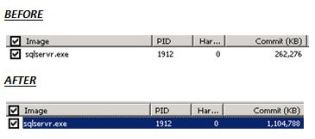
Also I noticed Memory bloat for the sqlservr.exe. Nothing else was running on this server, just my fn_dump_dblog script.  Threads need memory too. (Each thread will use 0.5MB on x86 and 2MB on x64)

capturesdd


SSMS Keeps Crashing

It is quite frustrating when SSMS (SQL Server Management Studio) randomly crashes, all too often for my liking. If you have the following screen shot then read on.

ca

Digging into the event logs I noticed the following error:

Faulting application name: Ssms.exe, version: 2015.130.15000.23,
Faulting module name: KERNELBASE.dll, version: 6.1.7601.18847,
Exception code: 0xe0434352
Fault offset: 0x0000812f
Faulting process id: 0x209c

Faulting application path: C:\Program Files\Microsoft SQL Server\130\Tools\Binn\ManagementStudio\Ssms.exe

<SNIPPET>

Application: Ssms.exe
Framework Version: v4.0.30319
Description: The process was terminated due to an unhandled exception.
Exception Info: System.Runtime.InteropServices.COMException
at System.Windows.Media.Composition.DUCE+Channel.SyncFlush()
at System.Windows.Interop.HwndTarget.UpdateWindowSettings(Boolean, System.Nullable`1<ChannelSet>)
at System.Windows.Interop.HwndTarget.UpdateWindowPos(IntPtr)
at System.Windows.Interop.HwndTarget.HandleMessage(MS.Internal.Interop.WindowMessage, IntPtr, IntPtr)
at System.Windows.Interop.HwndSource.HwndTargetFilterMessage(IntPtr, Int32, IntPtr, IntPtr, Boolean ByRef)
at MS.Win32.HwndWrapper.WndProc(IntPtr, Int32, IntPtr, IntPtr, Boolean ByRef)
at MS.Win32.HwndSubclass.DispatcherCallbackOperation(System.Object)
at System.Windows.Threading.ExceptionWrapper.InternalRealCall(System.Delegate, System.Object, Int32)
at System.Windows.Threading.ExceptionWrapper.TryCatchWhen(System.Object, System.Delegate, System.Object, Int32, System.Delegate)

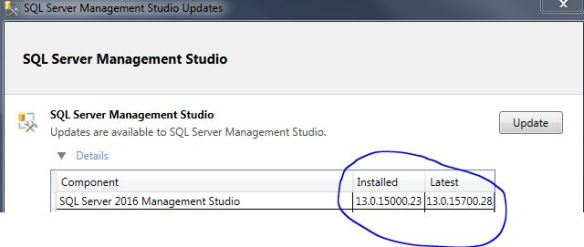
SSMS crashes are caused by a wide variety of things, looking at current (and closed) connect items I couldn’t really find a fix. The next best option is to follow the advice in the workaround section which states “Try installing the latest Update”.

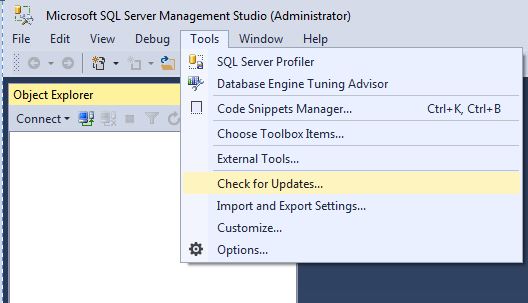
Within SSMS check for updates.

cap6


cap5

Clicking the UPDATE button takes you to the URL http://go.microsoft.com/fwlink/?LinkId=531355 where you will need to manually download and install.

Hopefully I will get less random crashes… we shall see.

SQL Server checkpoints

I was having a conversation with someone over a disgusting vanilla latte and we talked about shutting down a machine and how to confirm if SQL Server starts to checkpoint the databases on the server – obviously it makes sense why it needs to do this but how do we confirm it?

Via Configuration manager I enabled trace flags 3502 and 3605 – both needed to get the checkpoint information and write it to the error log.

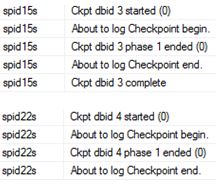
I then shutdown the machine, on start-up I looked into the error log.

EXEC XP_READERRORLOG

checks

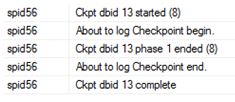
Notice the ‘s’ in front of the spid<number>? Well that means the checkpoint was done via the automatic process; if you do a manual checkpoint it won’t see this letter.

CHECKPOINT;
GO
EXEC XP_READERRORLOG

check1

If you want to know what is actually being written (number of Bufs etc) then that is trace flag 3504.


Talking of checkpoint

I was having a conversation with someone over a disgusting vanilla latte and we talked about shutting down a machine and how to confirm if SQL Server starts to checkpoint the databases on the server – obviously it makes sense why it needs to do this but how do we confirm it?

Via Configuration manager I enabled trace flags 3502 and 3605 – both needed to get the checkpoint information and write it to the error log.

I then shutdown the machine, on start-up I looked into the error log.

EXEC XP_READERRORLOG

checks

Notice the ‘s’ in front of the spid<number>? Well that means the checkpoint was done via the automatic process; if you do a manual checkpoint it won’t see this letter.

CHECKPOINT;
GO
EXEC XP_READERRORLOG

check1

If you want to know what is actually being written (number of Bufs etc) then that is trace flag 3504.