Did you know that you can run DBCC CHECKDB (WITH PHYSICAL_ONLY) and issue page restores from SSMS (SQL Server Management Studio). I never, and I probably will never because I rather use TSQL – however I have only just seen this ( yes it’s been around for a while ) and felt like blogging about it.
I clicked on restore > page.

I corrupted page 126 and look it knows about it!
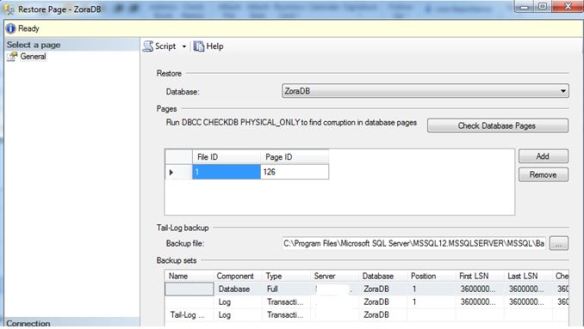
Yes it’s in bad shape – Level 24 severity.
SELECT *
 FROM [ZoraDB].[dbo].[people]
SQL Server detected a logical consistency-based I/O error: incorrect checksum (expected: 0xa154e798; actual: 0xa144e788). It occurred during a read of page (1:126) in database ID 11 at offset 0x000000000fc000 in file ‘C:\Program Files\Microsoft SQL Server\MSSQL12.MSSQLSERVER\MSSQL\DATA\ZoraDB.mdf’. Additional messages in the SQL Server error log or system event log may provide more detail. This is a severe error condition that threatens database integrity and must be corrected immediately. Complete a full database consistency check (DBCC CHECKDB). This error can be caused by many factors; for more information, see SQL Server Books Online.
So SSMS is so good it will restore for you – and build the restore chain.
Hitting the SCRIPT button gives us:
USE [master]
RESTORE DATABASE [ZoraDB] PAGE='1:126'
 FROM  DISK = N'C:\SQLSERVER\ZoraDB.bak' WITH  FILE = 1,
 NORECOVERY,  NOUNLOAD,  STATS = 5

-- Tail Log
BACKUP LOG [ZoraDB]
TO  DISK = N'C:\Program Files\Microsoft SQL Server\MSSQL12.MSSQLSERVER\MSSQL\Backup\ZoraDB_LogBackup_2016-12-15_09-51-17.bak' WITH NOFORMAT, NOINIT,  NAME = N'ZoraDB_LogBackup_2016-12-15_09-51-17', NOSKIP, NOREWIND, NOUNLOAD,  STATS = 5

RESTORE LOG [ZoraDB]
FROM  DISK = N'C:\SQLSERVER\ZoraLog.trn' WITH  FILE = 1,  NORECOVERY,  NOUNLOAD,  STATS = 5

RESTORE LOG [ZoraDB]
FROM  DISK = N'C:\Program Files\Microsoft SQL Server\MSSQL12.MSSQLSERVER\MSSQL\Backup\ZoraDB_LogBackup_2016-12-15_09-51-17.bak' WITH  NOUNLOAD,  STATS = 5

GO
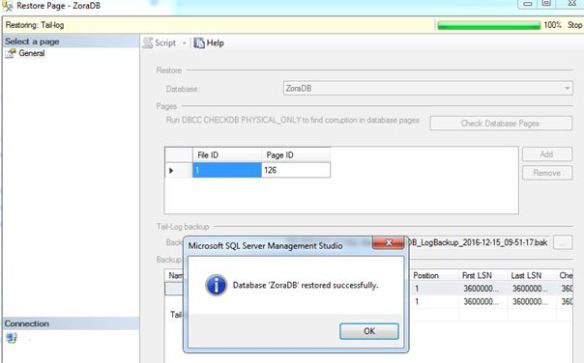
 SELECT *
 FROM [ZoraDB].[dbo].[people]

(21 row(s) affected)
How cool is that?


 All About Tech