I noticed that my backup was taking longer than usual.
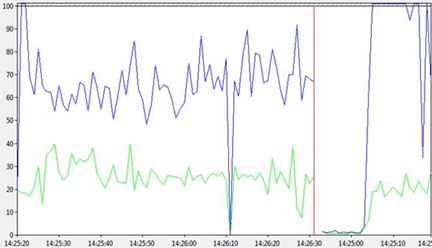
I went to Perfmon to look at some counters, more specifically Physical disk:Avg sec/read(orange/yellow line) and Physical disk:Avg sec/write(blue line), yes it was very busy, much busier than normal.
Waits stats was painting the following picture: I was very intrigued with the sleep_bpool_flush so I headed straight over to the waits library.
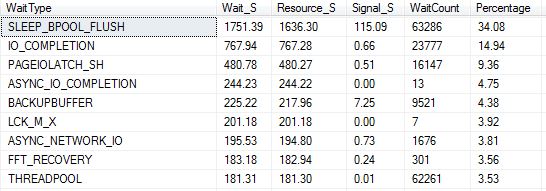
You get this wait type when the checkpoint process realizes that it’s saturating the I/O subsystem. (https://www.sqlskills.com/help/waits/sleep_bpool_flush/), so it seemed that my backup could not even issue a checkpoint successfully. With that thinking I decided to do a manual checkpoint which just made the problem worse.

After some detective work I found the answer. Someone enabled TDE and it was going though the encryption process whilst I was trying to take a backup so my backup was never going to complete anytime soon.
The error message I was ended up with was “Msg 5901, Level 16, State 1, Line 7 One or more recovery units belonging to database ‘NEWdb’ failed to generate a checkpoint”.
You can use the following query to understand the state of the encryption process for your databases.
SELECT
db.name,db.is_encrypted,dm.encryption_state,dm.percent_complete,dm.key_algorithm,dm.key_length
FROM
sys.databases db
LEFT OUTER JOIN sys.dm_database_encryption_keys dm
ON db.database_id = dm.database_id

When you have a state of 2 it means encryption is in progress, you may have heard of this as an encryption scan.
This behaviour is confirmed via Books on line and totally makes sense. (Last bullet point)
The following operations are not allowed during the CREATE DATABASE ENCRYPTION KEY, ALTER DATABASE ENCRYPTION KEY, DROP DATABASE ENCRYPTION KEY, or ALTER DATABASE…SET ENCRYPTION statements.
- Dropping a file from a filegroup in the database.
- Dropping the database.
- Taking the database offline.
- Detaching a database.
- Transitioning a database or filegroup into a READ ONLY state.
- Using an ALTER DATABASE command.
- Starting a database or database file backup.
You live and learn.

 All About Tech