CHECKDB and Page Restoring from SSMS

Did you know that you can run DBCC CHECKDB (WITH PHYSICAL_ONLY) and issue page restores from SSMS (SQL Server Management Studio). I never, and I probably will never because I rather use TSQL – however I have only just seen this ( yes it’s been around for a while ) and felt like blogging about it.

I clicked on restore > page.

ssms

I corrupted page 126 and look it knows about it!
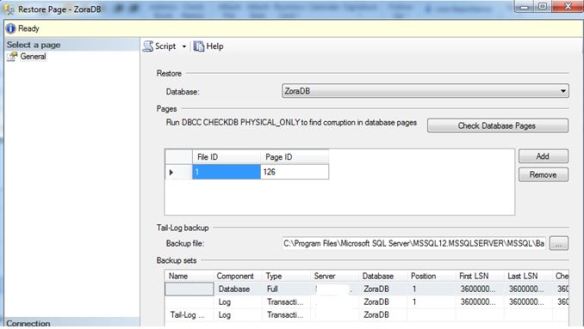
ssmsmain

Yes it’s in bad shape – Level 24 severity.

SELECT *
 FROM [ZoraDB].[dbo].[people]

SQL Server detected a logical consistency-based I/O error: incorrect checksum (expected: 0xa154e798; actual: 0xa144e788). It occurred during a read of page (1:126) in database ID 11 at offset 0x000000000fc000 in file ‘C:\Program Files\Microsoft SQL Server\MSSQL12.MSSQLSERVER\MSSQL\DATA\ZoraDB.mdf’.  Additional messages in the SQL Server error log or system event log may provide more detail. This is a severe error condition that threatens database integrity and must be corrected immediately. Complete a full database consistency check (DBCC CHECKDB). This error can be caused by many factors; for more information, see SQL Server Books Online.

So SSMS is so good it will restore for you – and build the restore chain.

Hitting the SCRIPT button gives us:

USE [master]
RESTORE DATABASE [ZoraDB] PAGE='1:126'
 FROM  DISK = N'C:\SQLSERVER\ZoraDB.bak' WITH  FILE = 1,
 NORECOVERY,  NOUNLOAD,  STATS = 5

-- Tail Log
BACKUP LOG [ZoraDB]
TO  DISK = N'C:\Program Files\Microsoft SQL Server\MSSQL12.MSSQLSERVER\MSSQL\Backup\ZoraDB_LogBackup_2016-12-15_09-51-17.bak' WITH NOFORMAT, NOINIT,  NAME = N'ZoraDB_LogBackup_2016-12-15_09-51-17', NOSKIP, NOREWIND, NOUNLOAD,  STATS = 5

RESTORE LOG [ZoraDB]
FROM  DISK = N'C:\SQLSERVER\ZoraLog.trn' WITH  FILE = 1,  NORECOVERY,  NOUNLOAD,  STATS = 5

RESTORE LOG [ZoraDB]
FROM  DISK = N'C:\Program Files\Microsoft SQL Server\MSSQL12.MSSQLSERVER\MSSQL\Backup\ZoraDB_LogBackup_2016-12-15_09-51-17.bak' WITH  NOUNLOAD,  STATS = 5

GO
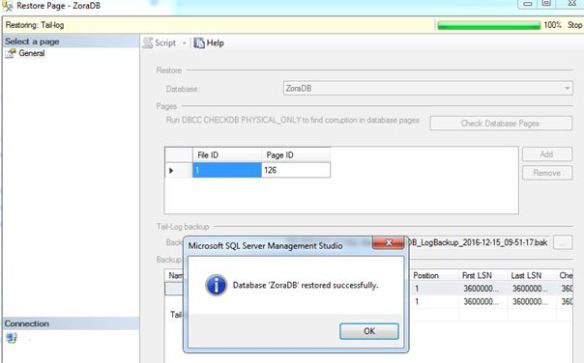
ssms3

 SELECT *
 FROM [ZoraDB].[dbo].[people]

(21 row(s) affected)

How cool is that?
SQL Server READPAST

Following on from my previous post on NOLOCK (https://blobeater.blog/2016/12/09/nolock/) I want to talk about another hint called READPAST. This hint tells the database engine not to read rows that are locked by other transactions.

It is best explained with an example.

First let’s look at the basics of locking under the default isolation level with no hints. In my first SSMS (SQL Server Management Studio) window I issue the following.

BEGIN TRAN
UPDATE [HumanResources].[Department]
SET Name = 'Global'
WHERE DepartmentID = 16

Under a second SSMS connection I run a select statement – yes naturally I am blocked.

SELECT * FROM HumanResources.Department

readpast

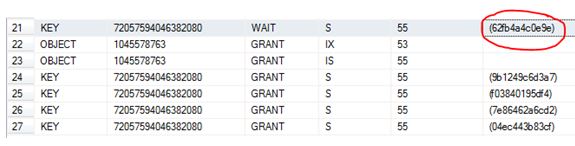
I have circled in red the resource_description which can be used as input into the undocumented function  %%lockres%% to understand/confirm what is actually being locked.

select *,%%lockres%%
from    HumanResources.Department (nolock)
where    %%lockres%% IN('(62fb4a4c0e9e)')

Just to confirm it is the DepartmentID = 16 row as per my update statement.

readpast1

Anyways, I issue a rollback and the blocking stops.

readpast3

So now that we understand what “normally” happens let’s play with the READPAST hint.

SSMS window 1

 BEGIN TRAN
UPDATE [HumanResources].[Department]
SET Name = 'Global'
WHERE DepartmentID = 16

SSMS window 2

 SELECT * FROM HumanResources.Department (READPAST)

readpst5.JPG

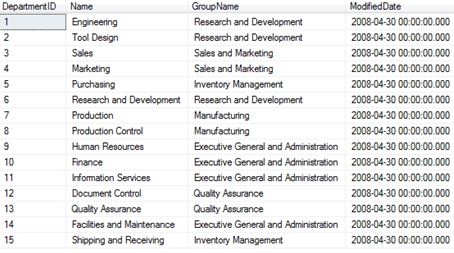
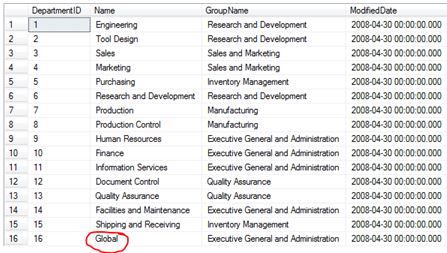
Totally skips the row where DepartmentID =16.

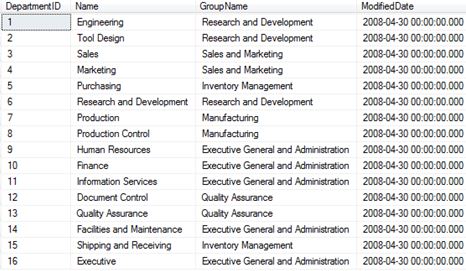
If I rollback the update statement you should see the DepartmentID = 16 come back.

 ROLLBACK

Then

SELECT * FROM HumanResources.Department (READPAST)

reradp2.JPG

So, as the name of the hint suggests, it literally does “readpast” it.

Don’t blink you might READPAST it

Following on from my previous post on NOLOCK (https://blobeater.blog/2016/12/09/nolock/) I want to talk about another hint called READPAST. This hint tells the database engine not to read rows that are locked by other transactions.

It is best explained with an example.

First let’s look at the basics of locking under the default isolation level with no hints. In my first SSMS (SQL Server Management Studio) window I issue the following.

BEGIN TRAN
UPDATE [HumanResources].[Department]
SET Name = 'Global'
WHERE DepartmentID = 16

Under a second SSMS connection I run a select statement – yes naturally I am blocked.

SELECT * FROM HumanResources.Department

readpast

I have circled in red the resource_description which can be used as input into the undocumented function  %%lockres%% to understand/confirm what is actually being locked.

select *,%%lockres%%
from    HumanResources.Department (nolock)
where    %%lockres%% IN('(62fb4a4c0e9e)')

Just to confirm it is the DepartmentID = 16 row as per my update statement.

readpast1

Anyways, I issue a rollback and the blocking stops.

readpast3

So now that we understand what “normally” happens let’s play with the READPAST hint.

SSMS window 1

 BEGIN TRAN
UPDATE [HumanResources].[Department]
SET Name = 'Global'
WHERE DepartmentID = 16

SSMS window 2

 SELECT * FROM HumanResources.Department (READPAST)

readpst5.JPG

Totally skips the row where DepartmentID =16.

If I rollback the update statement you should see the DepartmentID = 16 come back.

 ROLLBACK

Then

SELECT * FROM HumanResources.Department (READPAST)

reradp2.JPG

So, as the name of the hint suggests, it literally does “readpast” it.

SQL Server NOLOCK

NOLOCK, some say it’s a fast option for queries and will never cause blocking, I say it’s quite dirty and MAY cause blocking.

I used to think that a NOLOCK (which is the same as read uncommitted) hint actually meant that a “no lock” was used, I was very wrong and the naming doesn’t really help. Let’s have a look.

I will run a random SELECT statement with the hint, such as

SELECT * FROM Sales.BigSalesOrderDetailEnlarged WITH (NOLOCK)

Then I will check the “go to” DMV for locks.

SELECT resource_type, resource_associated_entity_id,
    request_status, request_mode,request_session_id,
    resource_description
    FROM sys.dm_tran_locks
    WHERE resource_database_id = 13

nolock

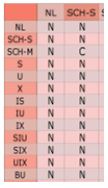
A Sch-S (schema stability) lock is taken.  This is a lightweight lock; the only lock that can conflict with this is a Sch-m (schema modification) lock. (C = Conflict). This means that a NOLOCK can actually block for example against an ALTER TABLE command.

nolock1

Below shows the example of when my NOLOCK query is being blocked by ALTER INDEX commands:

 SELECT resource_type, resource_associated_entity_id,
    request_status, request_mode,request_session_id,
    resource_description
    FROM sys.dm_tran_locks 

nolcok4

So there you go, it can be involved in blocking.

Dirty reads:

This is my example data.

nocok3.JPG

In Window 1 using SQL Server management Studio I begin an open UPDATE statement – notice that it has NOT been committed.

BEGIN TRAN
UPDATE [HumanResources].[Department]
SET Name = 'Global'
WHERE DepartmentID = 16

In window 2 I do a NOLOCK select statement.

SELECT * FROM HumanResources.Department (NOLOCK)

lockdffgsef.JPG

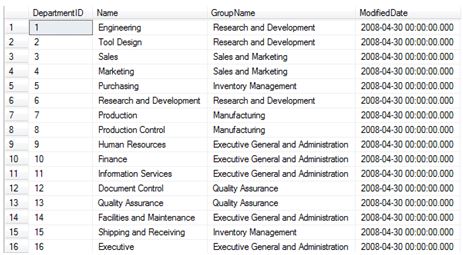
Now that’s dirty.

NOLOCK

NOLOCK, some say it’s a fast option for queries and will never cause blocking, I say it’s quite dirty and MAY cause blocking.

I used to think that a NOLOCK (which is the same as read uncommitted) hint actually meant that a “no lock” was used, I was very wrong and the naming doesn’t really help. Let’s have a look.

I will run a random SELECT statement with the hint, such as

SELECT * FROM Sales.BigSalesOrderDetailEnlarged WITH (NOLOCK)

Then I will check the “go to” DMV for locks.

SELECT resource_type, resource_associated_entity_id,
    request_status, request_mode,request_session_id,
    resource_description
    FROM sys.dm_tran_locks
    WHERE resource_database_id = 13

nolock

A Sch-S (schema stability) lock is taken.  This is a lightweight lock; the only lock that can conflict with this is a Sch-m (schema modification) lock. (C = Conflict). This means that a NOLOCK can actually block for example against an ALTER TABLE command.

nolock1

Below shows the example of when my NOLOCK query is being blocked by ALTER INDEX commands:

 SELECT resource_type, resource_associated_entity_id,
    request_status, request_mode,request_session_id,
    resource_description
    FROM sys.dm_tran_locks 

nolcok4

So there you go, it can be involved in blocking.

Dirty reads:

This is my example data.

nocok3.JPG

In Window 1 using SQL Server management Studio I begin an open UPDATE statement – notice that it has NOT been committed.

BEGIN TRAN
UPDATE [HumanResources].[Department]
SET Name = 'Global'
WHERE DepartmentID = 16

In window 2 I do a NOLOCK select statement.

SELECT * FROM HumanResources.Department (NOLOCK)

lockdffgsef.JPG

Now that’s dirty.