Detaching corrupt databases

Question – Can you detach a corrupt database?

Answer – IT DEPENDS!

More specifically it depends on the SQL Server version. SQL 2005 and prior it was possible, with the newer versions of SQL you will not be able to issue the command.

So let’s confirm this with SQL 2016.

Well I manufactured some corruption (I am starting to enjoy doing this too much for my own liking 😉 ) where the error log stated:

The header for file ‘C:\Program Files\Microsoft SQL Server\MSSQL12.SQLMCA\MSSQL\DATA\AmazonUK.mdf’ is not a valid database file header

I try to detach the database. (By the way, there is no good reason to do this; corruption does not just go away)

USE [master]
GO
ALTER DATABASE [AmazonUK] SET  SINGLE_USER WITH ROLLBACK IMMEDIATE
GO

USE [master]
GO
EXEC master.dbo.sp_detach_db @dbname = N'AmazonUK'
GO

SQL Server Management Studio returns

ALTER DATABASE statement failed.
Msg 3707, Level 16, State 2, Line 7
Cannot detach a suspect or recovery pending database. It must be repaired or dropped.

I totally forgot how helpful this is. I thought that I would refresh the minds of whoever reads this too.

Query Store – Quick Tour

The query store, Borko Novakovic Senior Program Manager from Microsoft calls this feature “Similar to an airplane’s flight data recorder”.

To get this setup there are some pre-Reqs needed. First you need the latest version of SSMS https://msdn.microsoft.com/library/mt238290.aspx – download it and install it.  This blog post is just a whirl wind / high level post on query store, you could write a book on it.

qs1

Anyways, next comes the fun part – enabling it.

ALTER DATABASE [OURDB] SET QUERY_STORE = ON;

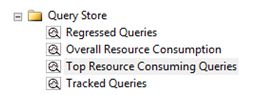
Why I said you need the latest version of SSMS is because it exposes the functionality via the GUI. You will see the query store node.

qs2

Once enabled you have a plethora of information at your finger tips – and I am really impressed with it. Now there is no real need to dig into the plan cache to get the information, or a need to run XML to parse data. It’s all here ready for use.

Beware of some default configuration options:

  • The number of days to retain data in the query store. The default value is 30.
  • The default value is 900 seconds (that is when data written to the query store is persisted to disk).
  • MAX_STORAGE_SIZE_MB limit is 100MB
  • Time interval at which runtime execution statistics data is aggregated into the query store. The default value is 60.
  • SIZE_BASED_CLEANUP_MODE – this is whether or not the cleanup process will be automatically activated, auto is the default option.
  • QUERY_CAPTURE_MODE for Azure the default is AUTO meaning ignore infrequent and queries with insignificant compile and execution duration
  • MAX_PLANS_PER_QUERY = 200.

You can change these settings via SSMS under database properties.

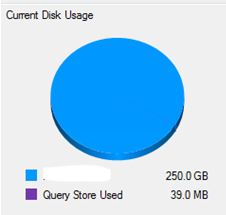
Please Note: Query store data is stored within the host database.

qs3

Let’s have a look at “Top Resource consuming queries” option. This is just 1 area of analysis, as mentioned before there is alot of information within query store that you could analyse.

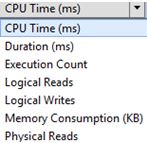
You have the ability to analyse the following metrics:

qs5

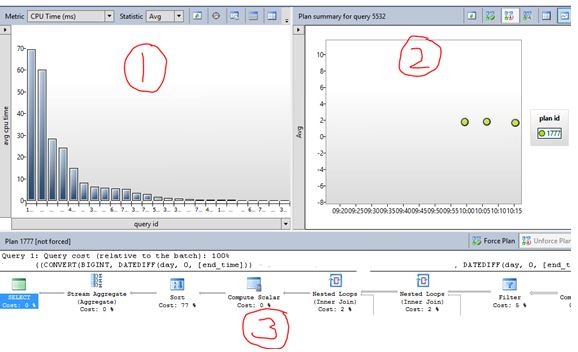
For this example I was looking at CPU (AVG).

You have 3 windows presented (for this example)

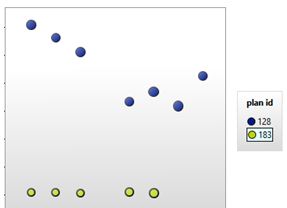
  1. This is a bar chart showing you query id’s – usually you select one of interest
  2. Shows you the plan summary for that specfic query
  3. Will give you the execution plan for the above plan id.

qs7.JPG

It’s so powerful you even have the option to FORCE a plan, something that you may want to consider before actually pressing that button.  Saying that, I have the below situation – you know what I am going to do right?

qs8


My application to Microsoft

I have been eager to write this blog post for a while now.

I want to share my experience of the process that I went through (last year) when I applied to Microsoft for a SQL PFE (Premier Field Engineer) role. Why would I want to do this? Well when I was going though the process I was online all day trying to get some insight into what I was going to go through, so I hope for those that are thinking of applying they will find this useful.

I will say that I received some advice from Gail Shaw about contacting Microsoft before writing this in case I was violating some piece of legislation; I thank her for this as I was sent some documentation by Microsoft to read before writing. So I am going to play it safe and not indulged on what was asked but what I went through (from my perspective).

Stage 1

Send your CV! If you have dreams of working for Microsoft then why not try and send your CV? I was sent an email with a Job description and thought why not?

If they like the look of your CV then you move to the next stage.

Stage 2

Technical telephone interview, exactly what it says on the tin. At this stage they engage with you to see if you know the basics i.e. if you have a solid foundation. You know you are not going to get far if you don’t really know something as simple as Minimum Server Memory or isolation levels.

Without going into too much detail (question types etc) it was quite evident that their requirements on the Job description would be the source of questions here around the following:

  • SQL Server (core product)
  • SQL HA/DR solutions.
  • Experiences with SQL Server Integration Services, Reporting Services, Analysis Services.
  • PowerShell
  • Azure

This started of fairly easy but if they feel you know more they will probe you. My advice here is if you don’t know the answer then be honest! This stage lasted around 1 hour. By the way if you lied on your CV you might get embarrassed here so be honest, this isn’t your local company interviewing you.

Stage 3

A Competency telephone interview was next. I found this quite tough. A lot of complex scenario based questions where Microsoft tries to find out how you would react to certain scenarios / situations. My advice here is to learn about Microsoft competencies and their expectations.

I was surprised to be invited to the last stage(s) the assessment day located at their HQ – Reading. If you reach this stage you will be in for a long but fun day.

Stage 4-5-6

Stage 4 – technical interview with 2 senior engineers.  Yes I was nervous, they knew it and I knew but they were really nice people. They DO NOT try to trick you here, all they want to know if how deep you can go.

Its starts of basic, you answer it then they build a question on your answer and that keeps going until you either don’t know or they move on to the next question – and yes there were times we were talking about SQL internals ( Think allocation bitmaps etc).

Many times I did not know the answer and I was not shy in saying “sorry I don’t know”.

Stage 5 – Technical presentation – after stage 3 you will be sent material to digest and prepare a presentation on your findings. This required A LOT of effort in terms of information preparation and practicing in front of a mirror for the presenting side of things. Be confident! I wore my favourite tie so I felt good too.

Stage 6- competency interview with 2 senior managers – Here they want to get to know you and what makes you “tick”. It’s up to them to decide if you will fit in at Microsoft. The questions here were complex ones designed to understand what your personality is like.

Even though I didn’t get the job I really enjoyed going through this process, I learnt a lot about myself, ultimately giving me the platform to improve myself. If you have any questions leave me a comment – I will try and answer without violating any T/Cs I was sent.

SSMS Keeps Crashing

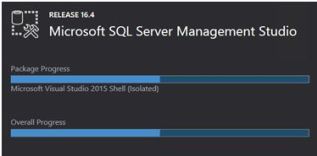
It is quite frustrating when SSMS (SQL Server Management Studio) randomly crashes, all too often for my liking. If you have the following screen shot then read on.

ca

Digging into the event logs I noticed the following error:

Faulting application name: Ssms.exe, version: 2015.130.15000.23,
Faulting module name: KERNELBASE.dll, version: 6.1.7601.18847,
Exception code: 0xe0434352
Fault offset: 0x0000812f
Faulting process id: 0x209c

Faulting application path: C:\Program Files\Microsoft SQL Server\130\Tools\Binn\ManagementStudio\Ssms.exe

<SNIPPET>

Application: Ssms.exe
Framework Version: v4.0.30319
Description: The process was terminated due to an unhandled exception.
Exception Info: System.Runtime.InteropServices.COMException
at System.Windows.Media.Composition.DUCE+Channel.SyncFlush()
at System.Windows.Interop.HwndTarget.UpdateWindowSettings(Boolean, System.Nullable`1<ChannelSet>)
at System.Windows.Interop.HwndTarget.UpdateWindowPos(IntPtr)
at System.Windows.Interop.HwndTarget.HandleMessage(MS.Internal.Interop.WindowMessage, IntPtr, IntPtr)
at System.Windows.Interop.HwndSource.HwndTargetFilterMessage(IntPtr, Int32, IntPtr, IntPtr, Boolean ByRef)
at MS.Win32.HwndWrapper.WndProc(IntPtr, Int32, IntPtr, IntPtr, Boolean ByRef)
at MS.Win32.HwndSubclass.DispatcherCallbackOperation(System.Object)
at System.Windows.Threading.ExceptionWrapper.InternalRealCall(System.Delegate, System.Object, Int32)
at System.Windows.Threading.ExceptionWrapper.TryCatchWhen(System.Object, System.Delegate, System.Object, Int32, System.Delegate)

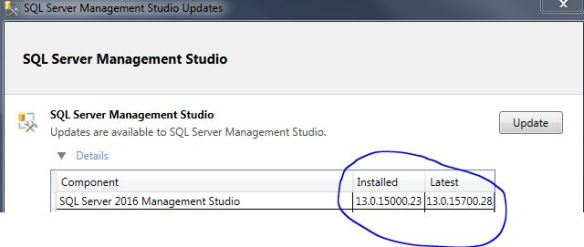
SSMS crashes are caused by a wide variety of things, looking at current (and closed) connect items I couldn’t really find a fix. The next best option is to follow the advice in the workaround section which states “Try installing the latest Update”.

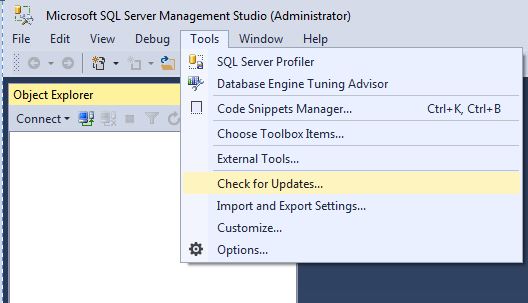
Within SSMS check for updates.

cap6


cap5

Clicking the UPDATE button takes you to the URL http://go.microsoft.com/fwlink/?LinkId=531355 where you will need to manually download and install.

Hopefully I will get less random crashes… we shall see.

DBCC CHECKFILEGROUP

Well, with the name “blobeater” it was about time I did another post on CHECKDB.

This time I want to talk about another strategy that you could use to manage CHECKDB on your TB sized databases – something that I actually do.

My bigger databases use partitioning that are stored on separate filegroups.

Let’s assume we have – Primary (obviously), AWS and LAM. I make use of the fact that my database has multiple filegroups so I then use DBCC CHECKFILEGROUP. This checks the allocation and structural integrity of all tables and indexed views in the specified filegroup of the database as stated by Books on Line.

So I issue:

USE Mydb
GO
-- Primary day 1
DBCC CHECKFILEGROUP;
GO
DBCC CHECKCATALOG

--other FileGroups Day2
DBCC CHECKFILEGROUP ('AWS')
GO
DBCC CHECKCATALOG

--other FileGroups Day3
DBCC CHECKFILEGROUP ('LAM')
GO
DBCC CHECKCATALOG

You may be wondering why I am issuing the CHECKCATALOG separately. Well this is because only CHECKALLOC and CHECKTABLE are done via CHECKFILEGROUP so you really should be doing CHECKCATALOG independently too. This approach gives you the ability to spread the burden over a couple of days rather than all in 1 day / window.

Just be aware of this bug http://www.sqlskills.com/blogs/paul/dbcc-checkfilegroup-bug-on-sql-server-2008/

If you do not have filegroups you could spread CHECKALLOC, CHECKCATALOG and CHECKTABLE over X days – I have some code that does this – https://blobeater.wordpress.com/category/sql-server-2/development/