Fix that page

I am in a fix-it mood so for this blog I am going to corrupt a page and then show you how to recover it using a page restore.

So let’s begin.

This is a very basic setup just to highlight the steps involved.


CREATE DATABASE [fixit];
GO
USE [fixit]
GO
ALTER DATABASE [fixit] SET RECOVERY FULL
GO
CREATE TABLE [xbox] (
[c1] INT IDENTITY,
[c2] CHAR (8000) DEFAULT 'a');
GO

INSERT INTO [xbox] DEFAULT VALUES;
GO

Let’s do some backups


USE master
GO
BACKUP DATABASE [fixit] TO DISK = 'C:\sqlserver\fixitfull11.bak'
GO
BACKUP LOG [fixit] TO DISK = 'C:\sqlserver\fixitLOG11.bak'

Let’s look at DBCC IND to get some pageIDs

DBCC IND (N'fixit', N'xbox', -1);
GO

page1

Trash it

I am going to trash data page 78 (type 1) using DBCC WRITEPAGE – This is a pretty dangerous command – DO NOT USE IT IN PRODUCTION. Actually, don’t use it all if you are not comfortable with it! This is going to be executed on my laptop, my hardware using my software – so I accept any consequence…..


ALTER DATABASE fixit SET SINGLE_USER;
GO
DBCC WRITEPAGE (N'fixit', 1, 78, 4000, 1, 0x45, 1);
GO
ALTER DATABASE fixit SET MULTI_USER;
GO


SELECT * FROM [fixit].[dbo].[xbox]

Msg 824, Level 24, State 2, Line 37
SQL Server detected a logical consistency-based I/O error:
It occurred during a read of page (1:78) in database ID 22 at offset 0x0000000009c000

DBCC CHECKDB ('Naughty') WITH NO_INFOMSGS, ALL_ERRORMSGS

CHECKDB found 0 allocation errors and 2 consistency errors in table ‘xbox’ (object ID 2105058535).
CHECKDB found 0 allocation errors and 2 consistency errors in database ‘fixit’.
repair_allow_data_loss is the minimum repair level for the errors found by DBCC CHECKDB (fixit).
DBCC execution completed. If DBCC printed error messages, contact your system administrator.

As a side note this will get recorded into the suspect_pages table within msdb.

SELECT * FROM [msdb].[dbo].[suspect_pages]

page2

Some more general activity.

USE [fixit]
go

INSERT INTO [dbo].[xbox]
([c2])
VALUES
('b')
GO

We want the data back!

Recovery time
First step is to issue a tail-log backup.

USE master
GO
-- tail
BACKUP log [fixit] TO DISK = 'C:\sqlserver\fixitLOG12.bak'

--So now we start the page recovery
RESTORE DATABASE [fixit]
PAGE = '1:78'
FROM DISK = 'C:\sqlserver\fixitfull11.bak'
WITH NORECOVERY
GO

RESTORE LOG [fixit] FROM
DISK = 'C:\sqlserver\fixitLOG11.bak'
WITH NORECOVERY
GO

RESTORE LOG [fixit] FROM
DISK = 'C:\sqlserver\fixitLOG12.bak'
WITH NORECOVERY
GO

-- Finally bring it back
RESTORE DATABASE [fixit] WITH RECOVERY

DBCC CHECKDB('Fixit')

CHECKDB found 0 allocation errors and 0 consistency errors in database ‘fixit’.
DBCC execution completed. If DBCC printed error messages, contact your system administrator.

USE [fixit]
GO
SELECT * FROM [dbo].[xbox]
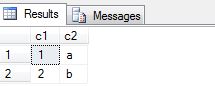
checkdb
Just be aware of certain limitations such as that allocation pages Global Allocation Map (GAM) pages, Shared Global Allocation Map (SGAM) pages, and Page Free Space (PFS) pages cannot be recovered. More information can be found at https://msdn.microsoft.com/en-us/library/ms175168.aspx.

Happy fixing!

Undocumented Commands

There isn’t really a need to do what I am doing in this blog post but I guess one reason for this is if you want to manufacture some sort of “targeted” corruption for a demo – here I will be making a value that is out of range for a data type. Or you just maybe interested in how to issue some of the commands.

First run DBCC IND (safe). So here I am interested in page 1120.

DBCC IND (N'AdventureWorks2012DR',N'Purchasing.PurchaseOrderDetail', -1)
GO

dd1

Using DBCC Page(safe) for a page of interest with option 3 = page header plus detailed per-row interpretation

DBCC TRACEON (3604)
DBCC PAGE (N'AdventureWorks2012DR',1,1120,3);

Snippet:

So I decided to “break” column 3 on slot 1 = DueDate using DBCC WRITEPAGE (Absolutely dangerous)

Below I have Highlighted parts (orange) that I use to calculate the offset in decimal – this being column offset + the offset of the record on page.

KeyHashValue = (e2338e2f4a9f)

Slot 1 Offset 0x98 Length 56

Record Type = PRIMARY_RECORD         Record Attributes =  NULL_BITMAP     Record Size = 56
Memory Dump @0x499EC098

00000000:   10003400 02000000 02000000 00000000 †..4………….
00000010:   65960000 03006701 000080e2 06000000 †e–….g….â….
00000020:   0000012c 01000001 00000000 00000000 †…,…………
00000030:   5e960000 09000000 †††††††††††††††††††^–..  …
Slot 1 Column 1 Offset 0x4 Length 4 Length (physical) 4
PurchaseOrderID = 2
Slot 1 Column 2 Offset 0x8 Length 4 Length (physical) 4
PurchaseOrderDetailID = 2
Slot 1 Column 3 Offset 0xc Length 8 Length (physical) 8
DueDate = 2005-05-31 00:00:00.000
Slot 1 Column 4 Offset 0x14 Length 2 Length (physical) 2
OrderQty = 3
Slot 1 Column 5 Offset 0x16 Length 4 Length (physical) 4
ProductID = 359
Slot 1 Column 6 Offset 0x1a Length 8 Length (physical) 8
UnitPrice = $45.1200
Slot 1 Column 8 Offset 0x22 Length 5 Length (physical) 5
ReceivedQty = 3.00

Convert to decimal the offset of RECORD ON PAGE + column offset C = 12(hex to decimal)

SELECT CONVERT (INT, 0x98 + 12) as [offset decimal]
= 164

On our page 1120 at the calculated offset above I am going to affect 8 bytes.
DO NOT USE IN PRODUCTION – THIS IS A WARNING

--Length 8 bytes
DBCC WRITEPAGE (N'AdventureWorks2012DR', 1, 1120, 164, 8, 0Xfffffffffffffc11)
GO
-- Check
DBCC CHECKDB (N'AdventureWorks2012DR')  WITH NO_INFOMSGS


Whoops I did it again.
Msg 2570, Level 16, State 3, Line 72
Page (1:1120), slot 1 in object ID 594101157, index ID 1, partition ID 72057594046578688, alloc unit ID 72057594049134592 (type “In-row data”). Column “DueDate” value is out of range for data type “datetime”. Update column to a legal value.

LOOKING AT DBCC PAGE:
Slot 1 Column 1 Offset 0x4 Length 4 Length (physical) 4
PurchaseOrderID = 2
Slot 1 Column 2 Offset 0x8 Length 4 Length (physical) 4
PurchaseOrderDetailID = 2
Slot 1 Column 3 Offset 0xc Length 8 Length (physical) 8
DueDate = INVALID COLUMN VALUE

LETS FIX THIS UP:
Let’s put in a value that makes sense. You can start piecing things together to build an update statement. The error message from CHECKDB says object id =594101157 hence run

select OBJECT_NAME(594101157) AS [Table] = PurchaseOrderDetail.

For the rest we know from DBCC PAGE the column to update(illegal value) and for which PurchaseOrderID (slot 1 column 1)

UPDATE [Purchasing].[PurchaseOrderDetail]
SET DueDate = GETDATE()
WHERE PurchaseOrderDetailID = 2

After the update:

Slot 1 Column 1 Offset 0x4 Length 4 Length (physical) 4
PurchaseOrderID = 2
Slot 1 Column 2 Offset 0x8 Length 4 Length (physical) 4
PurchaseOrderDetailID = 2
Slot 1 Column 3 Offset 0xc Length 8 Length (physical) 8
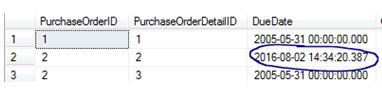
DueDate = 2016-08-02 14:34:20.387

dd2

DBCC CHECKDB (N'AdventureWorks2012DR')  WITH NO_INFOMSGS
- Command(s) completed successfully.

Why I like SQL Sentry Plan Explorer

Why I like SQL Sentry Plan Explorer.

I am going to be honest here, before attending SQLSKILLS Immersion training I never really thought about using SQL Sentry Plan Explorer before, but once I saw the demos I knew from that moment that I was going to install the product.

There are 2 versions, FREE and PRO – I am currently using the FREE version. https://www.sqlsentry.com/products/plan-explorer/sql-server-query-view

The tool

It is best describing what I like about this product from using an example hence presenting some screen shots, as you know, a picture speaks a thousand words. This is not a complete guide to the tool but a blog post about certain features that I PERSONALLY like and use.

Let’s Look at a basic execution plan and make some comparisons between native SSMS (SQL Server Management Studio) and Plan Explorer.

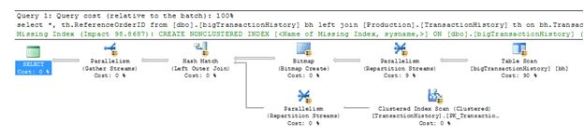
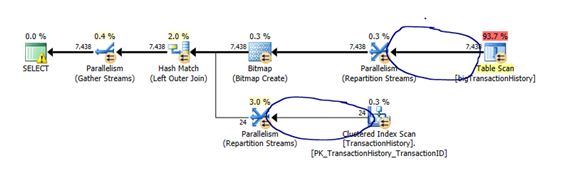
This is the execution plan in SSMS.

ss

To view it in via Plan Explorer (once installed) you literally right click on the plan and hit view in SQL Sentry Plan Explorer.

ss2

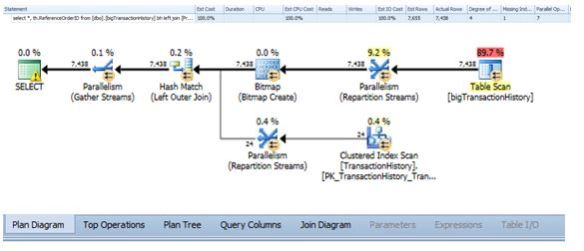
Then in Plan Explorer – it looks like this.

ss4


What Do I like?

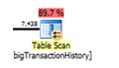
  • The colour coding scheme. Immediately the Table scan with cost of 89.7% stands out more than the SSMS version. Even though it is obvious it is still nice to see.

ss5

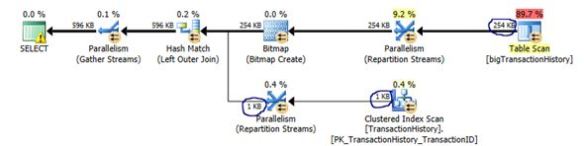
  • Notice the thickness of lines with numbers on them? It is MUCH easier to understand the flow of data (in terms of rows or data size) through Plan Explorer than using SSMS.

By rows processed:

ss6

By Data size:

ss7

  • I like the statement summary at the top which from analyzing it is easy to see if you have any skew (actual vs estimate), Degree of parallelism, missing indexes and a general summary of what operators used.


ss8

  • If you click the top operations section you will have the ability to sort the operations based on whatever column you desire – for the below example I wanted to sort operations based on IO Costs.


ss9

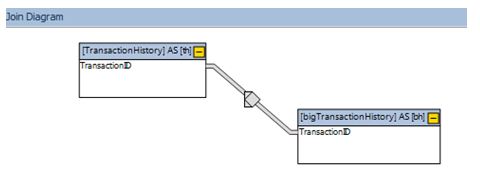
  • I also like the join diagram they build for you, even though my query for this test is simple for larger queries I have found it useful in understanding what tables were involved or when complex views had been used.


ss10

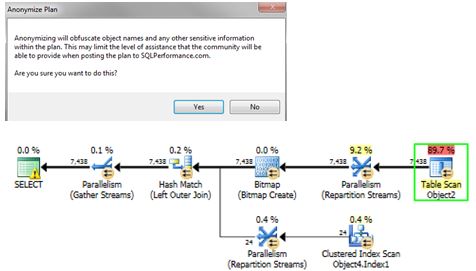
  • I love the “Anonymise” option for if you are not allowed to disclose table names. They get replaced with generic terminology yet everything else stays the same (plan shape, costs etc)

ss11

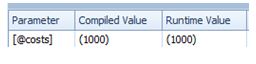
  • Finally it is pretty easy to gain an understanding on if there is a parameter sensitivity issue that is potentially happening as there is a dedicated section on parameters – complied vs run-time values.

ss12

All these features and available straight from the main screen. My advice is to install it and give it a go!


Azure SQL Database scripts

I thought that this would be useful for others – couple of scripts that I have been using in Azure for my SQL Databases.

--************************--
-- Azure SQL DB Scripts--
--**************************

-- Wait Stats / Database
WITH Waits AS
(SELECT wait_type, wait_time_ms / 1000. AS wait_time_s,
100. * wait_time_ms / SUM(wait_time_ms) OVER() AS pct,
ROW_NUMBER() OVER(ORDER BY wait_time_ms DESC) AS rn
FROM sys.dm_db_wait_stats
)
SELECT W1.wait_type,
CAST(W1.wait_time_s AS DECIMAL(12, 2)) AS wait_time_s,
CAST(W1.pct AS DECIMAL(12, 2)) AS pct,
CAST(SUM(W2.pct) AS DECIMAL(12, 2)) AS running_pct
FROM Waits AS W1
INNER JOIN Waits AS W2
ON W2.rn <= W1.rn
GROUP BY W1.rn, W1.wait_type, W1.wait_time_s, W1.pct
HAVING SUM(W2.pct) - W1.pct < 99
-- Currently active sessions
SELECT
sys.dm_exec_sessions.session_id AS [Spid],
CASE is_user_process
WHEN 1
THEN 'User'
WHEN 0
THEN 'System'
END
AS [Session],
HOST_NAME,
PROGRAM_NAME,
login_name,
Status,
cpu_time ,
total_scheduled_time ,
total_elapsed_time
FROM sys.dm_db_session_space_usage INNER join sys.dm_exec_sessions
ON sys.dm_exec_sessions.session_id = sys.dm_db_session_space_usage.session_id

-- Returns information about operations performed on databases
-- Context of Master
SELECT * FROM sys.dm_operation_status
ORDER BY start_time

-- Returns CPU, I/O, and memory consumption for an Azure SQL Database
SELECT
AVG(avg_cpu_percent) AS 'Average CPU Utilization In Percent',
MAX(avg_cpu_percent) AS 'Maximum CPU Utilization In Percent',
AVG(avg_data_io_percent) AS 'Average Data IO In Percent',
MAX(avg_data_io_percent) AS 'Maximum Data IO In Percent',
AVG(avg_log_write_percent) AS 'Average Log Write Utilization In Percent',
MAX(avg_log_write_percent) AS 'Maximum Log Write Utilization In Percent',
AVG(avg_memory_usage_percent) AS 'Average Memory Usage In Percent',
MAX(avg_memory_usage_percent) AS 'Maximum Memory Usage In Percent'
FROM sys.dm_db_resource_stats;

--DTU usage tracked over Timed intervals
SELECT end_time,
(SELECT Max(v)
FROM (VALUES (avg_cpu_percent), (avg_data_io_percent), (avg_log_write_percent)) AS
value(v)) AS [avg_DTU %]
FROM sys.dm_db_resource_stats;

sys.dm_db_wait_stats DMV

Come on guys, lets “UP- vote” this suggestion for  the actual SQL Server product – even the “Scary DBA” likes the idea!

A way to analyse wait stats at the database level just like Azure SQL Database? Yes please….

https://connect.microsoft.com/SQLServer/feedback/details/2647332/sys-dm-db-wait-stats-dmv