I used to shrink my databases!

This is an entry level post and a response to SQLEspresso’s blog challenge(http://sqlespresso.com/2017/01/10/ooops-was-that-was-me-blog-challenge) where we share mistakes from our “younger” days. My post takes me back 11 years and while it is nothing ground breaking I still  want to convey what shrinking does to your database. Why? Well it was something that I USED to do. ( Again – I will reinforce the point it was a long time ago)

Well not only does it generate a lot of I/O, consumes CPU but it also affects your fragmentation levels in indexes which is what we will look at today.

These tables and indexes are based from Jonathan’s script found here: https://www.sqlskills.com/blogs/jonathan/enlarging-the-adventureworks-sample-databases/

So I issued the below TSQL where I would expect to see no fragmentation after the rebuild (Index level 0 being the leaf node). Yes the page count is low but it’s the concept I want to talk about.


ALTER INDEX PK_SalesOrderHeaderEnlarged_SalesOrderID ON Sales.SalesOrderHeaderEnlarged REBUILD

DECLARE @db_id SMALLINT;
DECLARE @object_id INT;  

SET @db_id = DB_ID(N'AdventureWorks1997');
SET @object_id = OBJECT_ID(N'Sales.SalesOrderHeaderEnlarged');  

IF @db_id IS NULL
BEGIN;
    PRINT N'Invalid database';
END;
ELSE IF @object_id IS NULL
BEGIN;
    PRINT N'Invalid object';
END;
ELSE
BEGIN;
    SELECT * FROM sys.dm_db_index_physical_stats(@db_id, @object_id, NULL, NULL , 'detailed');
END;
GO  

shrink

Now let’s SHRINK. You can actually do this via SQL Server Management Studio.


DBCC SHRINKDATABASE(N'AdventureWorks1997' )
GO

DECLARE @db_id SMALLINT;
DECLARE @object_id INT;  

SET @db_id = DB_ID(N'AdventureWorks1997');
SET @object_id = OBJECT_ID(N'Sales.SalesOrderHeaderEnlarged');  

IF @db_id IS NULL
BEGIN;
    PRINT N'Invalid database';
END;
ELSE IF @object_id IS NULL
BEGIN;
    PRINT N'Invalid object';
END;
ELSE
BEGIN;
    SELECT * FROM sys.dm_db_index_physical_stats(@db_id, @object_id, NULL, NULL , 'detailed');
END;
GO

99.85% avg_fragmentation, in essence the order has been reversed.

shrinkafterOk, for a one-of activity I don’t mind  you could just sort out the fragmentation afterwards, but to do it as part of a maintenance routine, not the best option out there. SHAME ON ME!
Checking DBCC CHECKDB

I hope you run consistency checks on your databases, if you are not currently doing this you probably will want to.

For this post I want to show you how you can check whether or not CHECKDB has been successfully executed.

There are a couple of ways to check this but I will be using DBCC DBINFO for this check.

DBCC DBINFO WITH TABLERESULTS

checkdb

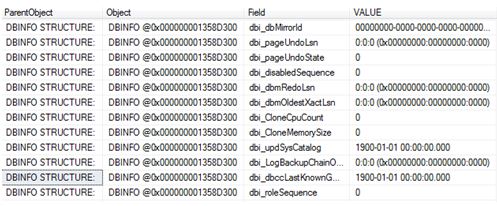
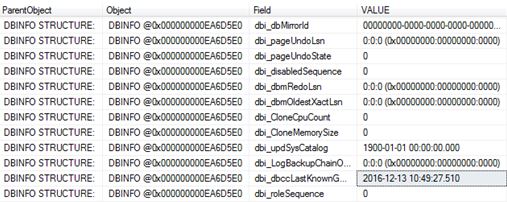
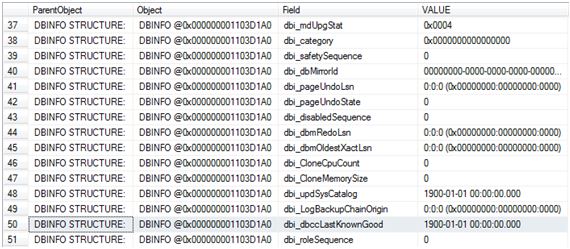
The field of interest here is dbi_dbccLastKnownGood where VALUE of 1900-01-01 00:00:00.000 means that DBCC CHECKDB has never been executed (successfully).

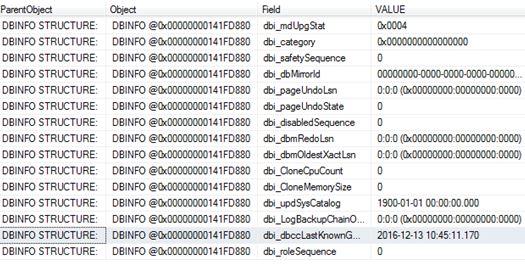
So let’s run CHECKDB and see the value get updated.

DBCC CHECKDB ('ZoraDB')
GO

DBCC DBINFO WITH TABLERESULTS

checkdb2.JPG

The next question I want answering is whether or not this value gets updated if I run CHECKDB with the physical_only option (I created a fresh copy of the database and performed a re-check)

USE [master]
GO

DROP DATABASE [ZoraDB]
GO

CREATE DATABASE [ZoraDB]
 CONTAINMENT = NONE
 ON  PRIMARY
( NAME = N'ZoraDB', FILENAME = N'C:\Program Files\Microsoft SQL Server\MSSQL12.MSSQLSERVER\MSSQL\DATA\ZoraDB.mdf' , SIZE = 5120KB , MAXSIZE = UNLIMITED, FILEGROWTH = 1024KB )
 LOG ON
( NAME = N'ZoraDB_log', FILENAME = N'C:\Program Files\Microsoft SQL Server\MSSQL12.MSSQLSERVER\MSSQL\DATA\ZoraDB_log.ldf' , SIZE = 2048KB , MAXSIZE = 2048GB , FILEGROWTH = 10%)
GO

DBCC DBINFO WITH TABLERESULTS

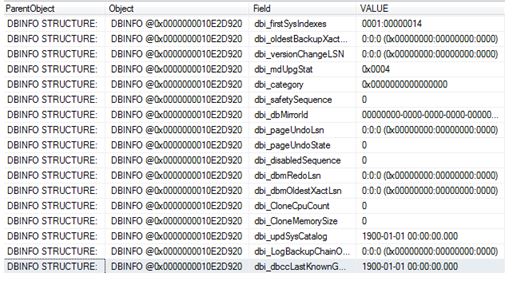
Below confirms that we are back to a newly created database.

checkdb3.JPG

So we now run it with the PHYSICAL_ONLY option.

DBCC CHECKDB ('ZoraDB') WITH PHYSICAL_ONLY
GO
USE [ZoraDB]
GO
DBCC DBINFO WITH TABLERESULTS

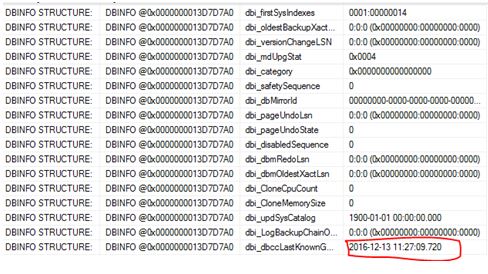
So, stating physical_only updates the value too.

physicalonly.JPG

What about separate checks?

Again I dropped and re-created the database to get back to level playing field.

Let’s work through the DBCC check commands, after a command I will check dbi_dbccLastKnownGood to see if it gets updated.

DBCC CHECKALLOC
GO
DBCC DBINFO WITH TABLERESULTS

checkdb4.JPG

DBCC CHECKCATALOG
GO

DBCC DBINFO WITH TABLERESULTS

checkdb4.JPG

DBCC CHECKTABLE ('dbo.people')
GO
DBCC DBINFO WITH TABLERESULTS

checkdb4.JPG

So checking the database via separate checks has no impact on dbi_dbccLastKnownGood.

What about if the database is corrupted? I re-created the database and corrupted it:

DBCC CHECKDB ('ZoraDB')
GO

CHECKDB found 0 allocation errors and 2 consistency errors in database ‘ZoraDB’.
repair_allow_data_loss is the minimum repair level for the errors found by DBCC CHECKDB (ZoraDB).
DBCC execution completed. If DBCC printed error messages, contact your system administrator.

DBCC DBINFO WITH TABLERESULTS

checkdb4

Naturally it will not get updated because it was unsuccessful – If we fixed the corruption and ran CHECKDB it would then get updated with the current timestamp.

DO NOT RUN REPAIR WITH THIS OPTION – THIS IS AN EXAMPLE ONLY! It deleted my data!! THIS IS A LAST RESORT – WARNING.

ALTER DATABASE [ZoraDB] SET SINGLE_USER;
GO

DBCC CHECKDB    ('ZoraDB'  , REPAIR_ALLOW_DATA_LOSS )

ALTER DATABASE [ZoraDB] SET MULTI_USER;
GO

DBCC CHECKDB ('ZoraDB')
GO

CHECKDB found 0 allocation errors and 0 consistency errors in database ‘ZoraDB’.

DBCC execution completed. If DBCC printed error messages, contact your system administrator.

checkdb6.JPG

There you have it – the updated value.

SQL Server READPAST

Following on from my previous post on NOLOCK (https://blobeater.blog/2016/12/09/nolock/) I want to talk about another hint called READPAST. This hint tells the database engine not to read rows that are locked by other transactions.

It is best explained with an example.

First let’s look at the basics of locking under the default isolation level with no hints. In my first SSMS (SQL Server Management Studio) window I issue the following.

BEGIN TRAN
UPDATE [HumanResources].[Department]
SET Name = 'Global'
WHERE DepartmentID = 16

Under a second SSMS connection I run a select statement – yes naturally I am blocked.

SELECT * FROM HumanResources.Department

readpast

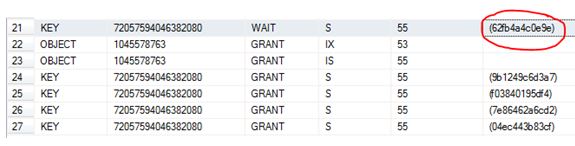
I have circled in red the resource_description which can be used as input into the undocumented function  %%lockres%% to understand/confirm what is actually being locked.

select *,%%lockres%%
from    HumanResources.Department (nolock)
where    %%lockres%% IN('(62fb4a4c0e9e)')

Just to confirm it is the DepartmentID = 16 row as per my update statement.

readpast1

Anyways, I issue a rollback and the blocking stops.

readpast3

So now that we understand what “normally” happens let’s play with the READPAST hint.

SSMS window 1

 BEGIN TRAN
UPDATE [HumanResources].[Department]
SET Name = 'Global'
WHERE DepartmentID = 16

SSMS window 2

 SELECT * FROM HumanResources.Department (READPAST)

readpst5.JPG

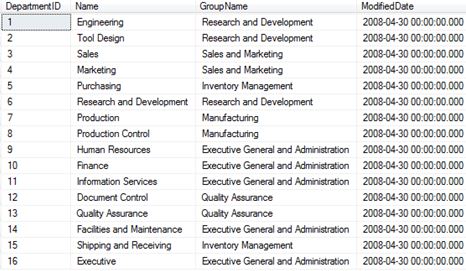
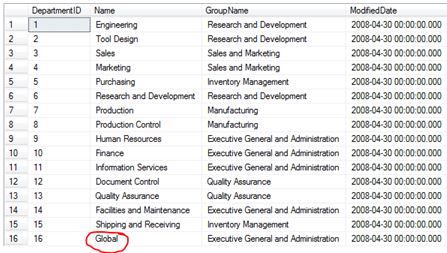
Totally skips the row where DepartmentID =16.

If I rollback the update statement you should see the DepartmentID = 16 come back.

 ROLLBACK

Then

SELECT * FROM HumanResources.Department (READPAST)

reradp2.JPG

So, as the name of the hint suggests, it literally does “readpast” it.

Don’t blink you might READPAST it

Following on from my previous post on NOLOCK (https://blobeater.blog/2016/12/09/nolock/) I want to talk about another hint called READPAST. This hint tells the database engine not to read rows that are locked by other transactions.

It is best explained with an example.

First let’s look at the basics of locking under the default isolation level with no hints. In my first SSMS (SQL Server Management Studio) window I issue the following.

BEGIN TRAN
UPDATE [HumanResources].[Department]
SET Name = 'Global'
WHERE DepartmentID = 16

Under a second SSMS connection I run a select statement – yes naturally I am blocked.

SELECT * FROM HumanResources.Department

readpast

I have circled in red the resource_description which can be used as input into the undocumented function  %%lockres%% to understand/confirm what is actually being locked.

select *,%%lockres%%
from    HumanResources.Department (nolock)
where    %%lockres%% IN('(62fb4a4c0e9e)')

Just to confirm it is the DepartmentID = 16 row as per my update statement.

readpast1

Anyways, I issue a rollback and the blocking stops.

readpast3

So now that we understand what “normally” happens let’s play with the READPAST hint.

SSMS window 1

 BEGIN TRAN
UPDATE [HumanResources].[Department]
SET Name = 'Global'
WHERE DepartmentID = 16

SSMS window 2

 SELECT * FROM HumanResources.Department (READPAST)

readpst5.JPG

Totally skips the row where DepartmentID =16.

If I rollback the update statement you should see the DepartmentID = 16 come back.

 ROLLBACK

Then

SELECT * FROM HumanResources.Department (READPAST)

reradp2.JPG

So, as the name of the hint suggests, it literally does “readpast” it.

SQL Server NOLOCK

NOLOCK, some say it’s a fast option for queries and will never cause blocking, I say it’s quite dirty and MAY cause blocking.

I used to think that a NOLOCK (which is the same as read uncommitted) hint actually meant that a “no lock” was used, I was very wrong and the naming doesn’t really help. Let’s have a look.

I will run a random SELECT statement with the hint, such as

SELECT * FROM Sales.BigSalesOrderDetailEnlarged WITH (NOLOCK)

Then I will check the “go to” DMV for locks.

SELECT resource_type, resource_associated_entity_id,
    request_status, request_mode,request_session_id,
    resource_description
    FROM sys.dm_tran_locks
    WHERE resource_database_id = 13

nolock

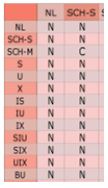
A Sch-S (schema stability) lock is taken.  This is a lightweight lock; the only lock that can conflict with this is a Sch-m (schema modification) lock. (C = Conflict). This means that a NOLOCK can actually block for example against an ALTER TABLE command.

nolock1

Below shows the example of when my NOLOCK query is being blocked by ALTER INDEX commands:

 SELECT resource_type, resource_associated_entity_id,
    request_status, request_mode,request_session_id,
    resource_description
    FROM sys.dm_tran_locks 

nolcok4

So there you go, it can be involved in blocking.

Dirty reads:

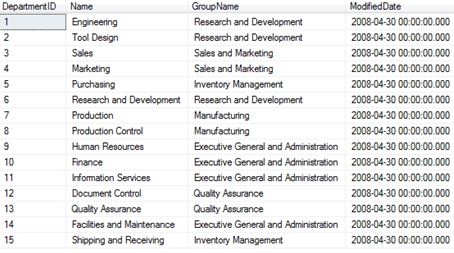
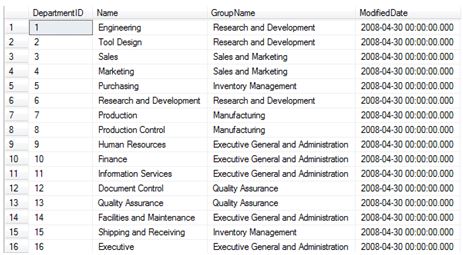
This is my example data.

nocok3.JPG

In Window 1 using SQL Server management Studio I begin an open UPDATE statement – notice that it has NOT been committed.

BEGIN TRAN
UPDATE [HumanResources].[Department]
SET Name = 'Global'
WHERE DepartmentID = 16

In window 2 I do a NOLOCK select statement.

SELECT * FROM HumanResources.Department (NOLOCK)

lockdffgsef.JPG

Now that’s dirty.