SQL Server – max server memory

Another re-post of a video from last year, this time showing you an in-built protection of setting max server memory for your SQL Server. You can clearly see that if you enter a silly figure such as 50 MB, the minimum memory amount allowable for max server memory is 128 MB. You will see SSMS (SQL Server Management Studio) change it to 128MB.

Continue reading

TDE: Looking inside your backups

TDE (Transparent Data Encryption) encrypts the data files at rest but don’t forget that it also encrypts your backup file too. I fancied looking inside a backup of my database before enabling TDE and comparing it to when enabled.

Continue reading

DBCC CHECKFILEGROUP

Well, with the name “blobeater” it was about time I did another post on CHECKDB.

This time I want to talk about another strategy that you could use to manage CHECKDB on your TB sized databases – something that I actually do.

My bigger databases use partitioning that are stored on separate filegroups.

Let’s assume we have – Primary (obviously), AWS and LAM. I make use of the fact that my database has multiple filegroups so I then use DBCC CHECKFILEGROUP. This checks the allocation and structural integrity of all tables and indexed views in the specified filegroup of the database as stated by Books on Line.

So I issue:

USE Mydb
GO
-- Primary day 1
DBCC CHECKFILEGROUP;
GO
DBCC CHECKCATALOG

--other FileGroups Day2
DBCC CHECKFILEGROUP ('AWS')
GO
DBCC CHECKCATALOG

--other FileGroups Day3
DBCC CHECKFILEGROUP ('LAM')
GO
DBCC CHECKCATALOG

You may be wondering why I am issuing the CHECKCATALOG separately. Well this is because only CHECKALLOC and CHECKTABLE are done via CHECKFILEGROUP so you really should be doing CHECKCATALOG independently too. This approach gives you the ability to spread the burden over a couple of days rather than all in 1 day / window.

Just be aware of this bug http://www.sqlskills.com/blogs/paul/dbcc-checkfilegroup-bug-on-sql-server-2008/

If you do not have filegroups you could spread CHECKALLOC, CHECKCATALOG and CHECKTABLE over X days – I have some code that does this – https://blobeater.wordpress.com/category/sql-server-2/development/

DBCC HELP

I was going through some online courses and came across Erin Stellato’s Course on DBCC commands.http://www.sqlskills.com/blogs/paul/new-course-understanding-and-using-dbcc-commands/

I learnt something new! It’s not that complicated but I have found it useful. It is called DBCC HELP.

The command returns syntax information for a specific DBCC command, pretty useful if you have forgotten the syntax to write for example CHECKDB with extended logical checks and no informational messages. (Just an example)

So execute the below.

DBCC HELP ('?');
GO

This will give you a list of what you can pass into DBCC HELP – Yep checkdb is there.

checkalloc
checkcatalog
checkconstraints
checkdb
checkfilegroup
checkident
checktable
cleantable
dbreindex
dropcleanbuffers
free
freeproccache
freesystemcache
help
indexdefrag
inputbuffer
opentran
outputbuffer
pintable
proccache
show_statistics
showcontig
shrinkdatabase
shrinkfile
sqlperf
traceoff
traceon
tracestatus
unpintable
updateusage
useroptions

So let’s pass in CHECKDB.

DBCC HELP (CHECKDB);
GO

OUTPUT:

/**
dbcc CHECKDB
(
    { 'database_name' | database_id | 0 }
    [ , NOINDEX
    | { REPAIR_ALLOW_DATA_LOSS
    | REPAIR_FAST
    | REPAIR_REBUILD
    } ]
)
    [ WITH
        {
            [ ALL_ERRORMSGS ]
            [ , [ NO_INFOMSGS ] ]
            [ , [ TABLOCK ] ]
            [ , [ ESTIMATEONLY ] ]
            [ , [ PHYSICAL_ONLY ] ]
            [ , [ DATA_PURITY ] ]
            [ , [ EXTENDED_LOGICAL_CHECKS  ] ]
        }
    ]

**/

So now you will know without googling how to write your command:

DBCC CHECKDB ('AdventureWorks2020')
WITH NO_INFOMSGS, EXTENDED_LOGICAL_CHECKS

Fix that page

I am in a fix-it mood so for this blog I am going to corrupt a page and then show you how to recover it using a page restore.

So let’s begin.

This is a very basic setup just to highlight the steps involved.


CREATE DATABASE [fixit];
GO
USE [fixit]
GO
ALTER DATABASE [fixit] SET RECOVERY FULL
GO
CREATE TABLE [xbox] (
[c1] INT IDENTITY,
[c2] CHAR (8000) DEFAULT 'a');
GO

INSERT INTO [xbox] DEFAULT VALUES;
GO

Let’s do some backups


USE master
GO
BACKUP DATABASE [fixit] TO DISK = 'C:\sqlserver\fixitfull11.bak'
GO
BACKUP LOG [fixit] TO DISK = 'C:\sqlserver\fixitLOG11.bak'

Let’s look at DBCC IND to get some pageIDs

DBCC IND (N'fixit', N'xbox', -1);
GO

page1

Trash it

I am going to trash data page 78 (type 1) using DBCC WRITEPAGE – This is a pretty dangerous command – DO NOT USE IT IN PRODUCTION. Actually, don’t use it all if you are not comfortable with it! This is going to be executed on my laptop, my hardware using my software – so I accept any consequence…..


ALTER DATABASE fixit SET SINGLE_USER;
GO
DBCC WRITEPAGE (N'fixit', 1, 78, 4000, 1, 0x45, 1);
GO
ALTER DATABASE fixit SET MULTI_USER;
GO


SELECT * FROM [fixit].[dbo].[xbox]

Msg 824, Level 24, State 2, Line 37
SQL Server detected a logical consistency-based I/O error:
It occurred during a read of page (1:78) in database ID 22 at offset 0x0000000009c000

DBCC CHECKDB ('Naughty') WITH NO_INFOMSGS, ALL_ERRORMSGS

CHECKDB found 0 allocation errors and 2 consistency errors in table ‘xbox’ (object ID 2105058535).
CHECKDB found 0 allocation errors and 2 consistency errors in database ‘fixit’.
repair_allow_data_loss is the minimum repair level for the errors found by DBCC CHECKDB (fixit).
DBCC execution completed. If DBCC printed error messages, contact your system administrator.

As a side note this will get recorded into the suspect_pages table within msdb.

SELECT * FROM [msdb].[dbo].[suspect_pages]

page2

Some more general activity.

USE [fixit]
go

INSERT INTO [dbo].[xbox]
([c2])
VALUES
('b')
GO

We want the data back!

Recovery time
First step is to issue a tail-log backup.

USE master
GO
-- tail
BACKUP log [fixit] TO DISK = 'C:\sqlserver\fixitLOG12.bak'

--So now we start the page recovery
RESTORE DATABASE [fixit]
PAGE = '1:78'
FROM DISK = 'C:\sqlserver\fixitfull11.bak'
WITH NORECOVERY
GO

RESTORE LOG [fixit] FROM
DISK = 'C:\sqlserver\fixitLOG11.bak'
WITH NORECOVERY
GO

RESTORE LOG [fixit] FROM
DISK = 'C:\sqlserver\fixitLOG12.bak'
WITH NORECOVERY
GO

-- Finally bring it back
RESTORE DATABASE [fixit] WITH RECOVERY

DBCC CHECKDB('Fixit')

CHECKDB found 0 allocation errors and 0 consistency errors in database ‘fixit’.
DBCC execution completed. If DBCC printed error messages, contact your system administrator.

USE [fixit]
GO
SELECT * FROM [dbo].[xbox]
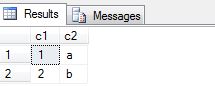
checkdb
Just be aware of certain limitations such as that allocation pages Global Allocation Map (GAM) pages, Shared Global Allocation Map (SGAM) pages, and Page Free Space (PFS) pages cannot be recovered. More information can be found at https://msdn.microsoft.com/en-us/library/ms175168.aspx.

Happy fixing!