SSMS Keeps Crashing

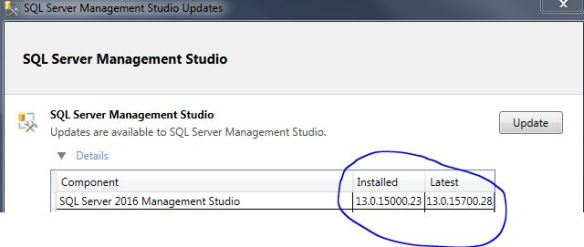
It is quite frustrating when SSMS (SQL Server Management Studio) randomly crashes, all too often for my liking. If you have the following screen shot then read on.

ca

Digging into the event logs I noticed the following error:

Faulting application name: Ssms.exe, version: 2015.130.15000.23,
Faulting module name: KERNELBASE.dll, version: 6.1.7601.18847,
Exception code: 0xe0434352
Fault offset: 0x0000812f
Faulting process id: 0x209c

Faulting application path: C:\Program Files\Microsoft SQL Server\130\Tools\Binn\ManagementStudio\Ssms.exe

<SNIPPET>

Application: Ssms.exe
Framework Version: v4.0.30319
Description: The process was terminated due to an unhandled exception.
Exception Info: System.Runtime.InteropServices.COMException
at System.Windows.Media.Composition.DUCE+Channel.SyncFlush()
at System.Windows.Interop.HwndTarget.UpdateWindowSettings(Boolean, System.Nullable`1<ChannelSet>)
at System.Windows.Interop.HwndTarget.UpdateWindowPos(IntPtr)
at System.Windows.Interop.HwndTarget.HandleMessage(MS.Internal.Interop.WindowMessage, IntPtr, IntPtr)
at System.Windows.Interop.HwndSource.HwndTargetFilterMessage(IntPtr, Int32, IntPtr, IntPtr, Boolean ByRef)
at MS.Win32.HwndWrapper.WndProc(IntPtr, Int32, IntPtr, IntPtr, Boolean ByRef)
at MS.Win32.HwndSubclass.DispatcherCallbackOperation(System.Object)
at System.Windows.Threading.ExceptionWrapper.InternalRealCall(System.Delegate, System.Object, Int32)
at System.Windows.Threading.ExceptionWrapper.TryCatchWhen(System.Object, System.Delegate, System.Object, Int32, System.Delegate)

SSMS crashes are caused by a wide variety of things, looking at current (and closed) connect items I couldn’t really find a fix. The next best option is to follow the advice in the workaround section which states “Try installing the latest Update”.

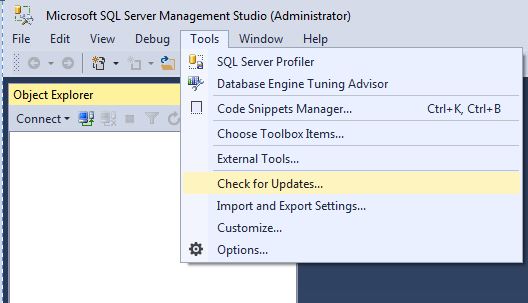
Within SSMS check for updates.
cap6


cap5

Clicking the UPDATE button takes you to the URL http://go.microsoft.com/fwlink/?LinkId=531355 where you will need to manually download and install.

Hopefully I will get less random crashes… we shall see.
DBCC CHECKFILEGROUP

Well, with the name “blobeater” it was about time I did another post on CHECKDB.

This time I want to talk about another strategy that you could use to manage CHECKDB on your TB sized databases – something that I actually do.

My bigger databases use partitioning that are stored on separate filegroups.

Let’s assume we have – Primary (obviously), AWS and LAM. I make use of the fact that my database has multiple filegroups so I then use DBCC CHECKFILEGROUP. This checks the allocation and structural integrity of all tables and indexed views in the specified filegroup of the database as stated by Books on Line.

So I issue:

USE Mydb
GO
-- Primary day 1
DBCC CHECKFILEGROUP;
GO
DBCC CHECKCATALOG

--other FileGroups Day2
DBCC CHECKFILEGROUP ('AWS')
GO
DBCC CHECKCATALOG

--other FileGroups Day3
DBCC CHECKFILEGROUP ('LAM')
GO
DBCC CHECKCATALOG

You may be wondering why I am issuing the CHECKCATALOG separately. Well this is because only CHECKALLOC and CHECKTABLE are done via CHECKFILEGROUP so you really should be doing CHECKCATALOG independently too. This approach gives you the ability to spread the burden over a couple of days rather than all in 1 day / window.

Just be aware of this bug http://www.sqlskills.com/blogs/paul/dbcc-checkfilegroup-bug-on-sql-server-2008/

If you do not have filegroups you could spread CHECKALLOC, CHECKCATALOG and CHECKTABLE over X days – I have some code that does this – https://blobeater.wordpress.com/category/sql-server-2/development/

DBCC HELP

I was going through some online courses and came across Erin Stellato’s Course on DBCC commands.http://www.sqlskills.com/blogs/paul/new-course-understanding-and-using-dbcc-commands/

I learnt something new! It’s not that complicated but I have found it useful. It is called DBCC HELP.

The command returns syntax information for a specific DBCC command, pretty useful if you have forgotten the syntax to write for example CHECKDB with extended logical checks and no informational messages. (Just an example)

So execute the below.

DBCC HELP ('?');
GO

This will give you a list of what you can pass into DBCC HELP – Yep checkdb is there.

checkalloc
checkcatalog
checkconstraints
checkdb
checkfilegroup
checkident
checktable
cleantable
dbreindex
dropcleanbuffers
free
freeproccache
freesystemcache
help
indexdefrag
inputbuffer
opentran
outputbuffer
pintable
proccache
show_statistics
showcontig
shrinkdatabase
shrinkfile
sqlperf
traceoff
traceon
tracestatus
unpintable
updateusage
useroptions

So let’s pass in CHECKDB.

DBCC HELP (CHECKDB);
GO

OUTPUT:

/**
dbcc CHECKDB
(
    { 'database_name' | database_id | 0 }
    [ , NOINDEX
    | { REPAIR_ALLOW_DATA_LOSS
    | REPAIR_FAST
    | REPAIR_REBUILD
    } ]
)
    [ WITH
        {
            [ ALL_ERRORMSGS ]
            [ , [ NO_INFOMSGS ] ]
            [ , [ TABLOCK ] ]
            [ , [ ESTIMATEONLY ] ]
            [ , [ PHYSICAL_ONLY ] ]
            [ , [ DATA_PURITY ] ]
            [ , [ EXTENDED_LOGICAL_CHECKS  ] ]
        }
    ]

**/

So now you will know without googling how to write your command:

DBCC CHECKDB ('AdventureWorks2020')
WITH NO_INFOMSGS, EXTENDED_LOGICAL_CHECKS

SQL Server checkpoints

I was having a conversation with someone over a disgusting vanilla latte and we talked about shutting down a machine and how to confirm if SQL Server starts to checkpoint the databases on the server – obviously it makes sense why it needs to do this but how do we confirm it?

Via Configuration manager I enabled trace flags 3502 and 3605 – both needed to get the checkpoint information and write it to the error log.

I then shutdown the machine, on start-up I looked into the error log.

EXEC XP_READERRORLOG

checks

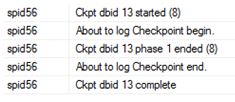
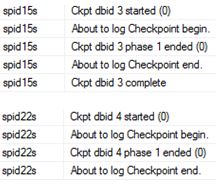
Notice the ‘s’ in front of the spid<number>? Well that means the checkpoint was done via the automatic process; if you do a manual checkpoint it won’t see this letter.

CHECKPOINT;
GO
EXEC XP_READERRORLOG

check1

If you want to know what is actually being written (number of Bufs etc) then that is trace flag 3504.


Talking of checkpoint

I was having a conversation with someone over a disgusting vanilla latte and we talked about shutting down a machine and how to confirm if SQL Server starts to checkpoint the databases on the server – obviously it makes sense why it needs to do this but how do we confirm it?

Via Configuration manager I enabled trace flags 3502 and 3605 – both needed to get the checkpoint information and write it to the error log.

I then shutdown the machine, on start-up I looked into the error log.

EXEC XP_READERRORLOG

checks

Notice the ‘s’ in front of the spid<number>? Well that means the checkpoint was done via the automatic process; if you do a manual checkpoint it won’t see this letter.

CHECKPOINT;
GO
EXEC XP_READERRORLOG

check1

If you want to know what is actually being written (number of Bufs etc) then that is trace flag 3504.