
I was building some basic queries around time zone manipulation and I am happy to say that I enjoyed myself as I found a way to get a time based on a geographic region.
This new feature is available to you from SQL 2016 which obviously means SQL database too (Azure). It is called AT TIME ZONE.
AT TIME ZONE implementation relies on following registry hive where time zones are installed: KEY_LOCAL_MACHINE\SOFTWARE\Microsoft\Windows NT\CurrentVersion\Time Zones. This is exposed via the following query
SELECT * FROM sys.time_zone_info
Looking at books on line via https://msdn.microsoft.com/en-us/library/mt612790.aspx it is wrong.
Look at the screen shot, it states it is supported from SQL 2008 – well it is not, it only works on 2016.

Running it on a non SQL 2016 server you will get the following message:
Msg 208, Level 16, State 1, Line 1 Invalid object name ‘sys.time_zone_info’.
On a correct SQL version it will return the following. (Snippet)
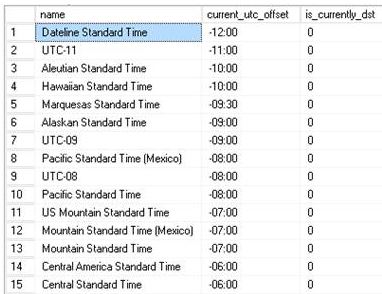
This information is key as we will use it to build the time zone queries (which is very basic).
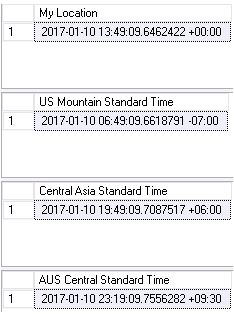
SELECT SYSDATETIMEOFFSET() AT TIME ZONE 'GMT Standard Time' AS [My Location]
GO
SELECT SYSDATETIMEOFFSET() AT TIME ZONE 'US Mountain Standard Time' AS [US Mountain Standard Time]
GO
SELECT SYSDATETIMEOFFSET() AT TIME ZONE 'Central Asia Standard Time' AS [Central Asia Standard Time]
GO
SELECT SYSDATETIMEOFFSET() AT TIME ZONE 'AUS Central Standard Time' AS [AUS Central Standard Time]
Based on the zone offset you will get the relevant correct time.
 All About Tech