Using a query label in Azure SQL DW (Data Warehouse) can be a really handy technique to track queries via DMVs. You might want to do this to see what problematic queries are doing under the covers.
Let’s check out an example. First I will show you how things would look without using a query label. I connect to SQL DW and issue the following basic example query.
SELECT sum(p.StandardCost),ps.[EnglishProductSubcategoryName]
FROM [dbo].[DimProduct] p
JOIN [dbo].[DimProductSubcategory] ps on P.ProductSubcategoryKey = ps.ProductSubcategoryKey
GROUP BY p.standardCost, ps.[EnglishProductSubcategoryName]
ORDER BY ps.[EnglishProductSubcategoryName]
So what query would you use to see what is going on within this MPP environment? You would normally use sys.dm_pdw_exec_requests and/or sys.dm_pdw_request_steps. Something like:
 SELECT r.session_id, r.start_time, r.end_time,rs.location_type, rs.status,rs.command,rs.step_index, rs.operation_type,rs.request_id
FROM sys.dm_pdw_exec_requests r
JOIN sys.dm_pdw_request_steps rs
ON r.request_id = rs.request_id
Output:
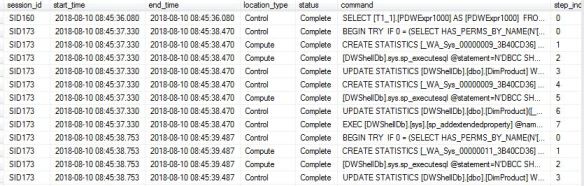
However you probably would not want to manually go through the output to try and piece the output together, this is where labels are handy. The original code now becomes:
SELECT sum(p.StandardCost),ps.[EnglishProductSubcategoryName]
FROM [dbo].[DimProduct] p
JOIN [dbo].[DimProductSubcategory] ps on P.ProductSubcategoryKey = ps.ProductSubcategoryKey
GROUP BY p.standardCost, ps.[EnglishProductSubcategoryName]
ORDER BY ps.[EnglishProductSubcategoryName]
OPTION (LABEL = 'QUERY: MySalesCodeSum');
We then use this LABEL within the DMV based query.
 SELECT r.session_id, r.start_time, r.end_time,rs.location_type, rs.status,rs.command,rs.step_index, rs.operation_type,rs.request_id
FROM sys.dm_pdw_exec_requests r
JOIN sys.dm_pdw_request_steps rs
ON r.request_id = rs.request_id WHERE r.[label] = 'QUERY: MySalesCodeSum'
ORDER BY step_index
Now you will have the output relevant to the original query only.
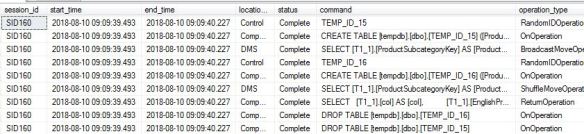
High level SQL DW is creating temp tables such as:
 CREATE TABLE [tempdb].[dbo].[TEMP_ID_16] ([ProductSubcategoryKey]
INT, [StandardCost] MONEY ) WITH(DATA_COMPRESSION=PAGE);
DMS does the famous ShuffleMoveOperation then the compute node actually ends up running:
 SELECT   [T1_1].[col] AS [col],
 [T1_1].[EnglishProductSubcategoryName] AS [EnglishProductSubcategoryName]
  FROM     (SELECT   SUM([T2_2].[StandardCost]) AS [col],
    [T2_1].[EnglishProductSubcategoryName] AS [EnglishProductSubcategoryName]
	    FROM     [tempdb].[dbo].[TEMP_ID_15] AS T2_1
		  INNER JOIN
		    [tempdb].[dbo].[TEMP_ID_16] AS T2_2
			    ON ([T2_1].[ProductSubcategoryKey] = [T2_2].[ProductSubcategoryKey])
				      GROUP BY [T2_2].[StandardCost], [T2_1].[EnglishProductSubcategoryName])
AS T1_1  ORDER BY [T1_1].[EnglishProductSubcategoryName] ASC
Quite cool right?

 All About Tech