SQL Server Bugs & Enhancement Requests

T-SQL Tuesday #86: SQL Server Bugs & Enhancement Requests hosted by Brent Ozar.

https://www.brentozar.com/archive/2017/01/announcing-t-sql-tuesday-87-sql-server-bugs-enhancement-requests/

tsql

I did not want to miss out on this one because I want to mention a connect item that I logged last year which is still active.

This is an enhancement request for SQL Server where I got the idea from SQL database (Azure).

Wait Stats is my “go-to” thing, when you want to dig into performance issues everyone knows you will probably end up using sys.dm_os_wait_stats. You cannot use this in the Azure world, you have to use a DMV that is scoped to the database level. I think this would be a nice idea to have with the “earth” based SQL Servers – the ability to return information about all the waits encountered by threads that executed at the database level.

The connect item can be found at this link: https://connect.microsoft.com/SQLServer/feedback/details/2647332/sys-dm-db-wait-stats-dmv?tduid=(262281c4c73a682498780643b77e80d1)(256380)(2459594)(TnL5HPStwNw-KjxCoz0pGWobbq7q1MQTIw)()

An example of using the DMV that I would like:

WITH Waits AS
(SELECT wait_type, wait_time_ms / 1000. AS wait_time_s,
100. * wait_time_ms / SUM(wait_time_ms) OVER() AS pct,
ROW_NUMBER() OVER(ORDER BY wait_time_ms DESC) AS rn
FROM sys.dm_db_wait_stats
)
SELECT W1.wait_type,
CAST(W1.wait_time_s AS DECIMAL(12, 2)) AS wait_time_s,
CAST(W1.pct AS DECIMAL(12, 2)) AS pct,
CAST(SUM(W2.pct) AS DECIMAL(12, 2)) AS running_pct
FROM Waits AS W1
INNER JOIN Waits AS W2
ON W2.rn <= W1.rn
GROUP BY W1.rn, W1.wait_type, W1.wait_time_s, W1.pct
HAVING SUM(W2.pct) - W1.pct <  99
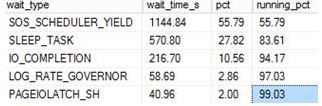
WAITSDMV.JPG

It currently has 8 votes, would be nice to get some more.

Clearing Plan Cache in SQL Database (Azure)

Sometimes when in a testing mode I do like to clear cache within my SQL database (Azure). Nowadays a lot of my test databases are Azure based so how I clear cache is different to how I would do it with an older “earthed” SQL Server.

Looking at my locally installed SQL Server.


SELECT @@VERSION

cold

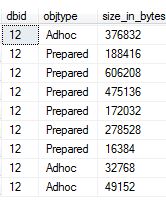
Getting some basic information about the cache for a specific database.

 SELECT st.dbid, cp.objtype, cp.size_in_bytes
FROM sys.dm_exec_cached_plans AS cp
CROSS APPLY sys.dm_exec_sql_text(cp.plan_handle) st
WHERE dbid = 12
OPTION (RECOMPILE);

cold1.JPG

Normally I would run:

-- Database_ID
DBCC FLUSHPROCINDB (12);

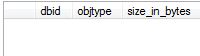
I have cleared it out.

cold2

So, lets go to the Azure world.


SELECT @@VERSION

cold3.JPG

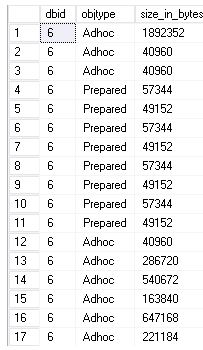
Again, get some basic information for my database ID.

SELECT st.dbid, cp.objtype, cp.size_in_bytes
FROM sys.dm_exec_cached_plans AS cp
CROSS APPLY sys.dm_exec_sql_text(cp.plan_handle) st
WHERE dbid = 6
OPTION (RECOMPILE);

cold5.JPG

-- Database_ID
DBCC FLUSHPROCINDB (6);

Just does not happen: Msg 15247, Level 16, State 14, Line 9
User does not have permission to perform this action – I am not sure what permission I need? I am logging in as a server admin.

So I used the following instead.

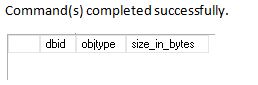
ALTER DATABASE SCOPED CONFIGURATION CLEAR PROCEDURE_CACHE ;

cold4.JPG

Checking DBCC CHECKDB

I hope you run consistency checks on your databases, if you are not currently doing this you probably will want to.

For this post I want to show you how you can check whether or not CHECKDB has been successfully executed.

There are a couple of ways to check this but I will be using DBCC DBINFO for this check.

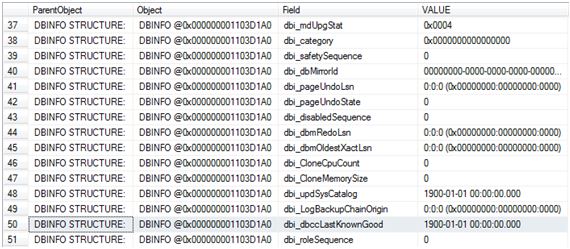
DBCC DBINFO WITH TABLERESULTS

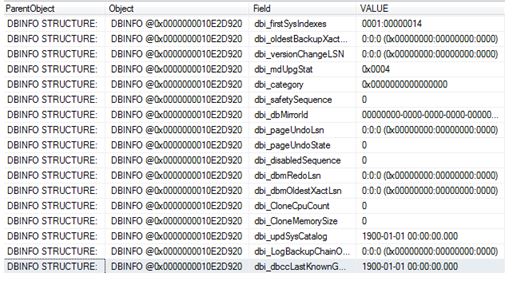
checkdb

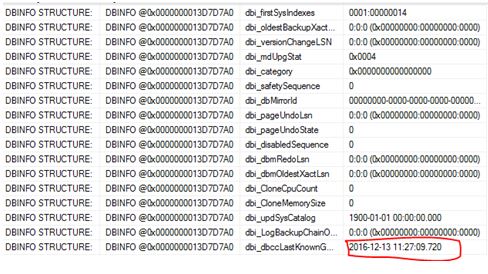
The field of interest here is dbi_dbccLastKnownGood where VALUE of 1900-01-01 00:00:00.000 means that DBCC CHECKDB has never been executed (successfully).

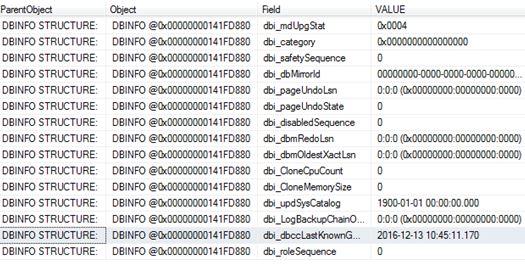
So let’s run CHECKDB and see the value get updated.

DBCC CHECKDB ('ZoraDB')
GO

DBCC DBINFO WITH TABLERESULTS

checkdb2.JPG

The next question I want answering is whether or not this value gets updated if I run CHECKDB with the physical_only option (I created a fresh copy of the database and performed a re-check)

USE [master]
GO

DROP DATABASE [ZoraDB]
GO

CREATE DATABASE [ZoraDB]
 CONTAINMENT = NONE
 ON  PRIMARY
( NAME = N'ZoraDB', FILENAME = N'C:\Program Files\Microsoft SQL Server\MSSQL12.MSSQLSERVER\MSSQL\DATA\ZoraDB.mdf' , SIZE = 5120KB , MAXSIZE = UNLIMITED, FILEGROWTH = 1024KB )
 LOG ON
( NAME = N'ZoraDB_log', FILENAME = N'C:\Program Files\Microsoft SQL Server\MSSQL12.MSSQLSERVER\MSSQL\DATA\ZoraDB_log.ldf' , SIZE = 2048KB , MAXSIZE = 2048GB , FILEGROWTH = 10%)
GO

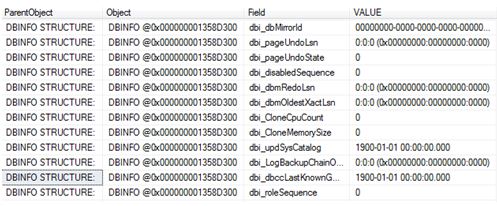
DBCC DBINFO WITH TABLERESULTS

Below confirms that we are back to a newly created database.

checkdb3.JPG

So we now run it with the PHYSICAL_ONLY option.

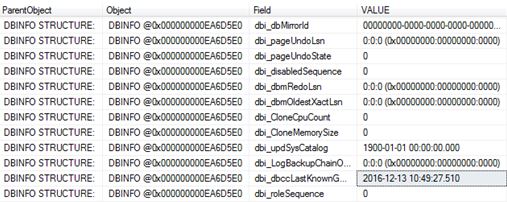
DBCC CHECKDB ('ZoraDB') WITH PHYSICAL_ONLY
GO
USE [ZoraDB]
GO
DBCC DBINFO WITH TABLERESULTS

So, stating physical_only updates the value too.

physicalonly.JPG

What about separate checks?

Again I dropped and re-created the database to get back to level playing field.

Let’s work through the DBCC check commands, after a command I will check dbi_dbccLastKnownGood to see if it gets updated.

DBCC CHECKALLOC
GO
DBCC DBINFO WITH TABLERESULTS

checkdb4.JPG

DBCC CHECKCATALOG
GO

DBCC DBINFO WITH TABLERESULTS

checkdb4.JPG

DBCC CHECKTABLE ('dbo.people')
GO
DBCC DBINFO WITH TABLERESULTS

checkdb4.JPG

So checking the database via separate checks has no impact on dbi_dbccLastKnownGood.

What about if the database is corrupted? I re-created the database and corrupted it:

DBCC CHECKDB ('ZoraDB')
GO

CHECKDB found 0 allocation errors and 2 consistency errors in database ‘ZoraDB’.
repair_allow_data_loss is the minimum repair level for the errors found by DBCC CHECKDB (ZoraDB).
DBCC execution completed. If DBCC printed error messages, contact your system administrator.

DBCC DBINFO WITH TABLERESULTS

checkdb4

Naturally it will not get updated because it was unsuccessful – If we fixed the corruption and ran CHECKDB it would then get updated with the current timestamp.

DO NOT RUN REPAIR WITH THIS OPTION – THIS IS AN EXAMPLE ONLY! It deleted my data!! THIS IS A LAST RESORT – WARNING.

ALTER DATABASE [ZoraDB] SET SINGLE_USER;
GO

DBCC CHECKDB    ('ZoraDB'  , REPAIR_ALLOW_DATA_LOSS )

ALTER DATABASE [ZoraDB] SET MULTI_USER;
GO

DBCC CHECKDB ('ZoraDB')
GO

CHECKDB found 0 allocation errors and 0 consistency errors in database ‘ZoraDB’.

DBCC execution completed. If DBCC printed error messages, contact your system administrator.

checkdb6.JPG

There you have it – the updated value.

Why I am called BlobEater

It’s coming towards the holiday season for me and I thought that I would wind-down a little with a non-technical post. I have been asked a few times over the past month where I got my online name from – BLOBEATER.

Well I will tell you. Firstly one of my favourite topics is DBCC CHECKDB ( and no I can’t use DBCC WRITEPAGE to fix corruption). Learning about it via sqlskills I noticed an internal variable called BlobEater which is a dummy variable with no purpose other than to consume any output from the CheckIndex function (source: http://www.sqlskills.com/blogs/paul/checkdb-internals-what-is-the-blobeater).

I thought this would be a good name for my online identity when you also throw in the fact that in my younger days my nick-name was BLOBBY!

So a past nick name + reference to of my favorite subjects ( which happens to be written by my ex-mentor) = best possible online name for me.

Thanks for reading.

Locking Resources in Azure

I look at locking resources within Azure as a safety mechanism where it can protect users from accidental deletion, it can get quite confusing within the portal if for example you have close to 100 databases.

There are 2 types of lock resources in Azure.

  • Delete – Obviously you can’t delete but you can read / modify a resource, this applies to authorised users.
  • ReadOnly – Authorised users can read a resource but they cannot edit or delete it.

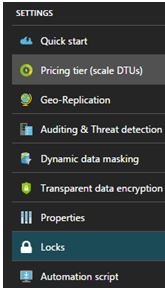
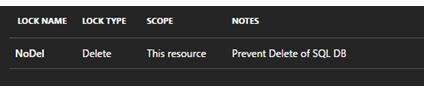
For this blog post I create a delete lock on one of my SQL Databases. Under the settings of your SQL database you will see the LOCKS option.

port

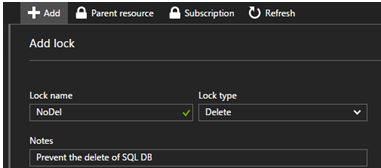
You will then want to click ADD.

port1

That’s it – let’s put it to a test

Message from the portal:

The lock named NoDel was unable to be added or edited for the following reasons: {“jqXHR”:{“readyState”:4,”responseText”:”{\”error\”:{\”code\”:\”AuthorizationFailed\”,\”message\”:\”The client does not have authorization to perform action ‘Microsoft.Authorization/locks/write’ over scope

Well, that is not what I want! You must be Owner or User Access Administrator.

 Once you have addressed the permission issues just click OK.

port2


You know how the saying goes – An ounce of prevention is worth a pound of cure.