SQL Server Restore to LSN

For this post I want to show you how I recovered to a LSN where I did do this on a server where I wanted to go back to a time just before a delete occurred.

This is my setup.

ALTER DATABASE [AdventureWorks2014] SET RECOVERY FULL
GO

BACKUP DATABASE [AdventureWorks2014] TO DISK = 'C:\SQLSERVER\backups\AdventureWorks2014.bak'WITH COMPRESSION

BACKUP LOG [AdventureWorks2014] TO DISK = 'C:\SQLSERVER\backups\AdventureWorks2014LOG1.bak'

-- DELETE occurred  (BAD USER)

DELETE FROM [Person].[Password]
WHERE BusinessEntityID = 2

BACKUP LOG [AdventureWorks2014] TO DISK = 'C:\SQLSERVER\backups\AdventureWorks2014LOG2.bak'

Lets gain some insight into the transaction log.

SELECT * FROM
fn_dblog (NULL, NULL)
trans

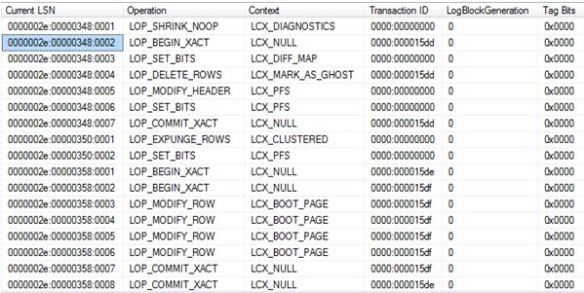
0000002e:00000348:0002 is The LSN where the transaction begins – LOP_BEGIN_XACT for transaction ID 0000:000015dd

This will be my recovery point. This LSN will be the STOPBEFOREMARK clause in my RESTORE code.

 RESTORE DATABASE [AdventureWorks2014DR]
    FROM DISK = 'C:\SQLSERVER\backups\AdventureWorks2014.BAK'
WITH
    MOVE N'AdventureWorks2014_Data' TO N'C:\SQLSERVER\AdventureWorks2014_Data2.mdf',
    MOVE N'AdventureWorks2014_Log' TO N'C:\SQLSERVER\AdventureWorks2014_log2.ldf',
   NORECOVERY
GO

RESTORE LOG [AdventureWorks2014DR]
FROM
    DISK = 'C:\SQLSERVER\backups\AdventureWorks2014LOG1.bak'
WITH
NORECOVERY;

RESTORE LOG [AdventureWorks2014DR]
FROM
    DISK = 'C:\SQLSERVER\backups\AdventureWorks2014LOG2.bak'
WITH
    STOPBEFOREMARK = 'lsn:0x0000002e:00000348:0002',
    NORECOVERY;
GO

RESTORE DATABASE [AdventureWorks2014DR] WITH RECOVERY;
GO

SELECT * FROM [Person].[Password]

Yes I have my delete back.

trans2

Let’s prove a point and go too far ahead. I will go past the commit; we wouldn’t expect it to be recovered right?

So let’s recover to LSN 0000002e:00000358:0001 (after the commit)


RESTORE DATABASE [AdventureWorks2014DR]
    FROM DISK = 'C:\SQLSERVER\backups\AdventureWorks2014.BAK'
WITH
    MOVE N'AdventureWorks2014_Data' TO N'C:\SQLSERVER\AdventureWorks2014_Data2.mdf',
    MOVE N'AdventureWorks2014_Log' TO N'C:\SQLSERVER\AdventureWorks2014_log2.ldf',
   NORECOVERY
GO

RESTORE LOG [AdventureWorks2014DR]
FROM
    DISK = 'C:\SQLSERVER\backups\AdventureWorks2014LOG1.bak'
WITH
NORECOVERY;

RESTORE LOG [AdventureWorks2014DR]
FROM
    DISK = 'C:\SQLSERVER\backups\AdventureWorks2014LOG2.bak'
WITH
    STOPBEFOREMARK = 'lsn:0x0000002e:00000358:0001',
    NORECOVERY;
GO

RESTORE DATABASE [AdventureWorks2014DR] WITH RECOVERY;
GO

USE [AdventureWorks2014DR]
go
SELECT * FROM [Person].[Password]

Nope, it’s too far ahead.

pd.JPG

Who did it?

Quite simply look for the Transaction SID for your Current LSN of interest.

 SELECT SUSER_SNAME(0x01050000000000051500000011C35F73E7CBDD7DA837D665F7620000) AS [WhoDidIt];
Task Manager is a liar

I remember asking a question at a recent training event, the outcome? I now don’t use task manager to try and understand how much memory SQL Server is consuming. Why? Well it has the ability to lie, and as you will see, it can lie really well. (Depending on settings)

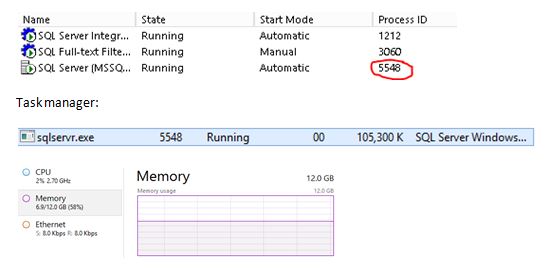
Let’s look at my environment, SQL Server is running under Process ID 5548.

tasks.JPG

Right, so I am using 58% of my server memory and looking at SQL Server it is consuming approx. 105MB? Well, it’s not. It doesn’t make any sense.

Use resource monitor to really know what is going on.

Resource monitor shows:

tasks1

Why this is so inaccurate (for my case) is because of the use of Lock Pages in Memory – Task manager does not track memory that is allocated using the AllocateUserPhysicalPages() API which is what this setting does.

CHECKDB’s Hidden Snapshot

I am in the middle of some research regarding CHECKDB and learnt something new. From SQL Server 2014 onwards the database snapshot that is used to get to a transactionally-consistent point-in-time is no longer hidden.

To understand the behavior prior to 2014 I am going to quote Paul Randal here – he states “ As the database snapshot is hidden, there is no control over where the snapshot files are placed – in fact they are created as alternate streams of the files comprising the source database” (http://www.sqlskills.com/blogs/paul/checkdb-from-every-angle-complete-description-of-all-checkdb-stages/)

In SQL Server 2014 things have changed – it is not hidden and it doesn’t use alternate streams.

DBCC CHECKDB ('Newdb')

Checking the location where the data files reside we can see the snapshot.

checkme.JPG

This disappears once CHECKDB finishes.


SQL Server – RECONFIGURE

When you want to change configuration settings for your SQL Server you would either do it via Management studio (under server properties) or via TSQL calling on sp_configure.

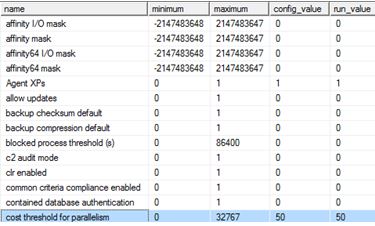
For example, I usually change the cost threshold for parallelism from the low value of 5 which is what I will show you now on my SQL Server, plus with a side-effect.

The side-effect is that your plan cache will get flushed, yes it really does.

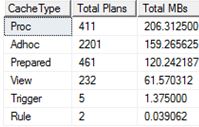
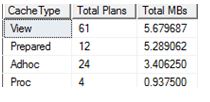
Let’s check cache before changing the setting (adapted from Kimberly Tripp http://www.sqlskills.com/blogs/kimberly/plan-cache-and-optimizing-for-adhoc-workloads/)

SELECT objtype AS [CacheType],
COUNT_BIG(*) AS [Total Plans],
SUM(CAST(size_in_bytes AS DECIMAL(18, 2))) / 1024 / 1024 AS [Total MBs]
FROM sys.dm_exec_cached_plans
GROUP BY objtype
ORDER BY [Total MBs] DESC
GO

cacge.JPG

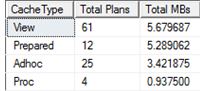
Let’s now change the setting and re-check cache.

EXEC sp_configure 'cost threshold for parallelism', '50'
RECONFIGURE;

cache1.JPG

 SELECT objtype AS [CacheType],
COUNT_BIG(*) AS [Total Plans],
SUM(CAST(size_in_bytes AS DECIMAL(18, 2))) / 1024 / 1024 AS [Total MBs]
FROM sys.dm_exec_cached_plans
GROUP BY objtype
ORDER BY [Total MBs] DESC
GO

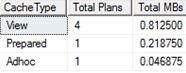
cach4.JPG

Yes, it has flushed. I couldn’t find anything on books on line about this behaviour. However it was mentioned in the following whitepaper: http://msdn.microsoft.com/en-us/library/dn148262.aspx under the flush entire plan cache section page 22 where RECONFIGURE command is mentioned. I am not sure if this applies to all options or a subset of them, more testing is required.

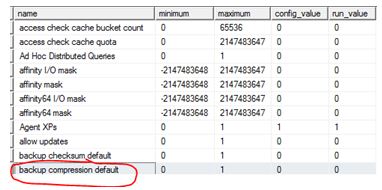
I was intrigued so I did one more test – enabling backup compression which is currently off.

cach5.JPG

Or you can check it this way:

SELECT *
FROM sys.configurations
WHERE name = 'backup compression default' ;
GO

afasefswgf

On the same test server my cache now looks like:

llllyr.JPG

Let’s enable backup compression and re-check.

EXEC sp_configure 'backup compression default', 1 ;
RECONFIGURE
GO

gggg.JPG

Well, no effect this time.

SELECT objtype AS [CacheType],
    COUNT_BIG(*) AS [Total Plans],
    SUM(CAST(size_in_bytes AS DECIMAL(18, 2))) / 1024 / 1024 AS [Total MBs]
FROM sys.dm_exec_cached_plans
GROUP BY objtype
ORDER BY [Total MBs] DESC
GO

hh.JPG

This is something that I would personally talk about to a group of people and is my entry to https://sqlbek.wordpress.com/2016/10/25/t-sql-tuesday-84-growing-new-speakers/ – yes it would be demo heavy.

tsql.JPG

Copying your SQL Database

If you have created a SQL Database in Azure (PaaS) and need to make a copy of it on the same server I will show you how via a quick method.

When connected to your master database execute the following: It creates SAP2 based on SAP.

CREATE DATABASE SAP2 AS COPY OF SAP
 

To track the progress you can use the following query.

SELECT * FROM sys.dm_database_copies
WHERE partner_database = 'SAP2'
 

as

Replication state 1 means seeding, this means that the SAP2 database has not yet completely synchronised with the original database. 0 means pending, which means that the copy is being prepared.

Once this has completed you can check sys.databases to confirm that the database has successful been created.

SELECT * FROM sys.databases
WHERE name = 'SAP2'
 

as1

If you really want you can query sys.dm_operation_status to see the operations that have been performed on a database. I would expect to see some sort of operation around copying on my original database.

SELECT * FROM sys.dm_operation_status   WHERE major_resource_id = 'SAP'
ORDER BY start_time DESC;
 

as3.JPG

If you are interested in other Azure based SQL queries check out an older post of mine: https://blobeater.wordpress.com/2016/10/18/azure-sql-database-dmvs/