SQL Server READPAST

Following on from my previous post on NOLOCK (https://blobeater.blog/2016/12/09/nolock/) I want to talk about another hint called READPAST. This hint tells the database engine not to read rows that are locked by other transactions.

It is best explained with an example.

First let’s look at the basics of locking under the default isolation level with no hints. In my first SSMS (SQL Server Management Studio) window I issue the following.

BEGIN TRAN
UPDATE [HumanResources].[Department]
SET Name = 'Global'
WHERE DepartmentID = 16

Under a second SSMS connection I run a select statement – yes naturally I am blocked.

SELECT * FROM HumanResources.Department

readpast

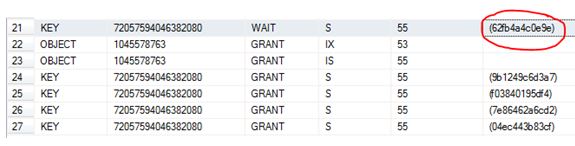
I have circled in red the resource_description which can be used as input into the undocumented function  %%lockres%% to understand/confirm what is actually being locked.

select *,%%lockres%%
from    HumanResources.Department (nolock)
where    %%lockres%% IN('(62fb4a4c0e9e)')

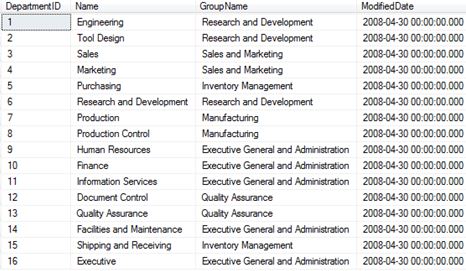
Just to confirm it is the DepartmentID = 16 row as per my update statement.

readpast1

Anyways, I issue a rollback and the blocking stops.

readpast3

So now that we understand what “normally” happens let’s play with the READPAST hint.

SSMS window 1

 BEGIN TRAN
UPDATE [HumanResources].[Department]
SET Name = 'Global'
WHERE DepartmentID = 16

SSMS window 2

 SELECT * FROM HumanResources.Department (READPAST)

readpst5.JPG

Totally skips the row where DepartmentID =16.

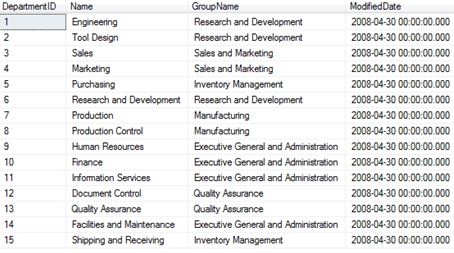
If I rollback the update statement you should see the DepartmentID = 16 come back.

 ROLLBACK

Then

SELECT * FROM HumanResources.Department (READPAST)

reradp2.JPG

So, as the name of the hint suggests, it literally does “readpast” it.

Don’t blink you might READPAST it

Following on from my previous post on NOLOCK (https://blobeater.blog/2016/12/09/nolock/) I want to talk about another hint called READPAST. This hint tells the database engine not to read rows that are locked by other transactions.

It is best explained with an example.

First let’s look at the basics of locking under the default isolation level with no hints. In my first SSMS (SQL Server Management Studio) window I issue the following.

BEGIN TRAN
UPDATE [HumanResources].[Department]
SET Name = 'Global'
WHERE DepartmentID = 16

Under a second SSMS connection I run a select statement – yes naturally I am blocked.

SELECT * FROM HumanResources.Department

readpast

I have circled in red the resource_description which can be used as input into the undocumented function  %%lockres%% to understand/confirm what is actually being locked.

select *,%%lockres%%
from    HumanResources.Department (nolock)
where    %%lockres%% IN('(62fb4a4c0e9e)')

Just to confirm it is the DepartmentID = 16 row as per my update statement.

readpast1

Anyways, I issue a rollback and the blocking stops.

readpast3

So now that we understand what “normally” happens let’s play with the READPAST hint.

SSMS window 1

 BEGIN TRAN
UPDATE [HumanResources].[Department]
SET Name = 'Global'
WHERE DepartmentID = 16

SSMS window 2

 SELECT * FROM HumanResources.Department (READPAST)

readpst5.JPG

Totally skips the row where DepartmentID =16.

If I rollback the update statement you should see the DepartmentID = 16 come back.

 ROLLBACK

Then

SELECT * FROM HumanResources.Department (READPAST)

reradp2.JPG

So, as the name of the hint suggests, it literally does “readpast” it.

SQL Server NOLOCK

NOLOCK, some say it’s a fast option for queries and will never cause blocking, I say it’s quite dirty and MAY cause blocking.

I used to think that a NOLOCK (which is the same as read uncommitted) hint actually meant that a “no lock” was used, I was very wrong and the naming doesn’t really help. Let’s have a look.

I will run a random SELECT statement with the hint, such as

SELECT * FROM Sales.BigSalesOrderDetailEnlarged WITH (NOLOCK)

Then I will check the “go to” DMV for locks.

SELECT resource_type, resource_associated_entity_id,
    request_status, request_mode,request_session_id,
    resource_description
    FROM sys.dm_tran_locks
    WHERE resource_database_id = 13

nolock

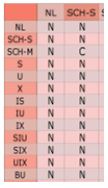
A Sch-S (schema stability) lock is taken.  This is a lightweight lock; the only lock that can conflict with this is a Sch-m (schema modification) lock. (C = Conflict). This means that a NOLOCK can actually block for example against an ALTER TABLE command.

nolock1

Below shows the example of when my NOLOCK query is being blocked by ALTER INDEX commands:

 SELECT resource_type, resource_associated_entity_id,
    request_status, request_mode,request_session_id,
    resource_description
    FROM sys.dm_tran_locks 

nolcok4

So there you go, it can be involved in blocking.

Dirty reads:

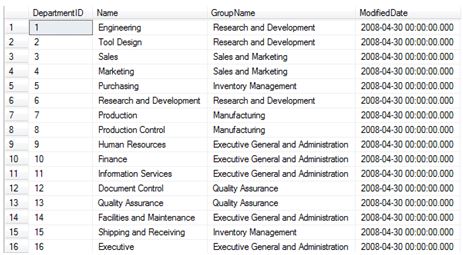
This is my example data.

nocok3.JPG

In Window 1 using SQL Server management Studio I begin an open UPDATE statement – notice that it has NOT been committed.

BEGIN TRAN
UPDATE [HumanResources].[Department]
SET Name = 'Global'
WHERE DepartmentID = 16

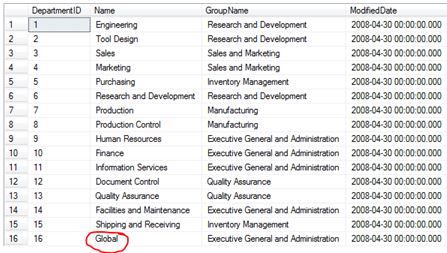
In window 2 I do a NOLOCK select statement.

SELECT * FROM HumanResources.Department (NOLOCK)

lockdffgsef.JPG

Now that’s dirty.

NOLOCK

NOLOCK, some say it’s a fast option for queries and will never cause blocking, I say it’s quite dirty and MAY cause blocking.

I used to think that a NOLOCK (which is the same as read uncommitted) hint actually meant that a “no lock” was used, I was very wrong and the naming doesn’t really help. Let’s have a look.

I will run a random SELECT statement with the hint, such as

SELECT * FROM Sales.BigSalesOrderDetailEnlarged WITH (NOLOCK)

Then I will check the “go to” DMV for locks.

SELECT resource_type, resource_associated_entity_id,
    request_status, request_mode,request_session_id,
    resource_description
    FROM sys.dm_tran_locks
    WHERE resource_database_id = 13

nolock

A Sch-S (schema stability) lock is taken.  This is a lightweight lock; the only lock that can conflict with this is a Sch-m (schema modification) lock. (C = Conflict). This means that a NOLOCK can actually block for example against an ALTER TABLE command.

nolock1

Below shows the example of when my NOLOCK query is being blocked by ALTER INDEX commands:

 SELECT resource_type, resource_associated_entity_id,
    request_status, request_mode,request_session_id,
    resource_description
    FROM sys.dm_tran_locks 

nolcok4

So there you go, it can be involved in blocking.

Dirty reads:

This is my example data.

nocok3.JPG

In Window 1 using SQL Server management Studio I begin an open UPDATE statement – notice that it has NOT been committed.

BEGIN TRAN
UPDATE [HumanResources].[Department]
SET Name = 'Global'
WHERE DepartmentID = 16

In window 2 I do a NOLOCK select statement.

SELECT * FROM HumanResources.Department (NOLOCK)

lockdffgsef.JPG

Now that’s dirty.

TDE Recovery

This week’s TSQL Tuesday is being held by the mighty Kenneth Fisher – Backup and Recovery- see this link, how can I not get involved with this one?

tsql

I have been blogging for about a year now and have covered most of Kenneth’s bullet points – except Internals and SSAS based stuff, so I decided to do something different but still about backups. This post is all about the importance of backing up certain objects when you are using TDE – Transparent Data Encryption.

To understand TDE see my older post  – https://blobeater.blog/2016/11/22/playing-with-tde/

So I have enabled TDE and I have a Full backup – lets restore it to a different server.

USE [master]
RESTORE DATABASE [DWHDB]
FROM  DISK = N'C:\temp\dwh.bak' WITH  FILE = 1, STATS = 5
GO

Cannot find server certificate with thumbprint ‘0xC0367AC8E9AE54538C17ACB0F63070D6FF21316A’.
Msg 3013, Level 16, State 1, Line 2
RESTORE DATABASE is terminating abnormally.

The dreaded cannot find server certificate with thumbprint message. Why is this happening?

Well if you read my post on TDE ( or anybody else’s) you would have noticed the following message:

Warning: The certificate used for encrypting the database encryption key has not been backed up. You should immediately back up the certificate and the private key associated with the certificate. If the certificate ever becomes unavailable or if you must restore or attach the database on another server, you must have backups of both the certificate and the private key or you will not be able to open the database.

So the point is – back them up

USE master
GO
BACKUP CERTIFICATE MyServerCert
TO FILE = 'c:\data\MyServerCert.cer'
WITH PRIVATE KEY
(FILE = 'c:\data\certificate_MyServerCert.pvk',
ENCRYPTION BY PASSWORD = 'xxxxxxxx')

Then on the restoring server you will need to issue the following (assuming you have a database master key too)


CREATE CERTIFICATE MyServerCert
FROM FILE = 'c:\temp\MyServerCert.cer'
WITH PRIVATE KEY (FILE = 'c:\temp\certificate_MyServerCert.pvk',
DECRYPTION BY PASSWORD = 'xxxxxxxx');

GO
USE [master]
RESTORE DATABASE [DWHDB]
FROM  DISK = N'C:\temp\dwh.bak' WITH  FILE = 1, STATS = 5

GO

RESTORE DATABASE successfully processed 13002 pages in 0.444 seconds (228.770 MB/sec) – the restore works a charm.