Azure SQL Database – TDE

I work in the financial space so you can imagine that security is quite high on the agenda. TDE (Transparent Data Encryption – see this article for more details https://blobeater.wordpress.com/category/sql-server-2/tde/ ) is nothing new, setting it up on “earthed” SQL Servers can have some what of an overhead but in the Azure world it is so simple to setup.

The big advantage of TDE in Azure over the earthed flavour is that Microsoft does alot of the work for you. Assuming your database is in a geo-replication partnership it will be protected by a different key on each of the servers. Also Microsoft will rotate your certificate at least every 90 days.

Azure SQL Database does not support Azure Key Vault integration with TDE. SQL Server running on an Azure virtual machine (IaaS) can use an asymmetric key from the Key Vault.

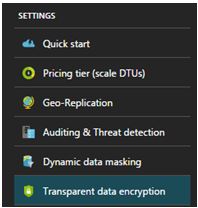
Within the settings section of your Azure SQL Database you will find the TDE option as shown below. To do this successfully you will need to be connected as the Azure Owner, Contributor, or SQL Security Manager.

enc1

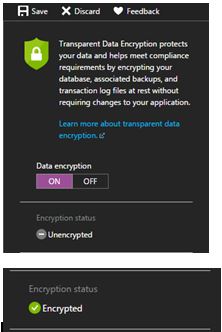
Select ON for the data encryption option and click save.

enc2

Seriously, that is all it takes.

I will then move to SSMS (SQL Server Management Studio) and issue the following query to understand the status. (Credit to David Pless: TSP – Microsoft)

 SELECT DB_NAME(database_id) AS DatabaseName, encryption_state,
encryption_state_desc =
CASE encryption_state
         WHEN '0' THEN 'No database encryption key present, no encryption'
         WHEN '1' THEN 'Unencrypted'
         WHEN '2' THEN 'Encryption in progress'
         WHEN '3' THEN 'Encrypted'
 WHEN '4' THEN 'Key change in progress'
 WHEN '5' THEN 'Decryption in progress'
 WHEN '6' THEN 'Protection change in progress (The certificate or asymmetric key that is encrypting the database encryption key is being changed'
         ELSE 'No Status'
      END,
percent_complete, create_date, key_algorithm, key_length,
encryptor_thumbprint, encryptor_type  FROM sys.dm_database_encryption_keys

enc3

Naturally tempdb gets encrypted too along with the user database. Azure uses AES-256 bit algorithm.

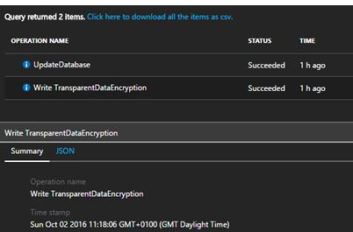
These sorts of activities get tracked and logged by the Activity log within Azure.

enc4

SQL Server ALTER INDEX….ABORT!

I know there are people out there that will be going from older versions of SQL to SQL Server 2016, yes it makes sense it is a great product with a lot of new features such as Query Store, Stretch DB to name  but a few.

However don’t forget about the features that were available in 2014 that are naturally available in 2016, such as the ability to control blocking behaviors when rebuilding indexes.

Classically when you want to use the ONLINE mode of rebuilding indexes the code would look like:

ALTER INDEX [MCD] ON [dbo].[mcdaol] REBUILD WITH(ONLINE = ON)

Looking into the locking you will see that ONLINE operation uses (Sch-M) on the corresponding table as part of the process (actually takes Shared Table Lock (S) at the beginning of the operation, and a Schema Modification Lock (Sch-M at the end)).

lock1

So to be granted a SCH-M lock you can’t have any conflicting locks, so what happens when / if you have a process that is updating the table and you want to use the ONLINE rebuild? Yes you will be blocked. With 2014 onwards we can control what happens if we get into this situation and for this post I am going to abort the other query causing me to wait.

Let’s see what happens.

I have 1 window running an update such as:

— Open Trans

BEGIN TRAN
UPDATE [dbo].[p_dinner]
SET og_status = 1
WHERE og_status = 10

In a different window I am running the Index rebuild:

ALTER INDEX [p_dinner_idx] ON [dbo].[p_dinner]
REBUILD WITH(ONLINE = ON)

Naturally this will be blocked.

lock2

So now we can control what happens here, for this example I want to kill the connection holding the locks that are conflicting with my rebuild i.e. the update (just an example).

So I run:

ALTER INDEX [p_dinner_idx] ON [dbo].[p_dinner] REBUILD
WITH
(
  ONLINE = ON
   (
     WAIT_AT_LOW_PRIORITY
     (
       MAX_DURATION = 1,
       ABORT_AFTER_WAIT = BLOCKERS
     )
   )
)
GO

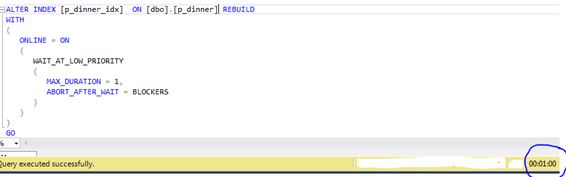
lock4

From the above image you can see after 1 minute (MAX_DURATION) the query successfully executes because it killed the connection causing the blocking, which is done via the ABORT_AFTER_WAIT = Blockers clause.

ALTER INDEX….ABORT!

I know there are people out there that will be going from older versions of SQL to SQL Server 2016, yes it makes sense it is a great product with a lot of new features such as Query Store, Stretch DB to name  but a few.

However don’t forget about the features that were available in 2014 that are naturally available in 2016, such as the ability to control blocking behaviors when rebuilding indexes.

Classically when you want to use the ONLINE mode of rebuilding indexes the code would look like:

ALTER INDEX [MCD] ON [dbo].[mcdaol] REBUILD WITH(ONLINE = ON)

Looking into the locking you will see that ONLINE operation uses (Sch-M) on the corresponding table as part of the process (actually takes Shared Table Lock (S) at the beginning of the operation, and a Schema Modification Lock (Sch-M at the end)).

lock1

So to be granted a SCH-M lock you can’t have any conflicting locks, so what happens when / if you have a process that is updating the table and you want to use the ONLINE rebuild? Yes you will be blocked. With 2014 onwards we can control what happens if we get into this situation and for this post I am going to abort the other query causing me to wait.

Let’s see what happens.

I have 1 window running an update such as:

— Open Trans

BEGIN TRAN
UPDATE [dbo].[p_dinner]
SET og_status = 1
WHERE og_status = 10

In a different window I am running the Index rebuild:

ALTER INDEX [p_dinner_idx] ON [dbo].[p_dinner]
REBUILD WITH(ONLINE = ON)

Naturally this will be blocked.

lock2

So now we can control what happens here, for this example I want to kill the connection holding the locks that are conflicting with my rebuild i.e. the update (just an example).

So I run:

ALTER INDEX [p_dinner_idx] ON [dbo].[p_dinner] REBUILD
WITH
(
  ONLINE = ON
   (
     WAIT_AT_LOW_PRIORITY
     (
       MAX_DURATION = 1,
       ABORT_AFTER_WAIT = BLOCKERS
     )
   )
)
GO

lock4

From the above image you can see after 1 minute (MAX_DURATION) the query successfully executes because it killed the connection causing the blocking, which is done via the ABORT_AFTER_WAIT = Blockers clause.

CHECKDB is slow!

Running the usual consistency checks on a database (with a new release code applied from an ISV) I noticed slower than usual timings. I started to dig into wait stats.

lemon1

OLEDB I expected as that is what is used by CHECKDB under the covers. However LATCH_EX Wait was the 2nd highest on the list with high wait counts and high Avg_wait_S. I then decided to move into latch DMV and saw this.

SELECT * FROM sys.dm_os_latch_stats
ORDER BY waiting_requests_count desc
lemons2


All the signs of CHECKDB Latch contention.

DBCC – OBJECT – METADATA this latch can be a major bottleneck for DBCC consistency checks when indexes on computed columns exist.  As a side note DBCC_Multiobject scanner  is used to get the next set of pages to process during a consistency check.

The call stack that I captured for DBCC – OBJECT – METADATA looked like:

XeSqlPkg::latch_suspend_end::Publish+e2 [ @ 0+0x0
LatchBase::Suspend+1002 [ @ 0+0x0
LatchBase::AcquireInternal+1ff [ @ 0+0x0
CheckCrossRowset::ProcessDataRecordInternal+3d1 [ @ 0+0x0
CheckCrossRowset::ProcessDataRecord+9c [ @ 0+0x0
CheckCrossRowset::ProcessRecord+a3 [ @ 0+0x0
CheckTables::ProcessDataPage+2af [ @ 0+0x0
CheckTables::ProcessPage+31c [ @ 0+0x0
CheckTables::ProcessNextData+297 [ @ 0+0x0
CheckAggregate::GetNextFact+113 [ @ 0+0x0
CTRowsetInstance::FGetNextRow+49 [ @ 0+0x0
CUtRowset::GetNextRows+7c [ @ 0+0x0
CQScanRmtScanNew::GetRowHelper+3e1 [ @ 0+0x0
CQScanXProducerNew::GetRowHelper+28f [ @ 0+0x0
FnProducerOpen+58 [ @ 0+0x0
FnProducerThread+4df [ @ 0+0x0</value>

For more information on what the above means see Paul’s Wait/Latch library for this type @ https://www.sqlskills.com/help/latches/dbcc_object_metadata/

I have captured call stacks many times to provide data for the library and it is alot of fun. (Maybe I need to get out more?)

When I disabled the indexes on the persisted computed columns I saw no LATCH based waits and the time taken to complete went down to literally couple of minutes(as opposed to 15) . Just having a glance into the latch DMV I did not see the DBCC – OBJECT – METADATA latch.

Oh the only thing to remember is to rebuild those indexes after the consistency check; I guess you could just offload the check to a different server if disabling is not a feasible option.

Detaching corrupt databases

Question – Can you detach a corrupt database?

Answer – IT DEPENDS!

More specifically it depends on the SQL Server version. SQL 2005 and prior it was possible, with the newer versions of SQL you will not be able to issue the command.

So let’s confirm this with SQL 2016.

Well I manufactured some corruption (I am starting to enjoy doing this too much for my own liking 😉 ) where the error log stated:

The header for file ‘C:\Program Files\Microsoft SQL Server\MSSQL12.SQLMCA\MSSQL\DATA\AmazonUK.mdf’ is not a valid database file header

I try to detach the database. (By the way, there is no good reason to do this; corruption does not just go away)

USE [master]
GO
ALTER DATABASE [AmazonUK] SET  SINGLE_USER WITH ROLLBACK IMMEDIATE
GO

USE [master]
GO
EXEC master.dbo.sp_detach_db @dbname = N'AmazonUK'
GO

SQL Server Management Studio returns

ALTER DATABASE statement failed.
Msg 3707, Level 16, State 2, Line 7
Cannot detach a suspect or recovery pending database. It must be repaired or dropped.

I totally forgot how helpful this is. I thought that I would refresh the minds of whoever reads this too.