DBCC HELP

I was going through some online courses and came across Erin Stellato’s Course on DBCC commands.http://www.sqlskills.com/blogs/paul/new-course-understanding-and-using-dbcc-commands/

I learnt something new! It’s not that complicated but I have found it useful. It is called DBCC HELP.

The command returns syntax information for a specific DBCC command, pretty useful if you have forgotten the syntax to write for example CHECKDB with extended logical checks and no informational messages. (Just an example)

So execute the below.

DBCC HELP ('?');
GO

This will give you a list of what you can pass into DBCC HELP – Yep checkdb is there.

checkalloc
checkcatalog
checkconstraints
checkdb
checkfilegroup
checkident
checktable
cleantable
dbreindex
dropcleanbuffers
free
freeproccache
freesystemcache
help
indexdefrag
inputbuffer
opentran
outputbuffer
pintable
proccache
show_statistics
showcontig
shrinkdatabase
shrinkfile
sqlperf
traceoff
traceon
tracestatus
unpintable
updateusage
useroptions

So let’s pass in CHECKDB.

DBCC HELP (CHECKDB);
GO

OUTPUT:

/**
dbcc CHECKDB
(
    { 'database_name' | database_id | 0 }
    [ , NOINDEX
    | { REPAIR_ALLOW_DATA_LOSS
    | REPAIR_FAST
    | REPAIR_REBUILD
    } ]
)
    [ WITH
        {
            [ ALL_ERRORMSGS ]
            [ , [ NO_INFOMSGS ] ]
            [ , [ TABLOCK ] ]
            [ , [ ESTIMATEONLY ] ]
            [ , [ PHYSICAL_ONLY ] ]
            [ , [ DATA_PURITY ] ]
            [ , [ EXTENDED_LOGICAL_CHECKS  ] ]
        }
    ]

**/

So now you will know without googling how to write your command:

DBCC CHECKDB ('AdventureWorks2020')
WITH NO_INFOMSGS, EXTENDED_LOGICAL_CHECKS

SQL Server checkpoints

I was having a conversation with someone over a disgusting vanilla latte and we talked about shutting down a machine and how to confirm if SQL Server starts to checkpoint the databases on the server – obviously it makes sense why it needs to do this but how do we confirm it?

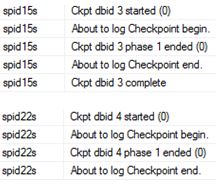
Via Configuration manager I enabled trace flags 3502 and 3605 – both needed to get the checkpoint information and write it to the error log.

I then shutdown the machine, on start-up I looked into the error log.

EXEC XP_READERRORLOG

checks

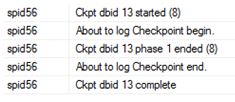
Notice the ‘s’ in front of the spid<number>? Well that means the checkpoint was done via the automatic process; if you do a manual checkpoint it won’t see this letter.

CHECKPOINT;
GO
EXEC XP_READERRORLOG

check1

If you want to know what is actually being written (number of Bufs etc) then that is trace flag 3504.


Talking of checkpoint

I was having a conversation with someone over a disgusting vanilla latte and we talked about shutting down a machine and how to confirm if SQL Server starts to checkpoint the databases on the server – obviously it makes sense why it needs to do this but how do we confirm it?

Via Configuration manager I enabled trace flags 3502 and 3605 – both needed to get the checkpoint information and write it to the error log.

I then shutdown the machine, on start-up I looked into the error log.

EXEC XP_READERRORLOG

checks

Notice the ‘s’ in front of the spid<number>? Well that means the checkpoint was done via the automatic process; if you do a manual checkpoint it won’t see this letter.

CHECKPOINT;
GO
EXEC XP_READERRORLOG

check1

If you want to know what is actually being written (number of Bufs etc) then that is trace flag 3504.


Do YOU Checksum?

I am going to show you why you should be using checksum options on your backups (and restores).
I AM ACTUALLY NOT GOING TO WRITE THE CODE TO FORCE THIS CORRUPTION. I am starting to feel bad spreading/writing about the commands involved.

Anyways I did what was necessary for this demo and running a SELECT we now have:

SELECT * FROM testtable

SQL Server detected a logical consistency-based I/O error:
incorrect checksum (expected: 0xe41c795b; actual: 0xe41c3c5b).
It occurred during a read of page (1:55) in database ID 10 at offset 0x0000000006e000 in file ‘C:\Program Files\Microsoft SQL Server\MSSQL10_50.MSSQLSERVER\MSSQL\DATA\DBMaint2008.mdf’. Additional messages in the SQL Server error log or system event log may provide more detail. This is a severe error condition that threatens database integrity and must be corrected immediately. Complete a full database consistency check (DBCC CHECKDB). This error can be caused by many factors; for more information, see SQL Server Books Online.

Let’s create some backups without checksums.

BACKUP DATABASE [DBMaint2008] TO DISK = 'C:\sqlserver\DBMaint2008pre.bak'

It works- BACKUP DATABASE successfully processed 186 pages in 0.140 seconds (10.351 MB/sec).

--The backup set on file 1 is valid
RESTORE VERIFYONLY FROM DISK =  'C:\sqlserver\DBMaint2008pre.bak'

We did a RESTORE of the DATABASE successfully – processed 186 pages in 0.232 seconds (6.246 MB/sec).

RESTORE DATABASE [DBMaint2008DR]
FROM  DISK = N'C:\sqlserver\DBMaint2008pre.bak' WITH  FILE = 1,
MOVE N'DBMaint2008'
TO N'C:\Program Files\Microsoft SQL Server\MSSQL10_50.MSSQLSERVER\MSSQL\DATA\DBMaint2008DR.mdf',
MOVE N'DBMaint2008_log'
TO N'C:\Program Files\Microsoft SQL Server\MSSQL10_50.MSSQLSERVER\MSSQL\DATA\DBMaint2008DR_log.LDF',
NOUNLOAD,  STATS = 5
GO

Are things really ok on this newly recovered database?

DBCC CHECKDB ('DBMaint2008DR')

I dont think so – CHECKDB found 0 allocation errors and 2 consistency errors in database ‘DBMaint2008DR’.

At least let’s have a checksum in place for protection from this kind of thing.

BACKUP DATABASE [DBMaint2008] TO DISK = 'C:\sqlserver\DBMaint2008POST.bak'
WITH CHECKSUM, STATS = 10
GO

12 percent processed.
21 percent processed.
Msg 3043, Level 16, State 1, Line 14
BACKUP ‘DBMaint2008’ detected an error on page (1:55) in file ‘C:\Program Files\Microsoft SQL Server\MSSQL10_50.MSSQLSERVER\MSSQL\DATA\DBMaint2008.mdf’.
Msg 3013, Level 16, State 1, Line 14
BACKUP DATABASE is terminating abnormally.

Can you imagine if you did neither Checksum or consistency checks? I don’t think I want to imagine such an environment.

Fix that page

I am in a fix-it mood so for this blog I am going to corrupt a page and then show you how to recover it using a page restore.

So let’s begin.

This is a very basic setup just to highlight the steps involved.


CREATE DATABASE [fixit];
GO
USE [fixit]
GO
ALTER DATABASE [fixit] SET RECOVERY FULL
GO
CREATE TABLE [xbox] (
[c1] INT IDENTITY,
[c2] CHAR (8000) DEFAULT 'a');
GO

INSERT INTO [xbox] DEFAULT VALUES;
GO

Let’s do some backups


USE master
GO
BACKUP DATABASE [fixit] TO DISK = 'C:\sqlserver\fixitfull11.bak'
GO
BACKUP LOG [fixit] TO DISK = 'C:\sqlserver\fixitLOG11.bak'

Let’s look at DBCC IND to get some pageIDs

DBCC IND (N'fixit', N'xbox', -1);
GO

page1

Trash it

I am going to trash data page 78 (type 1) using DBCC WRITEPAGE – This is a pretty dangerous command – DO NOT USE IT IN PRODUCTION. Actually, don’t use it all if you are not comfortable with it! This is going to be executed on my laptop, my hardware using my software – so I accept any consequence…..


ALTER DATABASE fixit SET SINGLE_USER;
GO
DBCC WRITEPAGE (N'fixit', 1, 78, 4000, 1, 0x45, 1);
GO
ALTER DATABASE fixit SET MULTI_USER;
GO


SELECT * FROM [fixit].[dbo].[xbox]

Msg 824, Level 24, State 2, Line 37
SQL Server detected a logical consistency-based I/O error:
It occurred during a read of page (1:78) in database ID 22 at offset 0x0000000009c000

DBCC CHECKDB ('Naughty') WITH NO_INFOMSGS, ALL_ERRORMSGS

CHECKDB found 0 allocation errors and 2 consistency errors in table ‘xbox’ (object ID 2105058535).
CHECKDB found 0 allocation errors and 2 consistency errors in database ‘fixit’.
repair_allow_data_loss is the minimum repair level for the errors found by DBCC CHECKDB (fixit).
DBCC execution completed. If DBCC printed error messages, contact your system administrator.

As a side note this will get recorded into the suspect_pages table within msdb.

SELECT * FROM [msdb].[dbo].[suspect_pages]

page2

Some more general activity.

USE [fixit]
go

INSERT INTO [dbo].[xbox]
([c2])
VALUES
('b')
GO

We want the data back!

Recovery time
First step is to issue a tail-log backup.

USE master
GO
-- tail
BACKUP log [fixit] TO DISK = 'C:\sqlserver\fixitLOG12.bak'

--So now we start the page recovery
RESTORE DATABASE [fixit]
PAGE = '1:78'
FROM DISK = 'C:\sqlserver\fixitfull11.bak'
WITH NORECOVERY
GO

RESTORE LOG [fixit] FROM
DISK = 'C:\sqlserver\fixitLOG11.bak'
WITH NORECOVERY
GO

RESTORE LOG [fixit] FROM
DISK = 'C:\sqlserver\fixitLOG12.bak'
WITH NORECOVERY
GO

-- Finally bring it back
RESTORE DATABASE [fixit] WITH RECOVERY

DBCC CHECKDB('Fixit')

CHECKDB found 0 allocation errors and 0 consistency errors in database ‘fixit’.
DBCC execution completed. If DBCC printed error messages, contact your system administrator.

USE [fixit]
GO
SELECT * FROM [dbo].[xbox]

checkdb
Just be aware of certain limitations such as that allocation pages Global Allocation Map (GAM) pages, Shared Global Allocation Map (SGAM) pages, and Page Free Space (PFS) pages cannot be recovered. More information can be found at https://msdn.microsoft.com/en-us/library/ms175168.aspx.

Happy fixing!