Always Encrypted Column Encryption

I have a need to encrypt a column within my SQL Database (Azure). I decided to use Always Encrypted. This feature essentially uses a column encryption key that is used to encrypt data in an encrypted column and a column master key  that encrypts one or more column encryption keys.

It is paramout that you install an Always Encrypted-enabled driver on the client as the driver encrypts the data in sensitive columns before passing the data to the database engine.

Your application connection string will be something similar to:

string connectionString = "Data Source=yourserver; Initial Catalog=mydb;
Integrated Security=true; Column Encryption Setting=enabled";
SqlConnection connection = new SqlConnection(connectionString);

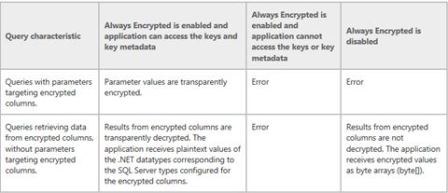
Doing this is important because if you have the setting disabled and you have a query with parameters targeting an encrypted column it will fail. The following table from Books on Line summaries this (last column).
ae1

There is a lot to digest for this feature it’s not just the database you need to consider; a picture speaks a thousand words so have a look how everything sits together.
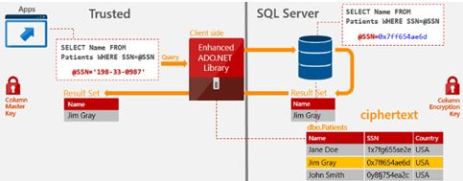
ae2

Setup via the wizard

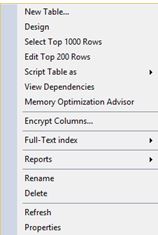
Navigate to your column of interest and click the Encrypt Columns option
ae3

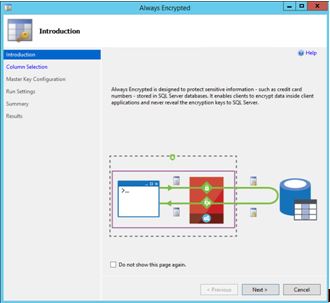
The wizard arrives

ae4

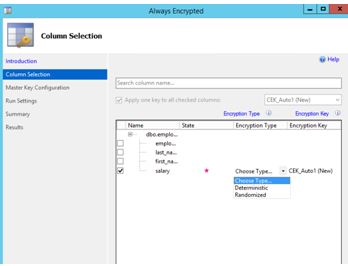
Next is column selection – This will be my salary column (ok it may not be a great example but it’s the idea I want to convey)

Always Encrypted uses AEAD_AES_256_CBC_HMAC_SHA_256 algorithm. There are 2 variations available, this being deterministic and randomized.
ae5

Deterministic – This is the weaker option of the 2. It uses a method which always generates the same encrypted value for any given plain text value. It allows for grouping, filtering by equality, and joining tables based on encrypted values. Be aware that Deterministic encryption must use a column collation with a binary2 sort order for character columns.

Randomised – Less predictable than the above, it does not allow for grouping and filtering on the encrypted column.

You have to make a choice here; both options have pros and cons.  If you know that you need to do grouping, indexing or joins on your encrypted column then you don’t really have a choice and will have to use deterministic.

For my example I am going with randomised. If you try and group/filter on a column with randomised you will get:

Msg 33299, Level 16, State 2, Line 8 – Encryption scheme mismatch for columns/variables ‘salary’. The encryption scheme for the columns/variables is (encryption_type = ‘RANDOMIZED’, encryption_algorithm_name = ‘AEAD_AES_256_CBC_HMAC_SHA_256’, column_encryption_key_name = ‘CEK_Auto1’, column_encryption_key_database_name = yourdb) and the expression near line ‘8’ expects it to be (encryption_type = ‘DETERMINISTIC’) (or weaker).

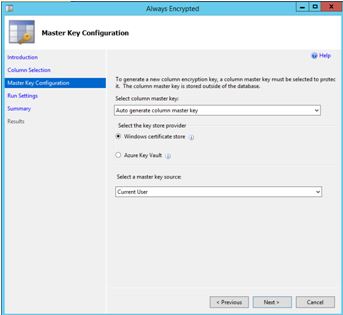
Next is master key configuration. Ideally I would love to setup the Azure Key Vault provider but I think that would make a great blog post (one day), so here I opted for Windows certificate store.
ae6

Save the PowerShell script if you desire.
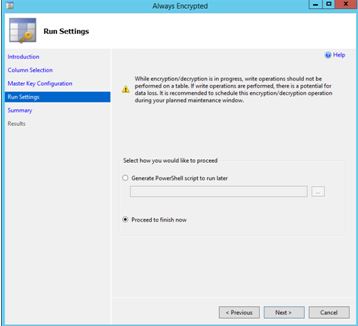
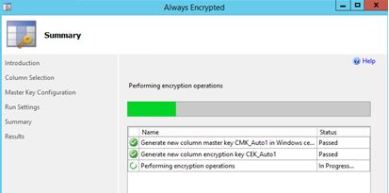
ae7

ae8

Issue your query now:

ae9

As mentioned before this is only 1 piece of the puzzle, you need to make application changes to handle this encryption. I suggest reading through https://msdn.microsoft.com/en-us/library/mt757097.aspx as this shows you how to build your queries (the documentation is in .NET) the last thing you want is to see something like –

System.Data.SqlClient.SqlException (0x80131904): Operand type clash: varchar is incompatible with varchar(8000) encrypted with (encryption_type = ‘DETERMINISTIC’, encryption_algorithm_name = ‘AEAD_AES_256_CBC_HMAC_SHA_256’, column_encryption_key_name = ‘CEK_Auto1’, column_encryption_key_database_name = ‘mydb’) collation_name = ‘SQL_Latin1_General_CP1_CI_AS’

I also suggest reading the Feature detail section found here https://msdn.microsoft.com/en-us/library/mt163865.aspx
Azure SQL Database – TDE

I work in the financial space so you can imagine that security is quite high on the agenda. TDE (Transparent Data Encryption – see this article for more details https://blobeater.wordpress.com/category/sql-server-2/tde/ ) is nothing new, setting it up on “earthed” SQL Servers can have some what of an overhead but in the Azure world it is so simple to setup.

The big advantage of TDE in Azure over the earthed flavour is that Microsoft does alot of the work for you. Assuming your database is in a geo-replication partnership it will be protected by a different key on each of the servers. Also Microsoft will rotate your certificate at least every 90 days.

Azure SQL Database does not support Azure Key Vault integration with TDE. SQL Server running on an Azure virtual machine (IaaS) can use an asymmetric key from the Key Vault.

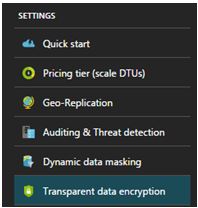
Within the settings section of your Azure SQL Database you will find the TDE option as shown below. To do this successfully you will need to be connected as the Azure Owner, Contributor, or SQL Security Manager.

enc1

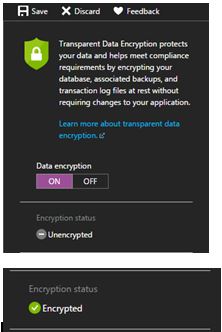
Select ON for the data encryption option and click save.

enc2

Seriously, that is all it takes.

I will then move to SSMS (SQL Server Management Studio) and issue the following query to understand the status. (Credit to David Pless: TSP – Microsoft)

 SELECT DB_NAME(database_id) AS DatabaseName, encryption_state,
encryption_state_desc =
CASE encryption_state
         WHEN '0' THEN 'No database encryption key present, no encryption'
         WHEN '1' THEN 'Unencrypted'
         WHEN '2' THEN 'Encryption in progress'
         WHEN '3' THEN 'Encrypted'
 WHEN '4' THEN 'Key change in progress'
 WHEN '5' THEN 'Decryption in progress'
 WHEN '6' THEN 'Protection change in progress (The certificate or asymmetric key that is encrypting the database encryption key is being changed'
         ELSE 'No Status'
      END,
percent_complete, create_date, key_algorithm, key_length,
encryptor_thumbprint, encryptor_type  FROM sys.dm_database_encryption_keys

enc3

Naturally tempdb gets encrypted too along with the user database. Azure uses AES-256 bit algorithm.

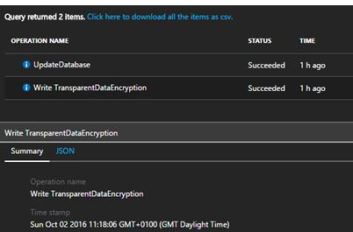
These sorts of activities get tracked and logged by the Activity log within Azure.

enc4

Query Performance Insight

It is really easy getting insight into Query performance within your Azure SQL DB. I think Microsoft have done a good job with the User Interaction and with the information provided – even though I would have liked to see a metric type on I/O. Never the less lets dig in.

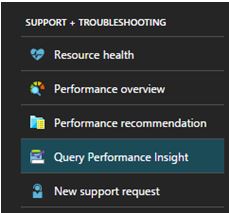
On you Azure DB under support and troubleshooting click on Query Performance Insight.

query1

Here you will be presented with the TOP X queries based on CPU, Duration or Execution count. You will have the ability to change the time period of analysis, return 5, 10 or 20 queries using aggregations SUM, MAX or AVG.

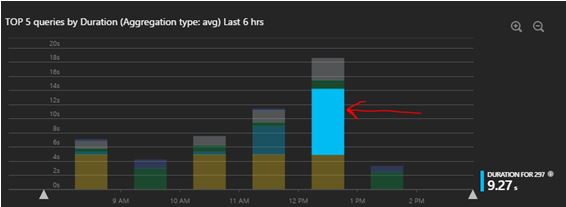
So let’s look at what information is provided based on queries with high AVG duration over the last 6 hours.

query2

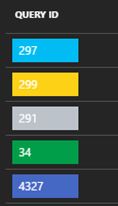
Once you have highlighted the section on the bar chart that interests you (red arrow), you will be presented with the duration time for that query ID. For this it is query ID 297 that had an Avg duration of 9.27S.

query3

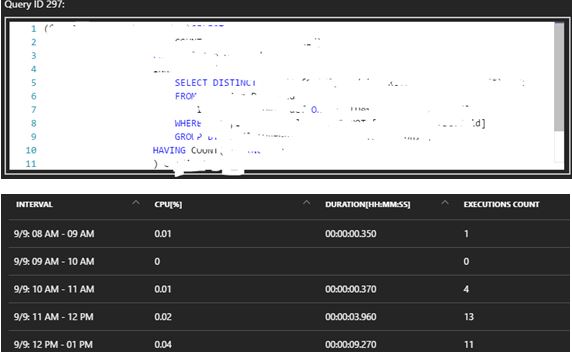
So you can then click the 297 ID button to dig in deeper where you can get the Query text and get timed interval analysis.

query4

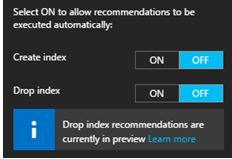
Now, there is a “recommendation” button – here you can have the ability to even automate index maintenance, personally this isn’t something I would automate – I would like to see what they recommend and analyse it myself.

query5

Pretty powerful (and colourful) stuff available at your finger tips.

UPDATE: 6TH OCTOBER 2016 – I have been contacted by Microsoft Query Performance Insight PM where he kindly informed me that I/O is now tracked (if you recall at the start of the article it was something that I would’ve loved to see – now I can ).

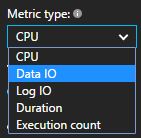
So back in the Query Performance Insight menu – you will see Data IO and Log IO.

data1

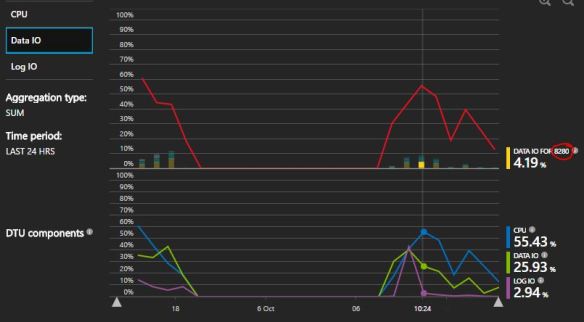
You will now have the ability to see a line graph to see a trend (if it exists) for these new metrics.

8200

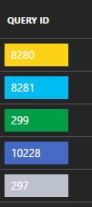
Then as mentioned before you would correlate this back to the Query ID to understand the TSQL being executed. So for this example I would dig into Query ID 8280.

qwer

It ended up being a pretty poor SELECT statement in much need of some optimization.


Azure SQL Database scripts

I thought that this would be useful for others – couple of scripts that I have been using in Azure for my SQL Databases.

--************************--
-- Azure SQL DB Scripts--
--**************************

-- Wait Stats / Database
WITH Waits AS
(SELECT wait_type, wait_time_ms / 1000. AS wait_time_s,
100. * wait_time_ms / SUM(wait_time_ms) OVER() AS pct,
ROW_NUMBER() OVER(ORDER BY wait_time_ms DESC) AS rn
FROM sys.dm_db_wait_stats
)
SELECT W1.wait_type,
CAST(W1.wait_time_s AS DECIMAL(12, 2)) AS wait_time_s,
CAST(W1.pct AS DECIMAL(12, 2)) AS pct,
CAST(SUM(W2.pct) AS DECIMAL(12, 2)) AS running_pct
FROM Waits AS W1
INNER JOIN Waits AS W2
ON W2.rn <= W1.rn
GROUP BY W1.rn, W1.wait_type, W1.wait_time_s, W1.pct
HAVING SUM(W2.pct) - W1.pct < 99
-- Currently active sessions
SELECT
sys.dm_exec_sessions.session_id AS [Spid],
CASE is_user_process
WHEN 1
THEN 'User'
WHEN 0
THEN 'System'
END
AS [Session],
HOST_NAME,
PROGRAM_NAME,
login_name,
Status,
cpu_time ,
total_scheduled_time ,
total_elapsed_time
FROM sys.dm_db_session_space_usage INNER join sys.dm_exec_sessions
ON sys.dm_exec_sessions.session_id = sys.dm_db_session_space_usage.session_id

-- Returns information about operations performed on databases
-- Context of Master
SELECT * FROM sys.dm_operation_status
ORDER BY start_time

-- Returns CPU, I/O, and memory consumption for an Azure SQL Database
SELECT
AVG(avg_cpu_percent) AS 'Average CPU Utilization In Percent',
MAX(avg_cpu_percent) AS 'Maximum CPU Utilization In Percent',
AVG(avg_data_io_percent) AS 'Average Data IO In Percent',
MAX(avg_data_io_percent) AS 'Maximum Data IO In Percent',
AVG(avg_log_write_percent) AS 'Average Log Write Utilization In Percent',
MAX(avg_log_write_percent) AS 'Maximum Log Write Utilization In Percent',
AVG(avg_memory_usage_percent) AS 'Average Memory Usage In Percent',
MAX(avg_memory_usage_percent) AS 'Maximum Memory Usage In Percent'
FROM sys.dm_db_resource_stats;

--DTU usage tracked over Timed intervals
SELECT end_time,
(SELECT Max(v)
FROM (VALUES (avg_cpu_percent), (avg_data_io_percent), (avg_log_write_percent)) AS
value(v)) AS [avg_DTU %]
FROM sys.dm_db_resource_stats;