A quick video clip where I show two things.
Firstly I show how since SQL Server 2014 SP1+ the snapshot is no longer hidden then finally how I check that DBCC CHECKDB has ran successfully.

A quick video clip where I show two things.
Firstly I show how since SQL Server 2014 SP1+ the snapshot is no longer hidden then finally how I check that DBCC CHECKDB has ran successfully.
My database is in the recovery pending state and I want to get in and extract the data out into a new database, I have NO BACKUPS available so some data (even if it is dodgy) is better than nothing.
The title is adapted from a child-hood movie of mine and is my daily (database-related) WTF moment and it is my entry for this month’s T-SQL Tuesday found: http://www.pontop.dk/single-post/2017/03/07/Announcing-T-SQL-Tuesday-88-%E2%80%93-The-daily-database-related-WTF

I hope you run consistency checks on your databases, if you are not currently doing this you probably will want to.
For this post I want to show you how you can check whether or not CHECKDB has been successfully executed.
There are a couple of ways to check this but I will be using DBCC DBINFO for this check.
DBCC DBINFO WITH TABLERESULTS
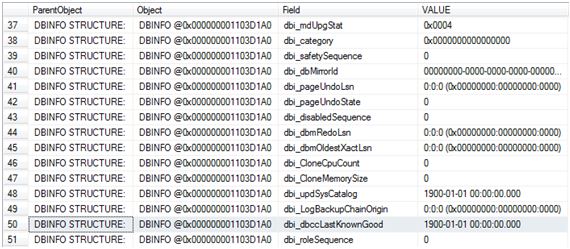
The field of interest here is dbi_dbccLastKnownGood where VALUE of 1900-01-01 00:00:00.000 means that DBCC CHECKDB has never been executed (successfully).
So let’s run CHECKDB and see the value get updated.
DBCC CHECKDB ('ZoraDB')
GO

DBCC DBINFO WITH TABLERESULTS
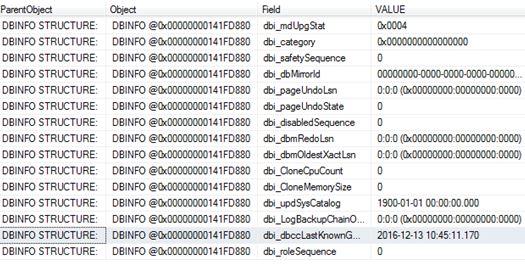
The next question I want answering is whether or not this value gets updated if I run CHECKDB with the physical_only option (I created a fresh copy of the database and performed a re-check)
USE [master]
GO

DROP DATABASE [ZoraDB]
GO

CREATE DATABASE [ZoraDB]
 CONTAINMENT = NONE
 ON  PRIMARY
( NAME = N'ZoraDB', FILENAME = N'C:\Program Files\Microsoft SQL Server\MSSQL12.MSSQLSERVER\MSSQL\DATA\ZoraDB.mdf' , SIZE = 5120KB , MAXSIZE = UNLIMITED, FILEGROWTH = 1024KB )
 LOG ON
( NAME = N'ZoraDB_log', FILENAME = N'C:\Program Files\Microsoft SQL Server\MSSQL12.MSSQLSERVER\MSSQL\DATA\ZoraDB_log.ldf' , SIZE = 2048KB , MAXSIZE = 2048GB , FILEGROWTH = 10%)
GO

DBCC DBINFO WITH TABLERESULTS
Below confirms that we are back to a newly created database.
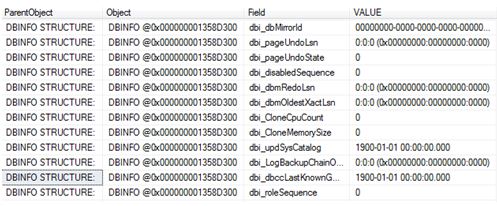
So we now run it with the PHYSICAL_ONLY option.
DBCC CHECKDB ('ZoraDB') WITH PHYSICAL_ONLY
GO
USE [ZoraDB]
GO
DBCC DBINFO WITH TABLERESULTS
So, stating physical_only updates the value too.
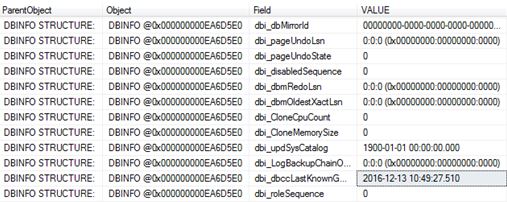
What about separate checks?
Again I dropped and re-created the database to get back to level playing field.
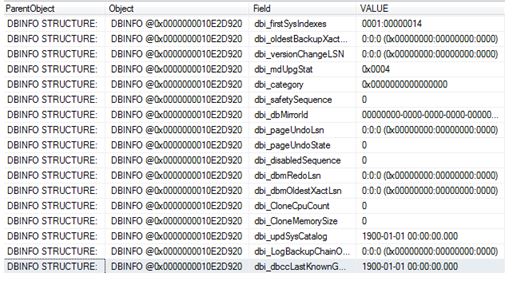
Let’s work through the DBCC check commands, after a command I will check dbi_dbccLastKnownGood to see if it gets updated.
DBCC CHECKALLOC
GO
DBCC DBINFO WITH TABLERESULTS
DBCC CHECKCATALOG
GO

DBCC DBINFO WITH TABLERESULTS
DBCC CHECKTABLE ('dbo.people')
GO
DBCC DBINFO WITH TABLERESULTS
So checking the database via separate checks has no impact on dbi_dbccLastKnownGood.
What about if the database is corrupted? I re-created the database and corrupted it:
DBCC CHECKDB ('ZoraDB')
GO
CHECKDB found 0 allocation errors and 2 consistency errors in database ‘ZoraDB’.
repair_allow_data_loss is the minimum repair level for the errors found by DBCC CHECKDB (ZoraDB).
DBCC execution completed. If DBCC printed error messages, contact your system administrator.
DBCC DBINFO WITH TABLERESULTS
Naturally it will not get updated because it was unsuccessful – If we fixed the corruption and ran CHECKDB it would then get updated with the current timestamp.
DO NOT RUN REPAIR WITH THIS OPTION – THIS IS AN EXAMPLE ONLY! It deleted my data!! THIS IS A LAST RESORT – WARNING.
ALTER DATABASE [ZoraDB] SET SINGLE_USER;
GO

DBCC CHECKDB    ('ZoraDB'  , REPAIR_ALLOW_DATA_LOSS )

ALTER DATABASE [ZoraDB] SET MULTI_USER;
GO

DBCC CHECKDB ('ZoraDB')
GO
CHECKDB found 0 allocation errors and 0 consistency errors in database ‘ZoraDB’.
DBCC execution completed. If DBCC printed error messages, contact your system administrator.
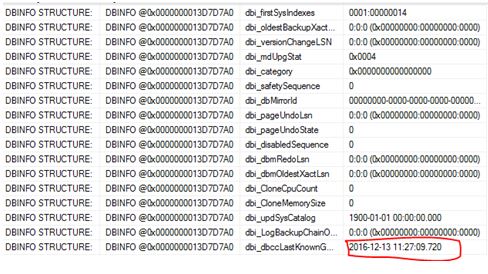
There you have it – the updated value.
I am in the middle of some research regarding CHECKDB and learnt something new. From SQL Server 2014 onwards the database snapshot that is used to get to a transactionally-consistent point-in-time is no longer hidden.
To understand the behavior prior to 2014 I am going to quote Paul Randal here – he states “ As the database snapshot is hidden, there is no control over where the snapshot files are placed – in fact they are created as alternate streams of the files comprising the source database” (http://www.sqlskills.com/blogs/paul/checkdb-from-every-angle-complete-description-of-all-checkdb-stages/)
In SQL Server 2014 things have changed – it is not hidden and it doesn’t use alternate streams.
DBCC CHECKDB ('Newdb')
Checking the location where the data files reside we can see the snapshot.

This disappears once CHECKDB finishes.
 All About Tech