TDE Recovery

This week’s TSQL Tuesday is being held by the mighty Kenneth Fisher – Backup and Recovery- see this link, how can I not get involved with this one?

tsql

I have been blogging for about a year now and have covered most of Kenneth’s bullet points – except Internals and SSAS based stuff, so I decided to do something different but still about backups. This post is all about the importance of backing up certain objects when you are using TDE – Transparent Data Encryption.

To understand TDE see my older post  – https://blobeater.blog/2016/11/22/playing-with-tde/

So I have enabled TDE and I have a Full backup – lets restore it to a different server.

USE [master]
RESTORE DATABASE [DWHDB]
FROM  DISK = N'C:\temp\dwh.bak' WITH  FILE = 1, STATS = 5
GO

Cannot find server certificate with thumbprint ‘0xC0367AC8E9AE54538C17ACB0F63070D6FF21316A’.
Msg 3013, Level 16, State 1, Line 2
RESTORE DATABASE is terminating abnormally.

The dreaded cannot find server certificate with thumbprint message. Why is this happening?

Well if you read my post on TDE ( or anybody else’s) you would have noticed the following message:

Warning: The certificate used for encrypting the database encryption key has not been backed up. You should immediately back up the certificate and the private key associated with the certificate. If the certificate ever becomes unavailable or if you must restore or attach the database on another server, you must have backups of both the certificate and the private key or you will not be able to open the database.

So the point is – back them up

USE master
GO
BACKUP CERTIFICATE MyServerCert
TO FILE = 'c:\data\MyServerCert.cer'
WITH PRIVATE KEY
(FILE = 'c:\data\certificate_MyServerCert.pvk',
ENCRYPTION BY PASSWORD = 'xxxxxxxx')

Then on the restoring server you will need to issue the following (assuming you have a database master key too)


CREATE CERTIFICATE MyServerCert
FROM FILE = 'c:\temp\MyServerCert.cer'
WITH PRIVATE KEY (FILE = 'c:\temp\certificate_MyServerCert.pvk',
DECRYPTION BY PASSWORD = 'xxxxxxxx');

GO
USE [master]
RESTORE DATABASE [DWHDB]
FROM  DISK = N'C:\temp\dwh.bak' WITH  FILE = 1, STATS = 5

GO

RESTORE DATABASE successfully processed 13002 pages in 0.444 seconds (228.770 MB/sec) – the restore works a charm.


SQL Server – Playing With Trace Flags

Trace flags are used to temporarily set specific server characteristics or to switch off a particular behavior. They are usually scoped to a global level or a session only level. For this blog post I thought it would be handy to show you how to enable (and disable) global based trace flags and then check the status on your system.

The difference between global and session is important to understand, global trace flags are visible to every connection whereas session scoped means that the trace flag is visible to only that connection.

Global Scope

For this example I will be using a global trace flag that overrides the use of index hints (This is not something I do or encourage; it is just a use case for this post).


SELECT AddressID,city FROM [Person].[Address]
WHERE City = 'Albany'

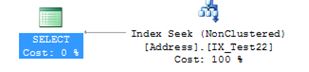
I wrote a basic query because as you will see it gives me a Non-Clustered Index Seek.

index

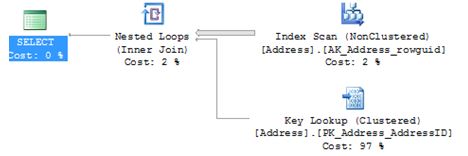
I am now going to write a query where I will force the above SELECT statement to use an index where it really shouldn’t – the outcome is a scan with a key lookup – yep not what we want

SELECT AddressID,city FROM [Person].[Address]  WITH (INDEX (AK_Address_rowguid))
WHERE City = 'Albany'

index1

So let’s set a global based trace flag to say for any connection ignore ALL index hints. I would expect it to go back to an index seek. The -1 in the TRACEON is very important – that is what makes it global.

 DBCC TRACEON (8602,-1)

SELECT AddressID,city FROM [Person].[Address]  WITH (INDEX (AK_Address_rowguid))
WHERE City = 'Albany'

index3.JPG

So it’s clear to see that even with the index hint it is now ignored.

Because it’s global I then connected to the server as someone else and issued the query with the same results.

Check status

To check what trace flags are enabled on the system run the below.

DBCC TRACESTATUS (-1);
GO

index4

Turn off

DBCC TRACEOFF (8602,-1)

DBCC execution completed. If DBCC printed error messages, contact your system administrator.

DBCC TRACESTATUS(-1);
GO

Re-issuing the above DBCC TRACESTATUS will now show nothing.

What about after a restart?

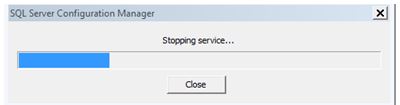
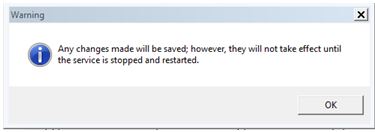
I switched the trace flag back on then restarted SQL Service and issued the status command:

index6

DBCC TRACESTATUS(-1);

GO

DBCC execution completed. If DBCC printed error messages, contact your system administrator.

The flag has been lost.

SQL Server Configuration Manager

Personally I prefer using configuration manager if I am using trace flags. Under properties of your MSSQLSERVER you will see a start-up parameters tab.

index0

Click ADD.

index101

After you have restarted logon to the SQL Server and check the status

DBCC TRACESTATUS(-1);

GO

index45

I restarted the SQL service again just to prove that settings will be preserved – which they are and that is the part that I like about configuration manager.

sqlservr.exe

We all know what the sqlservr.exe and its importance, but have you noticed the size difference of the .exe when comparing SQL Server 2008R2 to SQL Server 2012 onwards?

Let’s look at 2008R2, I navigate to the BINN folder i.e. Program Files\Microsoft SQL Server\MSSQL10_50.MSSQLSERVER\MSSQL\Binn – it is around 61MB

lang.JPG

Navigating to my 2012 instance via Program Files\Microsoft SQL Server\MSSQL11.MSSQLSERVER\MSSQL\Binn it is 190KB.

lang2.JPG

I never really noticed the difference before, but I understand why.

From 2012 onwards the architecture changed, it has been broken up into multiple DLLs. I can see the extra DLL files within the BINN folder these being sqllang.dll and sqlmin.dll where each are roughly 30MB each.

lanmg3.JPG

While this post wont change your day to day job I was quite fascinated with the size difference. As a side point sqllang.dll it where Query Processing and execution facilities takes place and sqlmin.dll offers services such as checkpoint, lazywriter and lock monitor.

SQL Server Restore to LSN

For this post I want to show you how I recovered to a LSN where I did do this on a server where I wanted to go back to a time just before a delete occurred.

This is my setup.

ALTER DATABASE [AdventureWorks2014] SET RECOVERY FULL
GO

BACKUP DATABASE [AdventureWorks2014] TO DISK = 'C:\SQLSERVER\backups\AdventureWorks2014.bak'WITH COMPRESSION

BACKUP LOG [AdventureWorks2014] TO DISK = 'C:\SQLSERVER\backups\AdventureWorks2014LOG1.bak'

-- DELETE occurred  (BAD USER)

DELETE FROM [Person].[Password]
WHERE BusinessEntityID = 2

BACKUP LOG [AdventureWorks2014] TO DISK = 'C:\SQLSERVER\backups\AdventureWorks2014LOG2.bak'

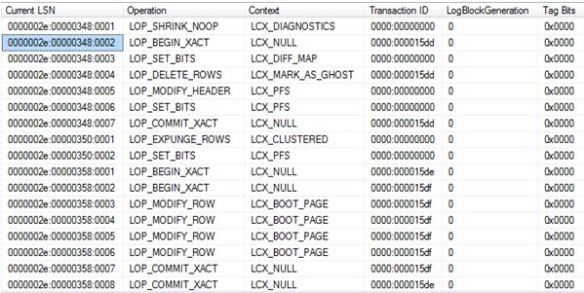
Lets gain some insight into the transaction log.

SELECT * FROM
fn_dblog (NULL, NULL)

trans

0000002e:00000348:0002 is The LSN where the transaction begins – LOP_BEGIN_XACT for transaction ID 0000:000015dd

This will be my recovery point. This LSN will be the STOPBEFOREMARK clause in my RESTORE code.

 RESTORE DATABASE [AdventureWorks2014DR]
    FROM DISK = 'C:\SQLSERVER\backups\AdventureWorks2014.BAK'
WITH
    MOVE N'AdventureWorks2014_Data' TO N'C:\SQLSERVER\AdventureWorks2014_Data2.mdf',
    MOVE N'AdventureWorks2014_Log' TO N'C:\SQLSERVER\AdventureWorks2014_log2.ldf',
   NORECOVERY
GO

RESTORE LOG [AdventureWorks2014DR]
FROM
    DISK = 'C:\SQLSERVER\backups\AdventureWorks2014LOG1.bak'
WITH
NORECOVERY;

RESTORE LOG [AdventureWorks2014DR]
FROM
    DISK = 'C:\SQLSERVER\backups\AdventureWorks2014LOG2.bak'
WITH
    STOPBEFOREMARK = 'lsn:0x0000002e:00000348:0002',
    NORECOVERY;
GO

RESTORE DATABASE [AdventureWorks2014DR] WITH RECOVERY;
GO

SELECT * FROM [Person].[Password]

Yes I have my delete back.

trans2

Let’s prove a point and go too far ahead. I will go past the commit; we wouldn’t expect it to be recovered right?

So let’s recover to LSN 0000002e:00000358:0001 (after the commit)


RESTORE DATABASE [AdventureWorks2014DR]
    FROM DISK = 'C:\SQLSERVER\backups\AdventureWorks2014.BAK'
WITH
    MOVE N'AdventureWorks2014_Data' TO N'C:\SQLSERVER\AdventureWorks2014_Data2.mdf',
    MOVE N'AdventureWorks2014_Log' TO N'C:\SQLSERVER\AdventureWorks2014_log2.ldf',
   NORECOVERY
GO

RESTORE LOG [AdventureWorks2014DR]
FROM
    DISK = 'C:\SQLSERVER\backups\AdventureWorks2014LOG1.bak'
WITH
NORECOVERY;

RESTORE LOG [AdventureWorks2014DR]
FROM
    DISK = 'C:\SQLSERVER\backups\AdventureWorks2014LOG2.bak'
WITH
    STOPBEFOREMARK = 'lsn:0x0000002e:00000358:0001',
    NORECOVERY;
GO

RESTORE DATABASE [AdventureWorks2014DR] WITH RECOVERY;
GO

USE [AdventureWorks2014DR]
go
SELECT * FROM [Person].[Password]

Nope, it’s too far ahead.

pd.JPG

Who did it?

Quite simply look for the Transaction SID for your Current LSN of interest.

 SELECT SUSER_SNAME(0x01050000000000051500000011C35F73E7CBDD7DA837D665F7620000) AS [WhoDidIt];

Task Manager is a liar

I remember asking a question at a recent training event, the outcome? I now don’t use task manager to try and understand how much memory SQL Server is consuming. Why? Well it has the ability to lie, and as you will see, it can lie really well. (Depending on settings)

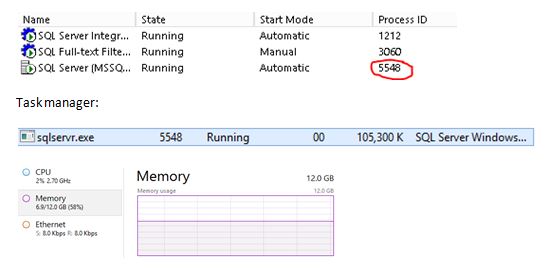
Let’s look at my environment, SQL Server is running under Process ID 5548.

tasks.JPG

Right, so I am using 58% of my server memory and looking at SQL Server it is consuming approx. 105MB? Well, it’s not. It doesn’t make any sense.

Use resource monitor to really know what is going on.

Resource monitor shows:

tasks1

Why this is so inaccurate (for my case) is because of the use of Lock Pages in Memory – Task manager does not track memory that is allocated using the AllocateUserPhysicalPages() API which is what this setting does.