Working with a couple of databases that needed TDE I noticed when I enabled one of them that it was stuck on “encryption in progress” for quite a while.
SQL Server Encryption in progress stuck
3

Working with a couple of databases that needed TDE I noticed when I enabled one of them that it was stuck on “encryption in progress” for quite a while.
The great thing about new versions of SQL Server is the fact that they are packed full of new features but there some that don’t really get talked about much. I found out about a concept called lightweight query execution statistics profiling infrastructure – think of this as a way of capturing your “in-flight” query execution information, I did however encounter an issue which you will see later on.
Over the past 6 months I have been trying to push myself to use extended events (XEvents) over SQL trace, once you get past the learning curve it’s probably the way to go. If you are operating in the Azure space then you have no choice. Extended events are what you will need to use if you want to collect information against SQL database. There are some subtle differences on how you write the T-SQL between SQL database (Azure) and your locally installed SQL Servers.
I have been pretty busy recently working with Joe Sack from Microsoft and getting my hands dirty with SQL Server vNext accessing some cool stuff (which obviously I can’t talk about – under NDA) and believe me it is pretty powerful stuff.
Taking a step back vNext is going to be a big deal, bringing us new features such as support for running SQL Server on Linux (Red Hat, SUSE, and Ubuntu) and Docker containers, adaptive query processing, SQL graph, improvements to R Services, Analysis Services, Reporting Services, and Integration Services.
I was working with the most recent release SQL Server vNext CTP 1.2 (January 2017) and more specifically the adaptive query processing area and it is a powerful concept. Just helping the guys at Microsoft validate some things made me realise what amazing stuff is in the pipeline. Joe has already blogged about a section within this space called batch mode adaptive memory grant feedback. https://blogs.msdn.microsoft.com/sqlserverstorageengine/2016/11/29/introducing-batch-mode-adaptive-memory-grant-feedback/ but I was working on something else <BIG SMILE>.
It really is an exciting time to be involved with the SQL Server product because I know there is more to come. It’s probably the right time to thank Joe for answering my questions and being very patient with me to really allow me to help them.
Hopefully I can keep helping with future releases of this product because from writing articles, blogging and building my codeplex project it is mini projects like this that really makes me smile. (Yes I include the SQLskills waits library in that too)
Thanks for reading!
Have you ever wanted to compare execution plans from SQL Server Management Studio? Well with the newer version of the software (SQL 2016 onward https://msdn.microsoft.com/en-us/library/mt238290.aspx) you can. Lets dive in.
Once you have an execution plan ready right click on it and you will see the show plan compare option.
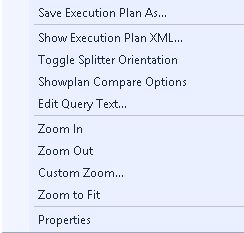
You will then need to navigate to the other execution plan that you want to compare. Ultimately they will then be “side by side” to allow for easy comparisons.
There are basically 3 windows to this, your top plan (blue box), bottom plan (orange box) and the options menu (yellow box).
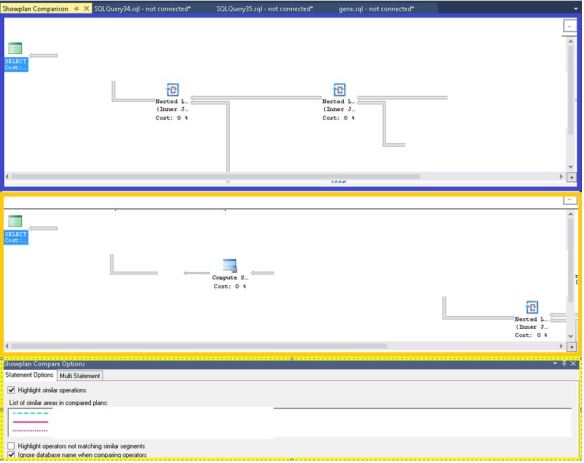
Or you can “toggle split” to change the orientation of the windows
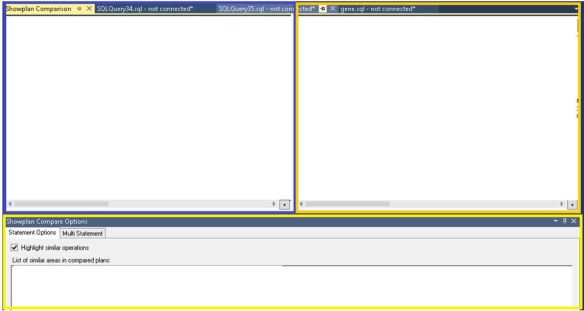
As you can see in the yellow box I selected highlight similar operations, I then use the properties menu to see a high level comparison of the SELECT operator.
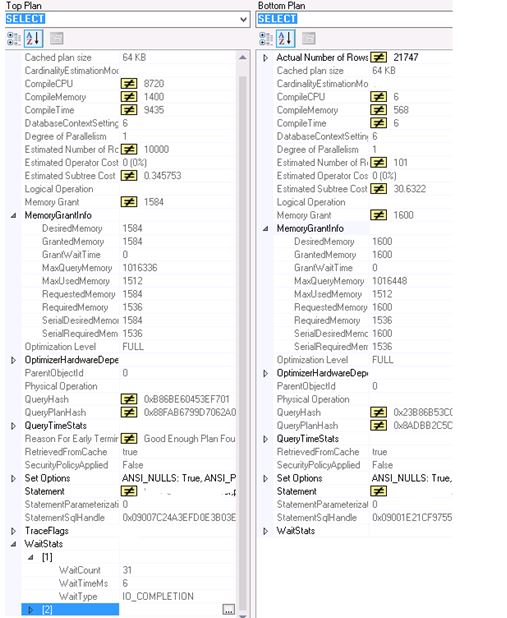
Notice the Wait stats information too? I thought that was pretty cool.
If you are interested in a certain operator that you want to compare you need to select it within both query plans and go to the properties window. Here I look at the hash match operator.

Then selecting the “highlight operators not matching similar segments” option you then will see where the execution plans differ. This was easy to see as the plan shape between the 2 plans was quite different.

This is a little feature that could prove quite handy.
 All About Tech