Wait Types and Latch Classes Library

Great news from SQLskills.”Announcing the comprehensive SQL Server Wait Types and Latch Classes Library” – Paul S. Randal

http://www.sqlskills.com/blogs/paul/announcing-the-comprehensive-sql-server-wait-types-and-latch-classes-library/

It has been really fun contributing to these libraries and I am still trying to capture more data ( just hitting some issues at the moment).

Watch this space. These libraries are going to be huge!

Symbols

I just want to write the setup I went through for using debug symbols within SQL Server to resolve call stacks. At a high level this is what you need to do – Assuming that you are using 64 BIT software.

  • Download the debugger kit – I downloaded Windows Kit 8.1 http://www.microsoft.com/en-us/download/details.aspx?id=42273.This will get installed @ C:\Program Files\Windows Kits\8.1\Debuggers\
  • Using CMD you will then need to CD to the Microsoft Binn location – this will depend on the version you are using – for example SQL 2008 R2 =CD C:\Program Files\Microsoft SQL Server\MSSQL10_50.MSSQLSERVER\MSSQL\Binn
  • Then you will need to issue this command:”C:\Program Files\Windows Kits\8.1\Debuggers\x64\symchk” sqlservr.exe /s SRV*c:\symbols*http://msdl.microsoft.com/download/symbols
  • This will then pull down a sqlservr.pdb file (to your C drive) which then you should move to the SQL Server Binn location.
  • Repeat this but replace the sqlservr..exe with *dll hence:“C:\Program Files\Windows Kits\8.1\Debuggers\x64\symchk” *.dll /s SRV*c:\symbols*http://msdl.microsoft.com/download/symbols


That’s it! You will then be able to resolve call stacks.

You may have issues if you cut and paste from this article – usually it is the following  “ “ which you may need to enter manually.

An Extended Event script

I have been enjoying XE alot recently ( from following SQLSKILLS) so I decided to write something that I used recently – aim: find what process within a specific database that was causing ALTER / CREATE commands, again I am modifying the below for a test concept.

This is what I used:


CREATE EVENT SESSION [XE_tracker] ON SERVER
ADD EVENT  sqlserver.object_altered
(
    ACTION (sqlserver.database_id)
    WHERE  (sqlserver.database_id = 5) -- bound to my DB of interest
),

ADD EVENT  sqlserver.object_created
(
    ACTION (sqlserver.database_id)
    WHERE  (sqlserver.database_id = 5)
),
ADD EVENT sqlserver.sql_statement_completed(
     ACTION (sqlserver.database_id, sqlserver.plan_handle,
            sqlserver.session_id, sqlserver.sql_text)
			WHERE  (sqlserver.database_id = 5) 

			)
add target package0.asynchronous_file_target	-- Store events on disk
(
	set filename           = N'C:\sqlserver\tracker.xel',
		max_file_size      = 1024, /* MB */
		max_rollover_files = 4
)
go

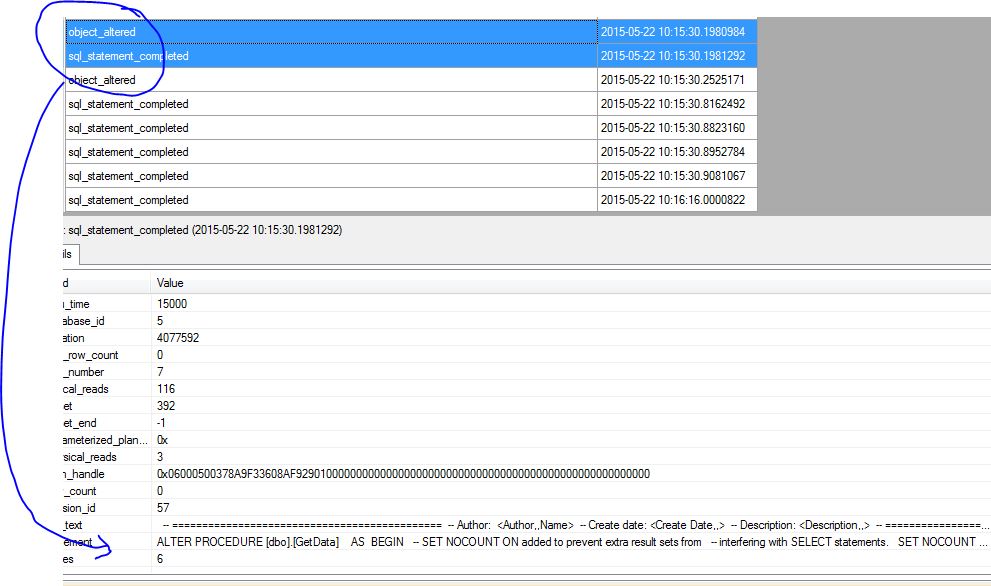
Then I could deduce what was happening – below showing ALTER command.

CaptureEE

Carving up CHECKDB

This is a technique that I am using from Paul Randal – concept of splitting CHECKDB: CHECKALLOC, CHECKCATALOG and CHECKTABLE – here we will use “buckets” of tables split across the week.

http://blogs.msdn.com/b/sqlserverstorageengine/archive/2006/10/20/consistency-checking-options-for-a-vldb.aspx

Lets assume Adventureworks is a VLDB 🙂
Day 1 would be the below


USE AdventureWorks2012
GO
DBCC CHECKALLOC
GO

DBCC CHECKCATALOG
GO

Now lets take 1 bucket of tables for day 1 for CHECKTABLE.


SELECT ''+SCHEMA_NAME(schema_id)+'.'+name+''
AS TableName,	NTILE(7)
				OVER (ORDER BY Name)
				AS [BUCKET] INTO ##CHECKTABLE
FROM sys.tables  WHERE type = 'U'

DECLARE @TABLE  NVARCHAR(100)
DECLARE @SQL  NVARCHAR(MAX)

		DECLARE CHECKTABLE CURSOR FAST_FORWARD
		FOR
			SELECT TableName FROM ##CHECKTABLE
			WHERE BUCKET  = 1

			OPEN CHECKTABLE
			FETCH NEXT FROM CHECKTABLE INTO @TABLE
			WHILE @@FETCH_STATUS=0
				BEGIN
					BEGIN TRY
					SET @SQL = 	'DBCC CHECKTABLE(''' + @TABLE + ''') '
					PRINT @SQL
					EXEC SP_EXECUTESQL @SQL

					END TRY

					BEGIN CATCH

					DECLARE @ErrorMessage NVARCHAR(4000);
					DECLARE @ErrorSeverity INT;
					DECLARE @ErrorState INT;
					SELECT
						@ErrorMessage = ERROR_MESSAGE(),
						@ErrorSeverity = ERROR_SEVERITY(),
						@ErrorState = ERROR_STATE();

						 RAISERROR (
						 		@ErrorMessage, -- Message text.
						 		@ErrorSeverity, -- Severity.
								@ErrorState -- State.

								) WITH LOG;
					END CATCH

					FETCH NEXT FROM CHECKTABLE INTO @TABLE
				end

			CLOSE CHECKTABLE
	DEALLOCATE CHECKTABLE

DBCC CHECKTABLE('Person.Address')
DBCC CHECKTABLE('Person.AddressType')
DBCC CHECKTABLE('dbo.AWBuildVersion')
DBCC CHECKTABLE('Production.BillOfMaterials')
DBCC CHECKTABLE('Person.BusinessEntity')
DBCC CHECKTABLE('Person.BusinessEntityAddress')
DBCC CHECKTABLE('Person.BusinessEntityContact')
DBCC CHECKTABLE('Person.ContactType')
DBCC CHECKTABLE('Person.CountryRegion')
DBCC CHECKTABLE('Sales.CountryRegionCurrency')
DBCC CHECKTABLE('Sales.CreditCard')

Then the 2nd day you could do the 2nd bucket. etc…

SQL Server Internals

If you like learning about internals use the undocumented function to get the FileID:PageID of your table rows and use that in DBCC PAGE.


SELECT sys.fn_PhysLocFormatter (%%physloc%%)
AS RID, *
FROM Person.EmailAddress;

Output:

RID
(1:3392:0)
(1:3392:1)
(1:3392:2)

Now set your trace flag on and read the contents of DBCC PAGE to satisfy your curiosity.

Enjoy.