The flight recorder: Replaying what an AI agent did on my SQL Server

“What exactly did it do on my server?” is the first question a DBA should ask about any AI agent. AgentDBA answers it from its own records: every decision in a run is written down with who made it, the reason given, what came back and how long it took.

I call it the flight recorder. This post replays one complete health check from those records, using two queries against the agent’s own database.

Read more: The flight recorder: Replaying what an AI agent did on my SQL Server

One health check, 11.2 seconds

The first result set is one row per run. This run was a full health check on local server (lab).

What the row recordsThis run
Triggerhealth_check
Modelgpt-6.1-sol
Decisions6, of which the model made 4
Routedb_status (HIGH) > error_log (LOW) > backup_failures (CRITICAL) > failed_jobs (HIGH) > log_file_health (MEDIUM)
OutcomeConcluded at CRITICAL, closed by the model

Two columns matter before any detail. One says how many of the six decisions the model made. The other says who closed the run. An agent’s record should always separate what the AI chose from what code chose for it.

Six steps, replayed

The second result set is the recorder itself: one row per decision, in order.

StepAt (ms)Decided byActionReason given
122codedb_statusHealth check Phase A gate.
267codeerror_logHealth check Phase A gate.
32,698LLMbackup_failuresTest whether the previously reported backup RPO breaches remain present
45,253LLMfailed_jobsTest whether previously disabled jobs remain disabled…
58,220LLMlog_file_healthCheck current log usage, truncation blockers, and VL…
611,227LLMCONCLUDEConcluding: AREA51-AKS remains in breach of back…

Steps 1 and 2 were not the model’s call. Every health check opens with database status and the error log, and code makes both calls. Had either come back CRITICAL, the agent would have escalated straight away with no model involved. They came back HIGH and LOW, so the run carried on.

From step 3 the model chose, inside a fixed boundary. It had three checks left, each allowed once, and then one verdict to write. It controls the order and the wording, and it has to state a reason with every action.

Where the 11.2 seconds went

The five SQL checks took 413 milliseconds between them. Almost all of the other 10.8 seconds was the model deciding what to do next: four decisions at roughly two and a half to three seconds each. That split matters to a DBA.

From the verdict back to the evidence

Each tool step carries an audit_log_id. It points to one stored row holding two things: the raw resultset SQL Server returned, and the compact summary of it that the model was shown.

Here is the raw resultset stored behind step 3, audit ID 22016.
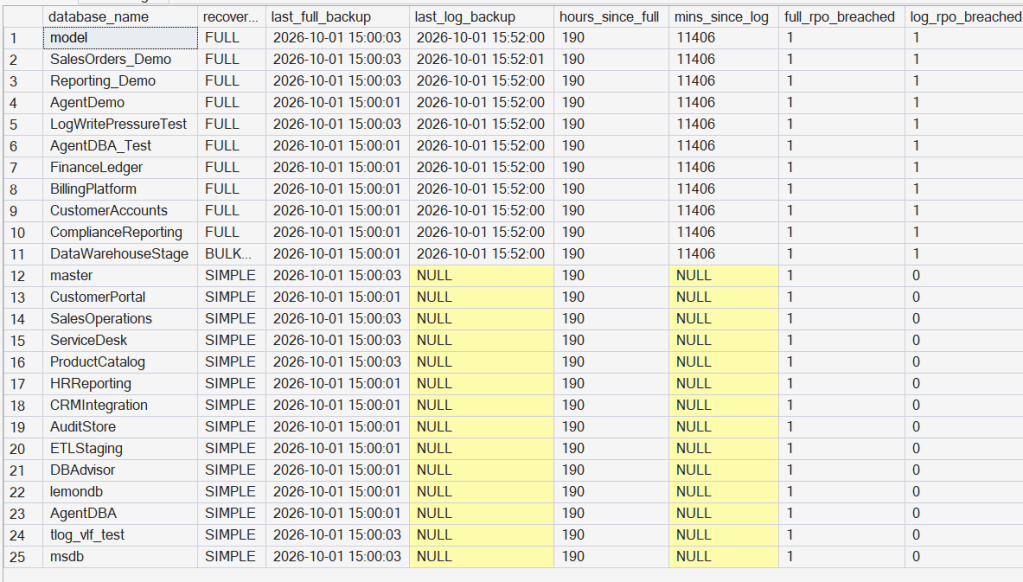
The model never sees the raw resultset. Each tool reduces its rows to a short, structured summary in ordinary code, and only that summary reaches the model. The raw rows are kept in the audit log, so a reviewer can check the agent’s conclusion against the data the tool actually read.

So a run can be followed end to end: the conclusion, every step that led to it, who decided each step, the reason the model gave, and the data behind it.

Trust or audit

I did not want to ask a DBA to take an AI agent’s word for anything on a production server. The recorder is my answer: one row per decision, kept in your own database, readable with a SELECT.

AgentDBA has a free evaluation at agentdba.ai if interested.
How AgentDBA Identifies Backup Failures

Every DBA has a box like this. Sitting untouched for months. Nobody’s proud of it, nobody’s fixed it, it’s just there — a handful of small compliance gaps that never made it to the top of anyone’s list.

I pointed AgentDBA at exactly that kind of instance. Then I made it worse on purpose.

Continue reading →

How AgentDBA Diagnoses SQL Server Issues Fast

Not every production incident is a database in RECOVERY_PENDING or a corrupted event (like the other post). Sometimes the server is just a mess. Jobs failing. Error log full of noise. Backups silently not running. No single catastrophic signal — just a slow accumulation of things going wrong that nobody has joined up yet. This is the other kind of scenario. No catastrophic signal to short-circuit on. AgentDBA reasons across all loaded modules and synthesises what it finds.

Read more: How AgentDBA Diagnoses SQL Server Issues Fast

The setup

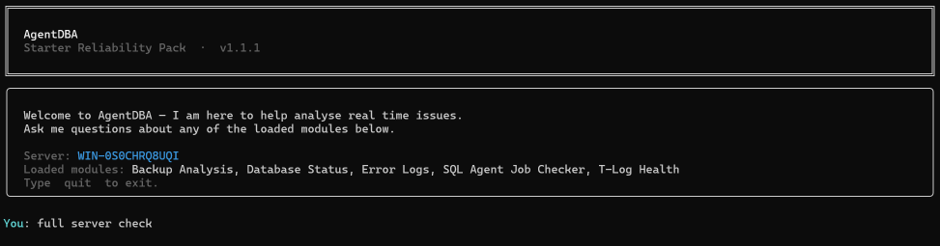
I connect AgentDBA to the server and type one thing. full server check

What comes back

 The Agent sweeps across the loaded modules — backup analysis, database status, error logs, SQL Agent job checker, T-Log health — reasons across the findings and returns a single structured output.

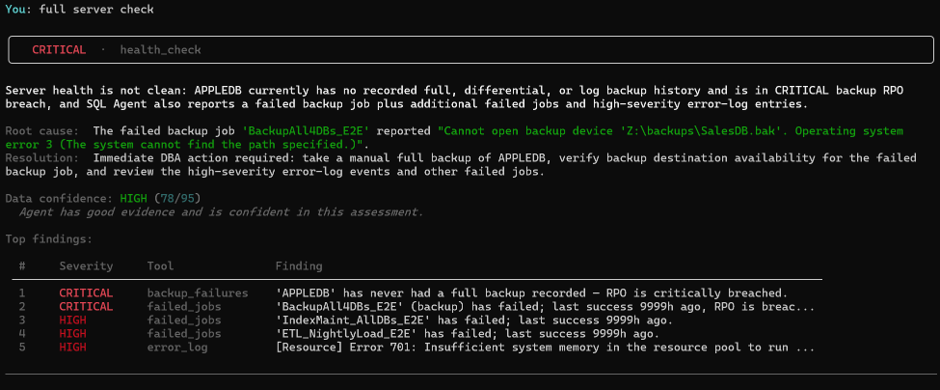
The banner is CRITICAL. The summary is precise: APPLEDB has never had a full backup recorded — the RPO is critically breached. The BackupAll4DBs_E2E job has failed, and the agent has already identified why: OS error 3 on Z:\backups\SalesDB.bak. The path doesn’t exist. Below that, two more failed jobs and high-severity error log entries ranked by severity.

Five findings. One output. Confidence scored at 78/95 — HIGH. The agent tells you it has good evidence and is confident in this assessment. It also tells you exactly what to do next.

This took seconds.

What shall I do?

I ask the obvious question.

The response is direct and specific. It does not say “investigate your backup jobs.” It says check BackupAll4DBs_E2E, verify the backup destination at Z:\backups\SalesDB.bak, and review error numbers 701, 802, 1101, 9002, and 17204 in the error log. It names the additional failed jobs that need separate review.

Every item on that list traces back to something a stored procedure returned. Nothing is inferred. Nothing is invented. If it is in the response, it came from the data.

The error log in isolation

Before I drill into the jobs, here is something worth showing. I call the error log module directly.

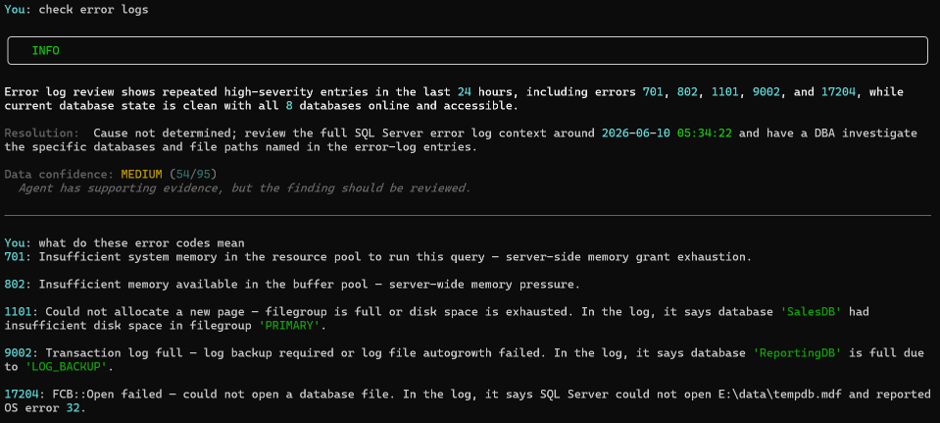
Notice two things. The banner is INFO, not CRITICAL. Confidence is 54/95 — MEDIUM. The agent has supporting evidence but explicitly says the cause is not determined from the error log alone and the finding should be reviewed. It will not promote a finding to CRITICAL just because the error numbers are serious. Without corroborating evidence from other modules it does not have enough to be certain

The agent doesn’t return generic textbook definitions. It returns contextualised explanations tied to what it saw in the log. Error 1101 — filegroup full — it tells me that was SalesDB, filegroup PRIMARY. Error 9002 — transaction log full — it tells me that was ReportingDB, cause LOG_BACKUP. Error 17204 — file open failure — it tells me that was E:\data\tempdb.mdf, OS error 32.

What this demonstrates

A noisy server is harder to read than a catastrophic one. One critical failure with a clear signal is straightforward. Five overlapping findings across jobs, backups, error logs with varying severities and a buried root cause, is where manual diagnosis costs time.

AgentDBA swept five modules, ranked the findings, identified a specific root cause backed by evidence from the job error message, scored its own confidence, and told me exactly what to fix — in one invocation.

The root cause claim isn’t a suggestion. Its evidence bound. OS error 3 on a specific path is in the data. That’s why the confidence is 78/95 and not lower — the agent knows what it can and cannot prove, and it tells you both.–  more information can be found at http://www.agentDBA.ai

AgentDBA vs Critical SQL Server

It’s 07:43. Someone’s already left a message. “Something’s wrong with the DB server.” You open the terminal and go to work.

This post is about what happens next — and why I built AgentDBA to handle it the way it does.

Read more: AgentDBA vs Critical SQL Server

What is AgentDBA?

AgentDBA is a self-hosted, CLI-based autonomous diagnostic reasoning engine for SQL Server. It is not a monitoring tool. It does not sit in the background polling metrics and firing alerts. You invoke it, it investigates, it reasons, and it tells you what it found and why.

The distinction matters. Monitoring tells you something happened. AgentDBA tells you what it means and what to look at next — grounded entirely in evidence it collected itself. No speculation. No plausible-sounding guesswork dressed up as a finding.

How it thinks

AgentDBA isn’t a script with an LLM bolted on. It reasons across multiple steps, remembers what it has seen before on your server, and decides for itself when it has enough evidence to conclude. Every action it takes is auditable — you can reconstruct exactly what it did and why without ever touching the LLM again. The LLM never receives raw SQL data. It receives structured, pre-processed findings. What it does with those findings is reasoning, not retrieval.

The non-negotiable: evidence first

The agent does not fill gaps with inference. Every finding must trace directly to data it collected. If the cause cannot be proven from what it holds, it says so — explicitly. That rule is not a prompt suggestion. It is enforced at code level.

When AgentDBA encounters a database integrity event or a critical error log condition, it doesn’t deliberate. It escalates immediately and ends the session. No reasoning loop. No sweep across other modules. Just the finding and a human on the hook.

When the critical class is clear, AgentDBA investigates the rest of the server. It selects which areas to examine, reasons across what it finds and concludes with severity and confidence — or with explicit uncertainty where evidence doesn’t support a conclusion. Every tool call, every decision, and every raw result is written to audit telemetry. The session is fully reconstructable from the database alone.

A clean server first

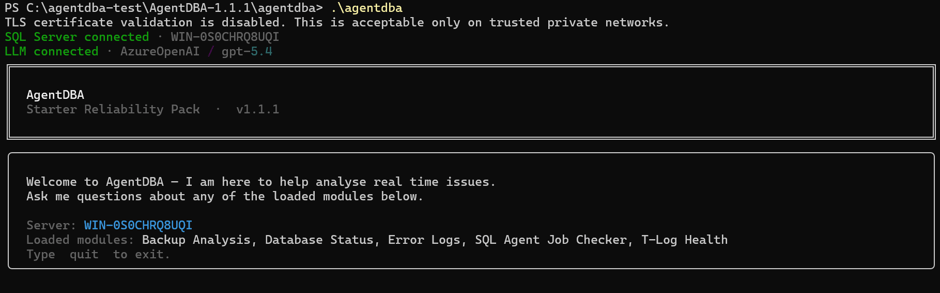
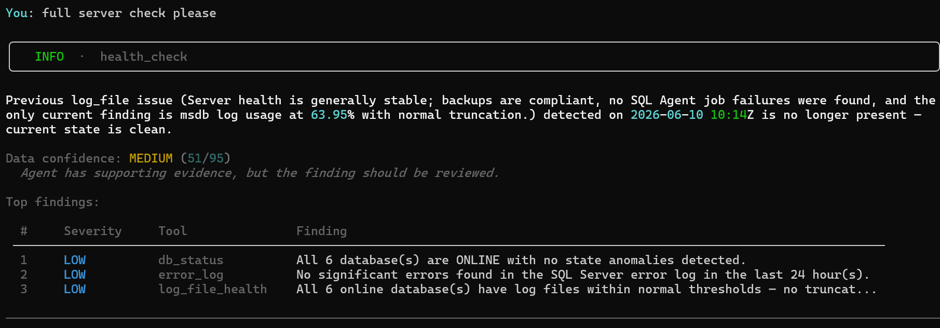
Before I introduce chaos, here is what AgentDBA looks like against a healthy server. I connect via Windows Auth, the LLM connects to Azure OpenAI GPT-5.4, and I run a full health check.

The server is clean. The only thing it surfaces is a historical finding: this server previously had a transaction log space warning on msdb, which I resolved. The agent knows this — it logged the episode, marked it resolved, and references it in context. It is not re-raising an issue that no longer exists.

Clean bill of health. Now let’s break things.

Scenario: The Critical Storm

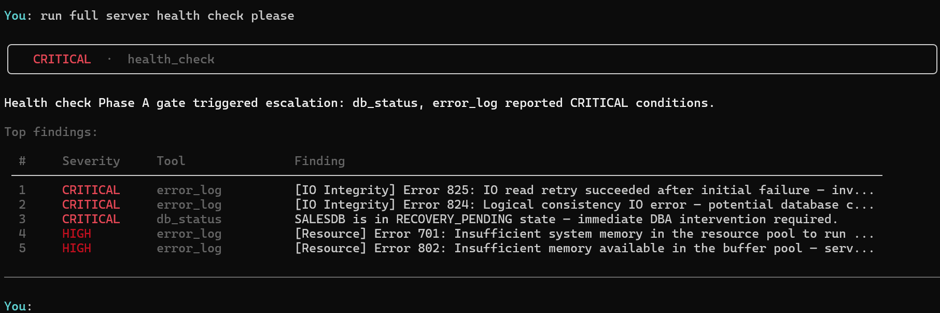
Many general failures but hidden deep within the group of issues are the dreaded Error 824 and Error 825 mixed with a RECOVERY_PENDING database means it cannot be accessed until someone intervenes.

These are not “look into it when you get a chance” events. These are the events that need looking at right away. I’ve staged exactly this on my VM server: a flood of errors (50+) in the SQL Server error log, 825 read retry events buried within them, and a database sitting in RECOVERY_PENDING. This is the kind of noise that hides the thing that matters.

I run the health check.

AgentDBA never reaches the LLM.

AgentDBA finds the CRITICAL conditions and short-circuits immediately. The RECOVERY_PENDING database is flagged. The 824/825 errors are flagged. The session ends. Escalation fires.

This is an explicit design decision. I do not want a reasoning loop when a database has a potential integrity event. I want to know immediately. Tell me. I’ll deal with it everything else can wait.

The escalation router has hooks for Slack and Teams — not wired up in this demo, but the architecture is there. A CRITICAL finding should be in your on-call channel before you’ve finished your coffee.

Fixing the critical issues

I work through the RECOVERY_PENDING database. I address the underlying cause and the critical checks now clear.

Missing Backups?

Once fixed, you call the agent again. With the critical class clear, AgentDBA now reasons across all other modules including failed jobs, backup compliance, log file health — and synthesises the finding.

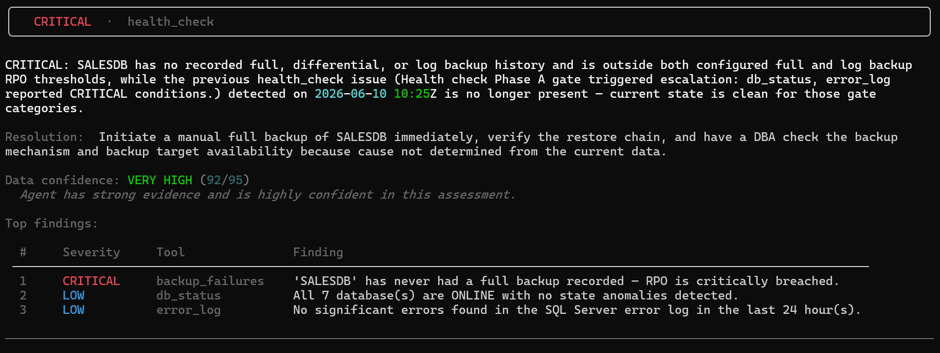
It comes back with a finding. Not catastrophic. But real. SALESDB has no backup recorded.

This hadn’t surfaced during the first run — not because the agent missed it, but because the critical-class check is intentionally scoped. It isn’t a full severity sweep. It is locked to a specific class of problem: database integrity and high severity errors that require immediate human intervention before anything else runs.

 RECOVERY_PENDING and 824/825 errors are in that class – from my POV, these are non-negotiables, I used to have nightmares when confronted with potential corruption. A broken backup chain, even though important, is a different category of problem — serious yes but not corruption serious.

IMPORTANT – When you call a specific module directly, AgentDBA focuses there. When you call a full health check, it prioritises catastrophic conditions first before broader investigation.

Root cause — and when it stays null

It will not connect the missing backup to something like a job failure or make something up. It needs direct evidence otherwise this is fabrication. So, it will say root cause unknown or words to that effect.

That boundary is not a limitation. It is the feature. A diagnostic tool that invents causal chains sends you to fix the wrong thing.

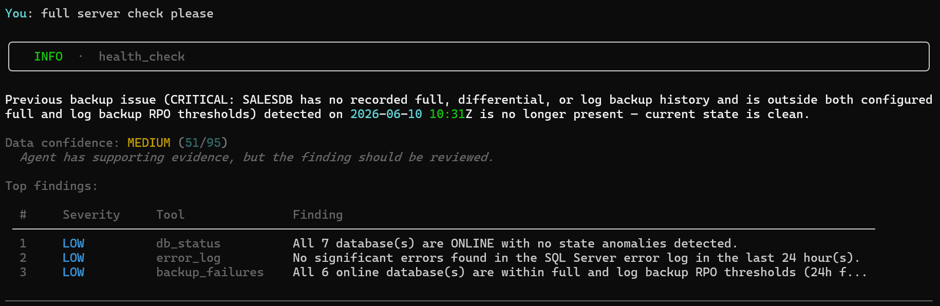
I fix the backup chain. I run again.

Everything is clean.

What this is

AgentDBA is not trying to replace your judgment. It is trying to make sure that when something is wrong, you are looking at the right thing and the right time within sixty seconds — not an hour later after manually correlating error logs, backup history, and job history across three SSMS windows.

The findings are evidence bound. The reasoning is auditable. And the longer it runs on your estate, the more context it carries. That is the point.

 http://www.agentDBA.ai

Database AI Agents: The Read-Only Rule

Fourth in a series on Ai and databases.

What Read-Only Advisory Actually Means

A read-only advisory system does exactly two things: it observes and it recommends. It never acts.

It can tell you a database is in a suspect state. It cannot attempt to recover it. It can tell you a backup chain is broken. It cannot re-run the job. It can identify that a transaction log is growing uncontrollably. It cannot intervene. That boundary is not a limitation. It is a deliberate design decision — and arguably the most important one when building AI for production database environments (in my opnion).

Why It Matters

Production SQL Server instances serve real applications, real users, and real business processes. A wrong action — even a well-intentioned one — can cause an outage, breach compliance, or trigger a recovery scenario nobody wanted. The only rational starting point is observation and recommendation. Let the DBA decide. Let the DBA act. The agent’s job is to make that decision faster and better informed — not to make it for them.

Trust Has to Be Structural

A trustworthy diagnostic agent is built so that the boundary between observation and action is not a setting, a configuration flag, or a prompt instruction. It is structural.

The agent should be architecturally incapable of writing to user data, running DDL, killing sessions, or executing any SQL it generated itself. Not because it has been told not to. Because the capability simply does not exist in the design. That means read-only diagnostic queries only. Pre-approved, version-controlled, human-reviewed. No runtime SQL generation reaching a cursor. The agent reasons over what it observes and hands a recommendation to a human. The human decides what happens next.

That is the only posture that earns enterprise trust — and it should be non-negotiable for any AI system pointed at a production database.