SSMS 2016 Bug

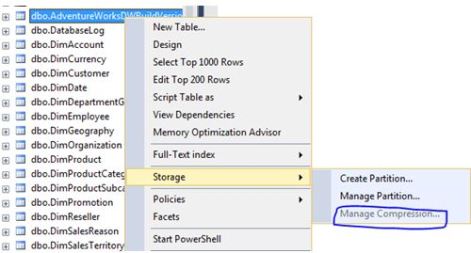
I have been using SSMS (SQL Server Management Studio) 2016 build number 13.0.15900.1 and noticed that if you wanted to manage compression you couldn’t as it is greyed out.

Microsoft SQL Server Management Studio 13.0.15900.1

ssms

The actual message that you are presented states: Tables with sparse columns cannot be compressed – I have no sparse columns.

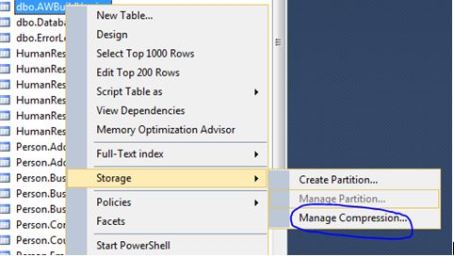
I never had this issue with SQL Server 2014 Management Studio:

Microsoft SQL Server Management Studio           12.0.4100.1

ssms1

The next release of SSMS is now available build number 13.0.16000.28 – see link https://msdn.microsoft.com/en-us/library/mt238290.aspx

I am happy because it addresses this issue, item number 4 from the above link states: Fixed the issue that “Manage Compression” menu item is disabled for the user table nodes in object explorer tree.


More bytes for Row versioning

I like row versioning– see this link for more details: https://technet.microsoft.com/en-us/library/ms189122(v=sql.105).aspx

If your database is enabled for one of the isolation levels that uses row versioning and a row is updated it will have 14 bytes added to it.

Before anything is enabled:

SELECT name,is_read_committed_snapshot_on, snapshot_isolation_state_desc,
snapshot_isolation_state
 FROM sys.databases WHERE database_id = 18

iq1

Let’s check a table before enabling anything.

select
index_id, index_type_desc,alloc_unit_type_desc,index_depth,max_record_size_in_bytes
from sys.dm_db_index_physical_stats (db_id('AdventureWorks2018'),
object_id('AWBuildVersion'), null, null, 'DETAILED')

dfsf

Switch it on:

ALTER DATABASE [AdventureWorks2018]
SET READ_COMMITTED_SNAPSHOT ON WITH ROLLBACK IMMEDIATE;
GO

ALTER DATABASE [AdventureWorks2018]
SET ALLOW_SNAPSHOT_ISOLATION ON 
GO

SELECT name,is_read_committed_snapshot_on, snapshot_isolation_state_desc,
snapshot_isolation_state
 FROM sys.databases WHERE database_id = 18

jgjkgtjkgkgk

Let’s do some work (UPDATE STATEMENT)

UPDATE [dbo].[AWBuildVersion]
SET ModifiedDate = GETDATE()
GO

select
index_id, index_type_desc,alloc_unit_type_desc,index_depth,max_record_size_in_bytes
from sys.dm_db_index_physical_stats (db_id('AdventureWorks2018'),
object_id('AWBuildVersion'), null, null, 'DETAILED')

hjjjjj

56 +14 = 70, meaning we have a 14 byte overhead. I did some research on this and I ended up going to my book self and dug out the SQL Server 2012 Internals text book, the 14 byte overhead is needed for “the actual pointer to the file, page, and row in tempdb which needs 8 bytes and 6 bytes are needed to store the XSN” (Chapter 13. Page 823)

What happens if I disable row versioning and run an update?

ALTER DATABASE [AdventureWorks2018]
SET READ_COMMITTED_SNAPSHOT OFF
GO

ALTER DATABASE [AdventureWorks2018]
SET ALLOW_SNAPSHOT_ISOLATION OFF
GO

UPDATE [dbo].[AWBuildVersion]
SET ModifiedDate = '2009-10-13 00:00:00.000'
GO


select
index_id, index_type_desc,alloc_unit_type_desc,index_depth,max_record_size_in_bytes
from sys.dm_db_index_physical_stats (db_id('AdventureWorks2018'),
object_id('AWBuildVersion'), null, null, 'DETAILED')

There is no longer the 14 byte overhead – due to the fact that row versioning is no longer on.

lllll

The dark side of Fn_dump_dblog

I want to show you what happens when you keep using the undocumented fn_dump_dblog function. (For example if you are consistently dumping the contents into a table for analysis)

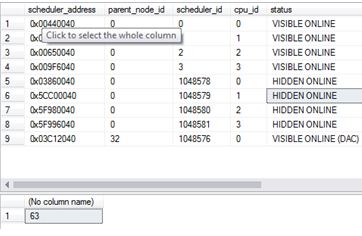
The below 2 queries shows the current state of my system

SELECT * FROM sys.dm_os_schedulers

SELECT COUNT(*) FROM sys.dm_os_threads
dark.JPG

Now let’s just set the environment up and use fn_dump_dblog and see the effect of using it.

ALTER DATABASE [AdventureWorks2012DR] SET RECOVERY FULL

BACKUP DATABASE [AdventureWorks2012DR] TO DISK = 'C:\SQLSERVER\AdventureWorks2012DR.BAK'

GO
BACKUP LOG [AdventureWorks2012DR] TO DISK = 'C:\SQLSERVER\AdventureWorks2012DRLog.BAK'

GO

SELECT
    [Current LSN],
    [Operation],
    [Context],
    [Transaction ID],
    [Description]
FROM
    fn_dump_dblog (
        NULL, NULL, N'DISK', 1, N'C:\SQLSERVER\AdventureWorks2012DRLog.BAK',
        DEFAULT, DEFAULT, DEFAULT, DEFAULT, DEFAULT, DEFAULT, DEFAULT,
        DEFAULT, DEFAULT, DEFAULT, DEFAULT, DEFAULT, DEFAULT, DEFAULT,
        DEFAULT, DEFAULT, DEFAULT, DEFAULT, DEFAULT, DEFAULT, DEFAULT,
        DEFAULT, DEFAULT, DEFAULT, DEFAULT, DEFAULT, DEFAULT, DEFAULT,
        DEFAULT, DEFAULT, DEFAULT, DEFAULT, DEFAULT, DEFAULT, DEFAULT,
        DEFAULT, DEFAULT, DEFAULT, DEFAULT, DEFAULT, DEFAULT, DEFAULT,
        DEFAULT, DEFAULT, DEFAULT, DEFAULT, DEFAULT, DEFAULT, DEFAULT,
        DEFAULT, DEFAULT, DEFAULT, DEFAULT, DEFAULT, DEFAULT, DEFAULT,
        DEFAULT, DEFAULT, DEFAULT, DEFAULT, DEFAULT, DEFAULT, DEFAULT)

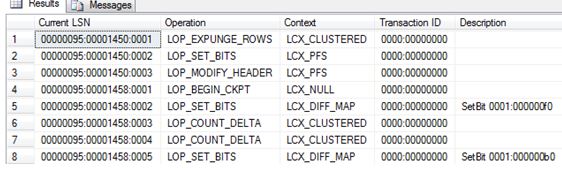
Ok so it returns some information – Great.
dark2

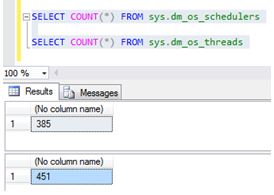
Let’s keep running the code (Movement into a table for future analysis). Look at the state of my system. After couple of hours:
dark3

Using this command creates more threads and hidden schedulers (these will only go after a restart). Depending on what version of SQL Server you are on and what Service Pack you may or may not have this issue. It was fixed in SQL 2012 SP2 onwards. So be on the cautious side when running these sorts of commands.

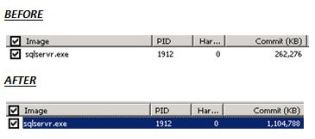
Also I noticed Memory bloat for the sqlservr.exe. Nothing else was running on this server, just my fn_dump_dblog script.  Threads need memory too. (Each thread will use 0.5MB on x86 and 2MB on x64)
capturesdd


Microsoft Certifications

Every now and again I would navigate to Microsoft’s certification page and see what / if any changes have taken place regarding certification within the Data Platform space. (Check out the link – http://www.microsoft.com/en-us/learning/certification-overview.aspx)

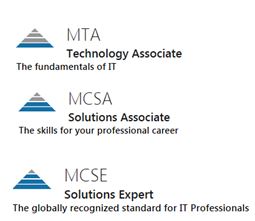
Nothing has changed in terms of the “pyramid” grade structures, you know, going from MTA, MCSA to MCSE which I will get to later.

pyr

However there is one change I have noticed – MCSE: Data Management & Analytics (they still have the MCSE: Data Platform and BI)  where for this certificate you would need to know about Designing and Implementing Cloud Data Platform Solutions and Designing and Implementing Big Data Analytics Solutions.

It makes sense cloud, data, data analysis / mining is becoming more important as data grows, businesses can leverage these techniques to gain advantage so it’s good to see Microsoft adapt to this and change up their certifications.

HOWEVER, I am still slightly disappointed that there is still no tip of the pyramid certificate.

pya2

A bit of background, I used to hold all three MCITP and MCSE: Data Platform certificates (I failed them a few times but I got there in the end). Logically I would then look to the next step; I just feel that there should be a certificate that surpasses the level of questioning asked in the MCSE exams.

I have this one:

MCSE

When I went to the SQLskills training on the last day we were given questions to troubleshoot and fix. They were tough, made me think hard and we had to “apply” what we learned from the last 10 days or so. These are the sorts of questions I want to evaluate myself against.

I won’t be renewing my MCSE certificate, not because of a lack of motivation to learn, if anything it’s quite the opposite. I am hungrier than ever to pick up and improve my Azure (and SQL) skills and get my hands dirty then hopefully share the knowledge that I gain within my blog.

I will say if you are new to this technology I think it’s a great way to help you get started and learn to a set plan so I would encourage you start at the MSCA, just like I did 10 years ago (It was MCTS back then).

Azure SQL Database – TDE

I work in the financial space so you can imagine that security is quite high on the agenda. TDE (Transparent Data Encryption – see this article for more details https://blobeater.wordpress.com/category/sql-server-2/tde/ ) is nothing new, setting it up on “earthed” SQL Servers can have some what of an overhead but in the Azure world it is so simple to setup.

The big advantage of TDE in Azure over the earthed flavour is that Microsoft does alot of the work for you. Assuming your database is in a geo-replication partnership it will be protected by a different key on each of the servers. Also Microsoft will rotate your certificate at least every 90 days.

Azure SQL Database does not support Azure Key Vault integration with TDE. SQL Server running on an Azure virtual machine (IaaS) can use an asymmetric key from the Key Vault.

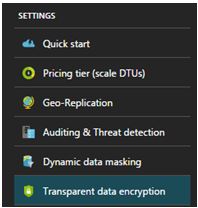
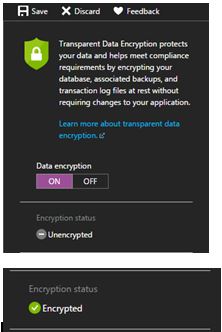
Within the settings section of your Azure SQL Database you will find the TDE option as shown below. To do this successfully you will need to be connected as the Azure Owner, Contributor, or SQL Security Manager.

enc1

Select ON for the data encryption option and click save.

enc2

Seriously, that is all it takes.

I will then move to SSMS (SQL Server Management Studio) and issue the following query to understand the status. (Credit to David Pless: TSP – Microsoft)

 SELECT DB_NAME(database_id) AS DatabaseName, encryption_state,
encryption_state_desc =
CASE encryption_state
         WHEN '0' THEN 'No database encryption key present, no encryption'
         WHEN '1' THEN 'Unencrypted'
         WHEN '2' THEN 'Encryption in progress'
         WHEN '3' THEN 'Encrypted'
 WHEN '4' THEN 'Key change in progress'
 WHEN '5' THEN 'Decryption in progress'
 WHEN '6' THEN 'Protection change in progress (The certificate or asymmetric key that is encrypting the database encryption key is being changed'
         ELSE 'No Status'
      END,
percent_complete, create_date, key_algorithm, key_length,
encryptor_thumbprint, encryptor_type  FROM sys.dm_database_encryption_keys

enc3

Naturally tempdb gets encrypted too along with the user database. Azure uses AES-256 bit algorithm.

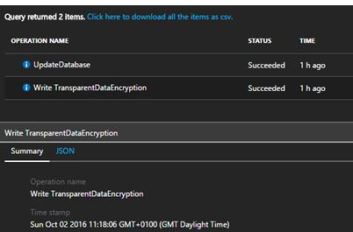
These sorts of activities get tracked and logged by the Activity log within Azure.

enc4